4.
Press E The
scanner dispays lhe NotetTurn lhe rotary
tu n
er ctockwise
channe number and
CTCSS tone to step up the
displayed
tone
fre-
treq!ency
ass
gned
to the
channel.
qirency.
Turn the rotary
tuner
coun-
CTCSS flashes.
terclockwise
to
steo dowr lhe
d sp
ayed tone Irequency.
5 To
change a CTCSS toneirequency,
enlef the new
lrequency
using the 6. Press E.
CTCSS slops flashrng.
number kevs. or
selecl lhe new tre-
quenCy
w
th the rotary tuner NOte: When
you
tune lO
a
frequenCy
prograrnmed
for cTcss
the scanner's
To
delete a CTCSS tone lrequency, d splay aternales
belween lheireqlen.
enter 0 us ng
the number keys.
or
cy and the
CTCSS tone lrequency as-
seect 0000 wth
lhe rotary tuner. srgned to t.
5ee utu55 ton e Freo!enares
lHz):
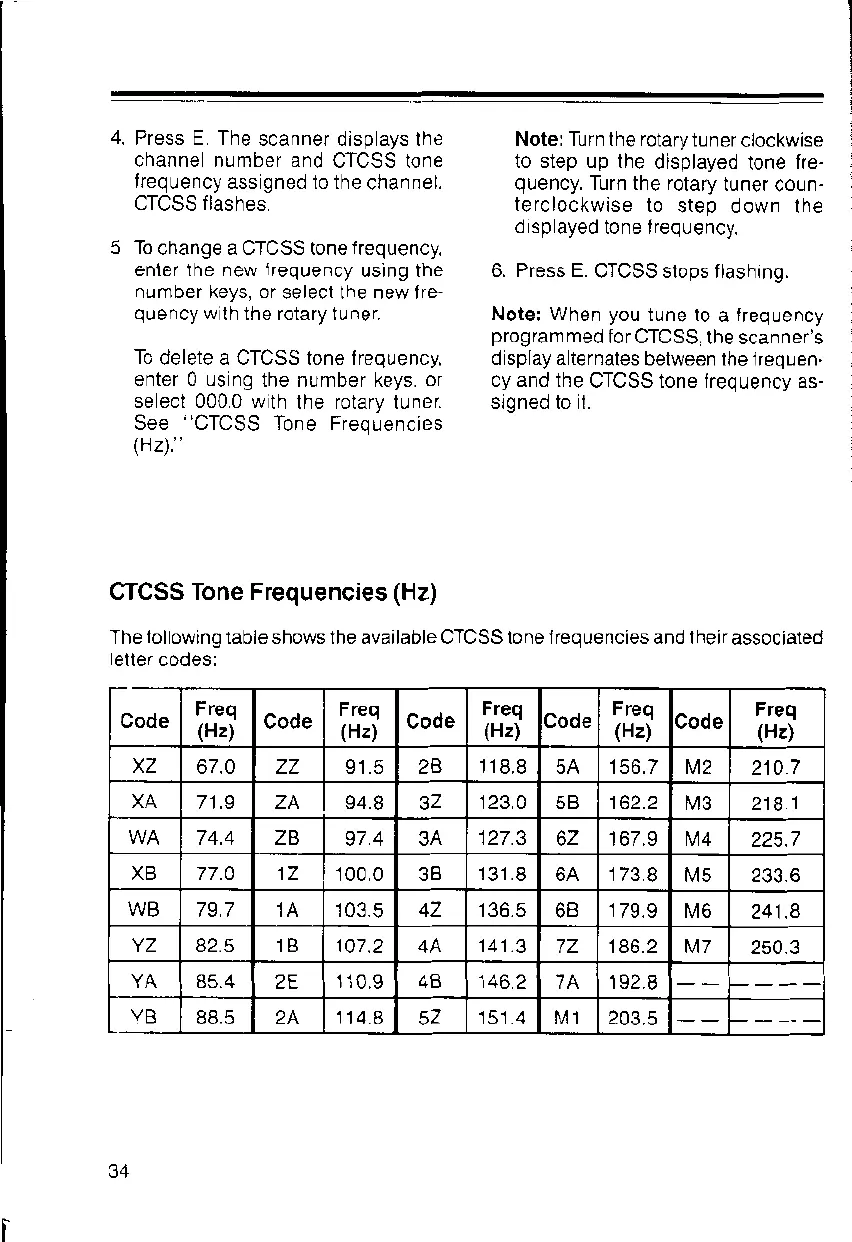
CTCSS Tone Frequencies
(Hz)
T he
lol
owing lable shows the available CTCSS to ne i req ue ncies and I
heir
assoc iated
eller codes:
Code
Freq
(H2)
Code
Freq
(Hz)
Code
Freq
(Hz)
Code
Freq
(Hz)
Code
Freq
(Hz)
67.0 zz 91.5
i18.8
5A 156.7 M2
210
7
XA
71.9 ZA 94.8 123 A
't62.2
M3 2t81
74.4 ZB
974 3A
127.3
'167.9
M4
225.7
XB 77.A 1Z
100 0
131.8
6A 173
B tv5 233.6
WB
797 103.5 136.5 179.9
N,46
241.8
YZ 82.5 1B 107.2 141 .3
7Z 186.2 M7
2s0.3
2E
1i0.9 4B
'146
2 192
I
VB
88.5 24.
114.a
151.4 t\t 1 203.5
34



 To Next Page