EasyManua.ls Logo

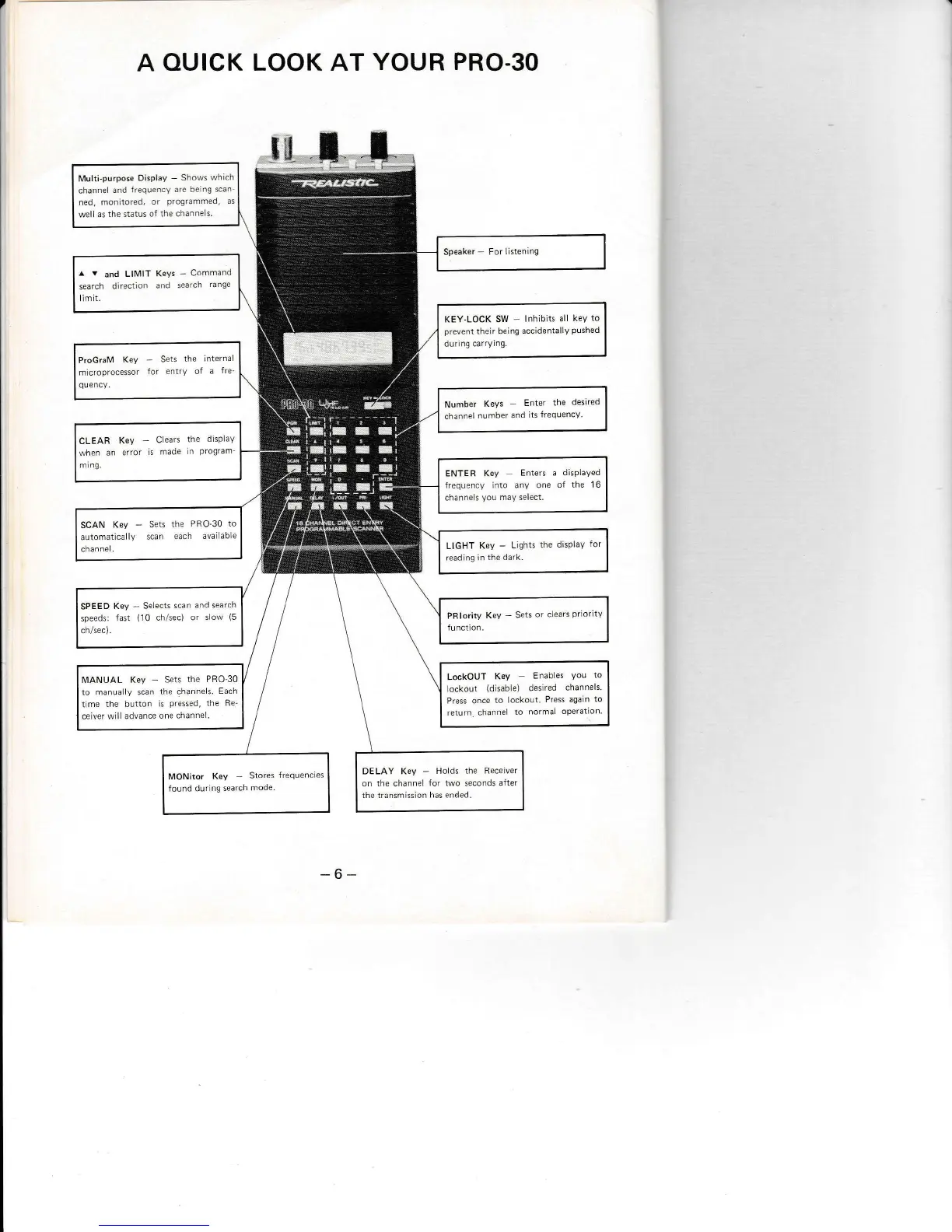
Realistic Pro-30 - A Quick Look At Your PRO-30

Realistic Pro-30
20 pages
Print Icon
To Next Page IconTo Next Page
To Previous Page IconTo Previous Page
Loading...
A
OUICK LOOK AT
YOUR PRO,3O
-6-
Multi-purpose
Display
-
Shows
rvhich
channel
and
irequeicY are
lle ng scan
ned,
monitored,
or
Programmed,
as
wPll a\ the status of the channe
s.
^
v
and
Llil,4lT
KeYs
-
Command
search
dlrect
on ano
search
range
llmit.
KEY-LOCK SW lnhibLts
all kev
to
prevent
their
belng accidentally
pushed
dur
ng
carrying.
ProGraM
Key
-
Sets
the internal
micToprocessor
for entry of
a
fre
qu
ency.
Number
Keys
Enter
the
deslred
channel
number
and lts
frequency
CLEAR
Kev
-
C
ears
the
dispLaY
lvhen
an
eTror
is
made
ir
Program
m
ng.
ENTER Key
Enters a
displayed
frequency
into
anv
one o{
the 1
6
channe s
vou
mav select.
SCAN
Key
-
Sets
the
PRO-30
to
automatlcally
scan
each avallable
channel.
LIGHT
Key
-
Lights
the display
readlng
in the dark.
SPEED
Key
-
SeLects
scan
and search
speeds:
fast
(10
ch/sec)
or
slow
(5
ch/sec).
LockO[JT
Key
Enabes
You
to
ocPou
(
r'sab
Pl
de\'r
eo
chd'nPls.
Press once
to lockout.
Press
again
to
return
channe
to
normal
operatlon
[/ANUAL
Key
-
Sets
the PRO 30
to manuaLly
scan
the channels.
Each
t
me the button
is
Pressed,
the Re
ceiver will advance one
channe.
DELAY Key
-
Holds
the Receiver
on the channe
for two seconds
after
the transmisslon has ended.
MONitor
Key
Stores
frequencies
found durlnq
search
mode.

Related product manuals