EasyManua.ls Logo

Realistic Pro-30 - Page 7

Realistic Pro-30
20 pages
Print Icon
To Next Page IconTo Next Page
To Previous Page IconTo Previous Page
Loading...
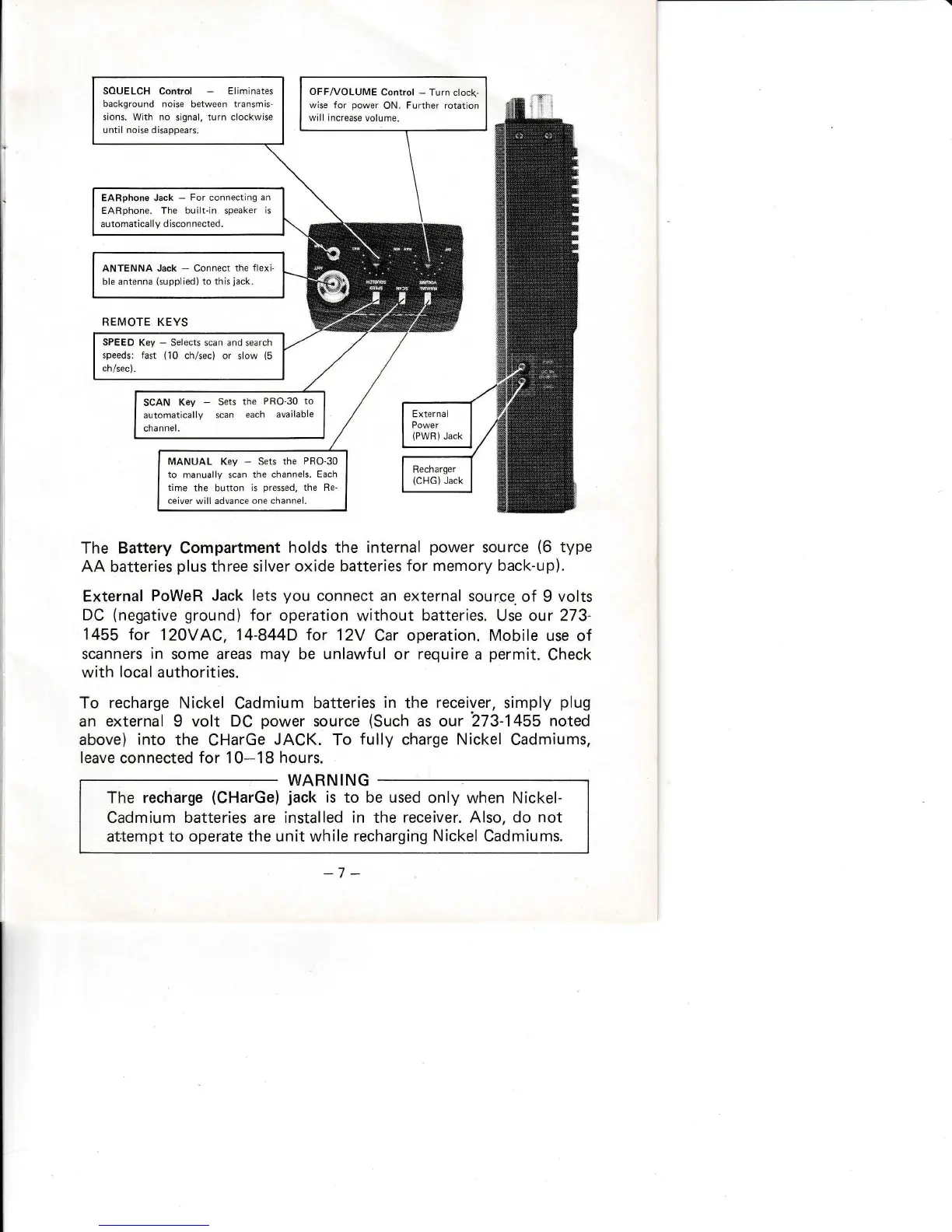
souELcH control
-
Eliminates
background noise
between
trarsmis-
sions. With no
signal, turn clockwise
until noise disappears.
OFF/VOLUME
Control
-
Turn clock-
wise for
power
ON.
Further rotation
will increase
volume.
EARphone Jack
-
For connectlng
an
EARphone. The
built.in
speaker
is
automatically disconnected.
ANTENNA
Jack
-
Connect the
flexi-
ble antenna
(supplied)
to this
iack.
SPEED
Key
-
Selects scan and
search
speeds: fast
(10
ch/sec) or
slow
{5
ch/sec).
SCAN
Key
-
Sets
the
PRO-30
to
automatically
scan
each
available
channel.
MANUAL Key
-
Sets
the
PRO-30
to
manually scan
the channels.
Each
time
the button
is
pressed,
the Re-
ceiver
will advance
one channel.
The Battery Compartment
holds
the internal
power
source
(6
type
AA batteries
plus
three silver oxide
batteries
for memory back-up).
External
PoWeR Jack lets
you
connect an
external source.
of 9
volts
DC
(negative
ground)
for
operation
without
batteries.
Use our
273-
1455 for
120VAC, 14-844D for
12Y
Car operation. Mobile use
of
scanners
in
some areas may
be
unlawful
or
require
a
permit.
Check
with
local
authorities.
To
recharge Nickel
Cadmium
batteries
in
the
receiver,
simply
plug
an
external
I
volt DC
power
source
(Such
as our 273-1455
noted
above)
into
the
CHarGe
JACK.
To
fully
charge Nickel
Cadmiums,
leave
connected
for
10-18
hours.
WARN I NG
The recharge
(CHarGe)
jack
is to be used
only when Nickel-
Cadmium batteries are installed
in
the
receiver. Also, do
not
attempt
to operate the unit while recharging
Nickel
Cadmiums.

Related product manuals