EasyManua.ls Logo

Realistic STA-115 - Page 15

Realistic STA-115
66 pages
Print Icon
To Next Page IconTo Next Page
To Previous Page IconTo Previous Page
Loading...
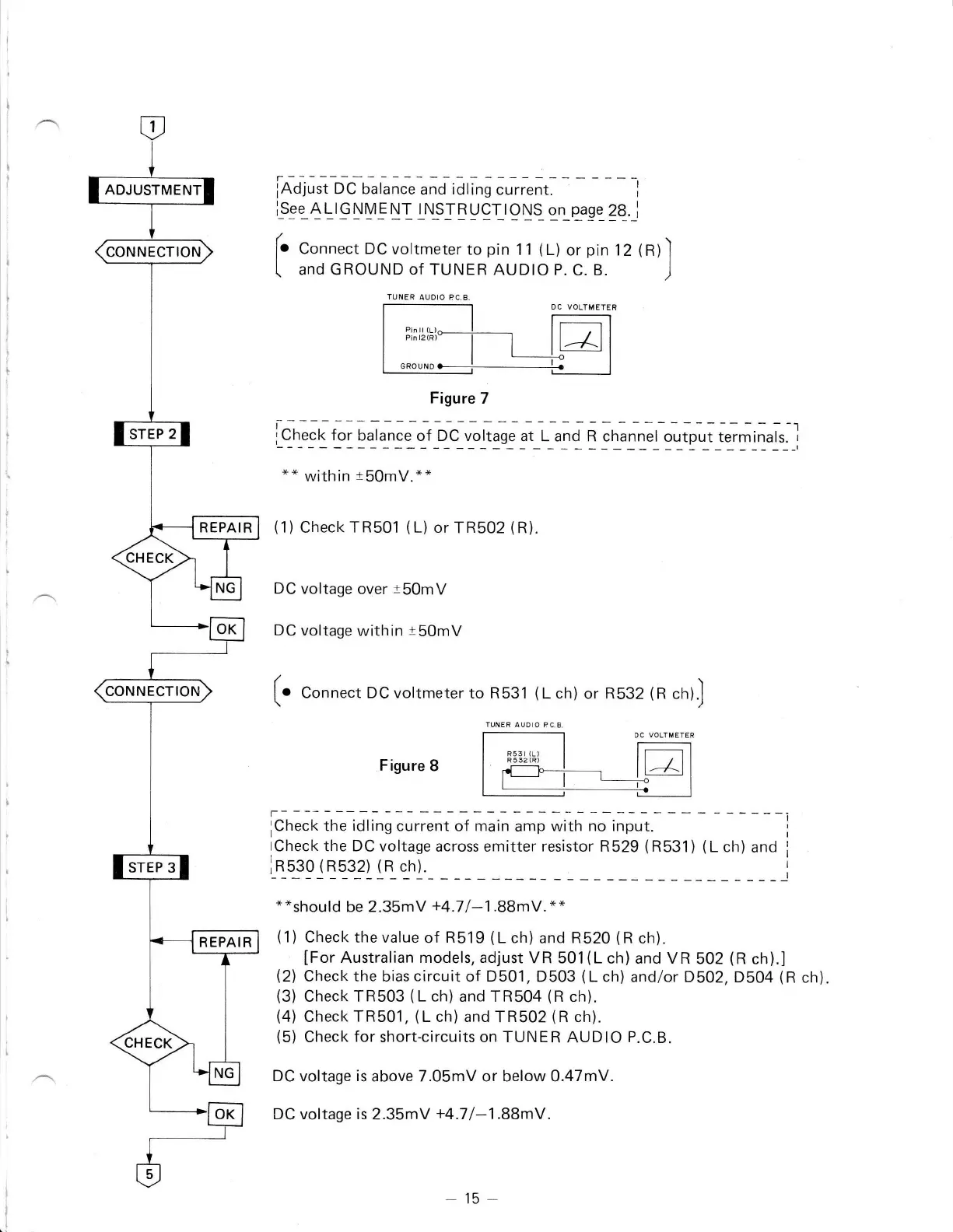
iAdjust
DC balance
and
idling
current.
r
l_s9e_4!r_GryV_ENIL\sIEqqr_r9rys_gLqage_?B_._i
[.
Conn.., DC
voltmeter
to
pin
11
(L)
or
pin
12
(R)l
(
and GROUND of TUNER
AUDIO P.
C. B.
)
DC VOLIMETER
Figure
7
i_.1.:f
!iplqry:"_t_r_._*lrgs:
g,
L_.1J n .r,rr,".i"r.pr.
,"_'li1a
."]
*"
within
t50mV.*"
(1)CheckTR501 (L)
orTR502
(R).
DC voltage
over
t50mV
DC
voltage
within
t50mV
(:
[.
Conn."t DC voltmeter
to R531
(L
ch)
or R532
(R
ch)J
Figure
8
icrrect<
the
idling
"urlniot
*rr"
lrnp
*i.1
""
i"p;.-
-
tCheck
the DC voltage
across emitter resistor R529
(R531)
(L
ch)
and
lnsso
(Rb32) (R
ch).
**should
be
2.35mV
+4.71-1.88mV.
*"
(1)
Check the value
of
R519
(L
ch)
and
R520
(R
ch).
IFor
Australian models, adjust
VR 501(L
ch) and VR
502
(R
ch).]
(2)
Check
the
bias
circuit
of D501,
D503
(L
ch) and/or D502,
D504
(R
ch).
(3)
Check TR503
(L
ch)
and TR504
(R
ch).
(4)
Check
TR501,
(L
ch) and
TR502
(R
ch).
(5)
Check
for
short-circuits
on TUNER
AUDIO
P.C.B.
DC
voltage
is
above 7.05mV or below 0.47mV.
DC voltage is
2.35mV
+4.71-1.BBmV.
'i
I
I
I
I
I
I
ADJUSTMENT
REPAIR
-
15
-