EasyManua.ls Logo

Realistic STA-95 - MPX Alignment; Main Amplifier Alignment

Realistic STA-95
36 pages
Print Icon
To Next Page IconTo Next Page
To Previous Page IconTo Previous Page
Loading...
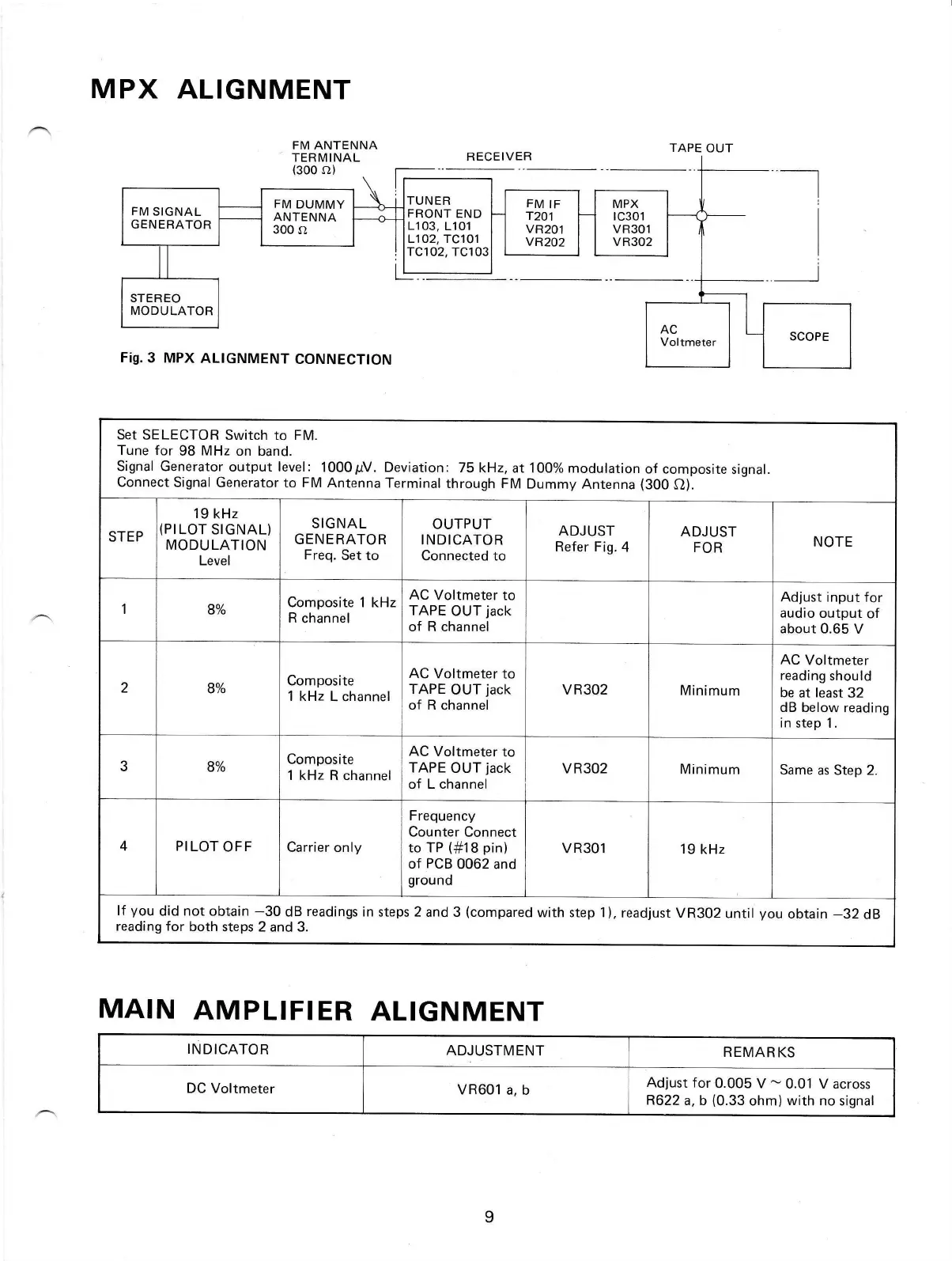
MPX
ALIGNMENT
FM ANTENNA
TERMINAL
(s00
s})
Fig.3
MPX
ALIGNMENT
CONNECTTON
TAPE OUT
RECEIVER
I
I
I
FM
SIGNAL
GENERATOR
FM
DUMMY
ANTENNA
300 sl
Set SELECTOR
Switch to FM.
Tune for
98
MHz
on band.
Signal Generator
output level
:
1000pV. Deviation:
75
kHz, at 100% modulation
of
composite
signal.
connect
Signal Generator
to FM Antenna
Terminal
through FM
Dummy
Antenna
(300
o).
STEP
19
kHz
(PILOT
SIGNAL)
MODULATION
Level
SIGNAL
GENERATOR
Freq.
Set to
OUTPUT
INDICATOR
Connected to
ADJUST
Refer Fig.
4
ADJUST
FOR
NOTE
1
8%
Composite 1
kHz
R channel
AC
Voltmeter to
TAPE
OUT
jack
of R channel
Adjust input for
audio output
of
about 0.65 V
2
8Yo
Composite
1 kHz
L channel
AC Voltmeter
to
TAPE
OUT
jack
of R
channel
VR3O2
Minimum
AC
Voltmeter
reading
should
be
at
least
32
dB
below reading
in
step 1.
3
8%
Composite
1 kHz R channel
AC Voltmeter
to
TAPE
OUT
jack
of L channel
VR3O2
Minimum
Same
as Step 2.
4 PI
LOT
OFF
Carrier only
Frequency
Counter
Connect
to TP
(#18
pin)
of
PCB
0062 and
ground
VR301
19 kHz
lf
you
did not obtain
-30
dB
readings
in
steps 2 and 3
(compared
with step 1),
readjust
VR302
until
you
obtain
-32
dB
reading for
both
steps 2
and
3.
MAIN
AMPLIFIER
ALIGNMENT
INDICATOR
ADJUSTMENT
REMARKS
DC
Voltmeter
VR601
a, b
Adjust for
0.005 V
-
0.01 V across
R622
a, b
(0.33
ohm)
with
no signal

Other manuals for Realistic STA-95

Related product manuals