RTL8773B Motherboard User Guide
19
·Copyright 2019 Realtek Semiconductor Corporation.
All Rights Reserved.
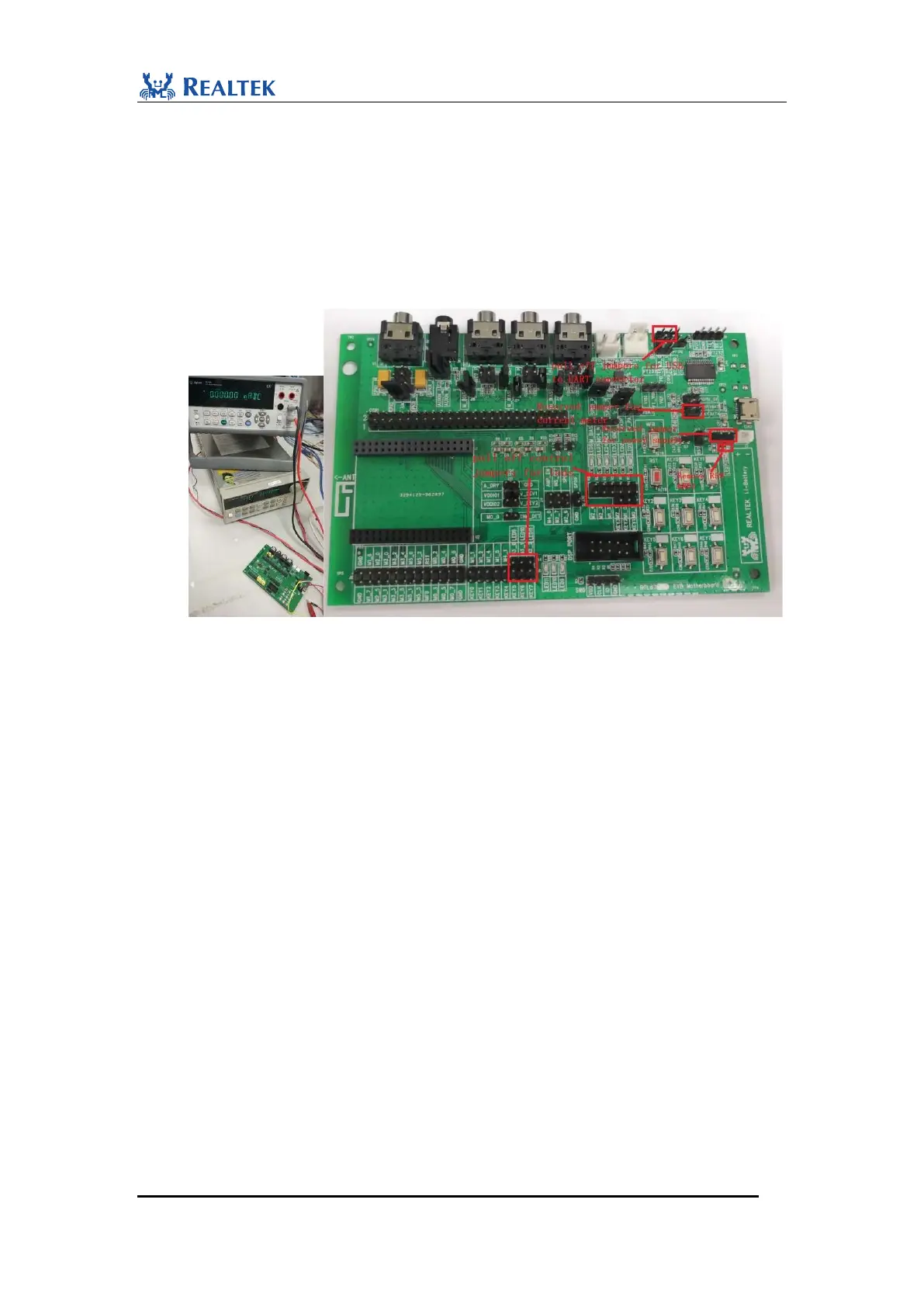
1. Pull off control jumpers for LEDs and USB-to-UART converter. Make sure that no
external leakage from IOs exists.
2. Remove R59 and R61 which is in series with VBAT indicator and thermistor R63
respectively.
3. Connect positive (+) point of OUTPUT1 on Agilent 66319D with J37.1, and connect
negative (-) point with J37.3.
4. Connect current input terminal on the front panel of Agilent 34410A with J38.1. Connect
LO terminal with J38.2. In this way, 34410A is in series with 66319D as a current meter.
Figure 3-2 Device Connection for Power test
3.1.3 RWS Power Test Demonstration
In this demonstration, users can explore power consumption test of RTL8773B
Motherboard RWS application. This demonstration requires a smart phone to play an
audio stream. Coupled with 14565B Software and Agilent DMM Software, it is
allowed to analyze whether power consumption of low power state and dynamic state
is within expectations. The following are the steps to perform the demonstration:
1. Download RWS flash code to RTL8773B Motherboard with MP Programming Tool. In
RWS application, headphone out is configured to be mono.
2. Pull off jumpers and connect devices to certain jumper as shown in Figure3-2.
3. Connect a headphone to headphone jack U3.
4. Open 14565B Software on PC, and choose DLOG window. This demonstration is performed
with 3.7V power supply, which is common voltage of Li-ion Battery. Different voltages of
power supply cause change of power consumption. Set the output voltage of 66319D to be
3.7V as shown in Figure 3-3.
5. Open Agilent 34410A on PC. Choose DC current measurement and 10mA range for LPS state
measurement as shown in Figure 3-3.
6. Power on RTL8773B MOTHERBOARD and start current measurement.
7. Connect EVB to a smartphone. Start audio stream on smart phone and listen to it through
headphone from RTL8773B MOTHERBOARD.


 To Next Page