RTL8773B Motherboard User Guide
23
·Copyright 2019 Realtek Semiconductor Corporation.
All Rights Reserved.
2. Connect HCI UART (RS232) TX to UART RX of Bluetooth measurement
equipment (Level shifter / USB converter board).
3. Connect HCI UART (RS232) RX to UART TX of Bluetooth measurement
equipment (Level shifter / USB converter board).
4. Connect GND between the EUD and Bluetooth measurement equipment (Level
shifter / USB converter board).
5. Push HW Reset pin and begin test.
3.2.3 BR/EDR or NON-LINK Mode
- Test RTL8773B EVB for BR/EDR Test Items
This part describes how to establish hardware connection for BR/EDR items or LE
RF certification.
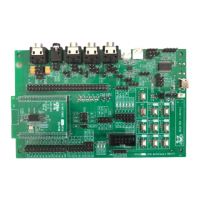
BR/EDR test requires command from PC through HCI UART. RTL8773B EVB
Motherboard use RF path to connect with the Bluetooth measurement instrument as
shown in Figure 3-9.
Figure 3-9 BR/EDR RF test hardware connection
Configure test environment step by step:
1. Connect an RF cable between IPEX connector on EVB board and Bluetooth
measurement equipment.
2. Short J40.1 and J41.4.
3. Short J40.2 and J41.3, as shown in Figure3-9.


 To Next Page