Operating your Smart Grill
Technology Controller
About the Smart Grill Technology™ Controller
The SGT is the “brain” of your Rec Tec Mini Grill and the reason for its ease-of-use. When you
select a temperature, the SGT adjusts the pellet feed rate and compensates for ambient (outside)
temperatures to maintain a precise temperature.
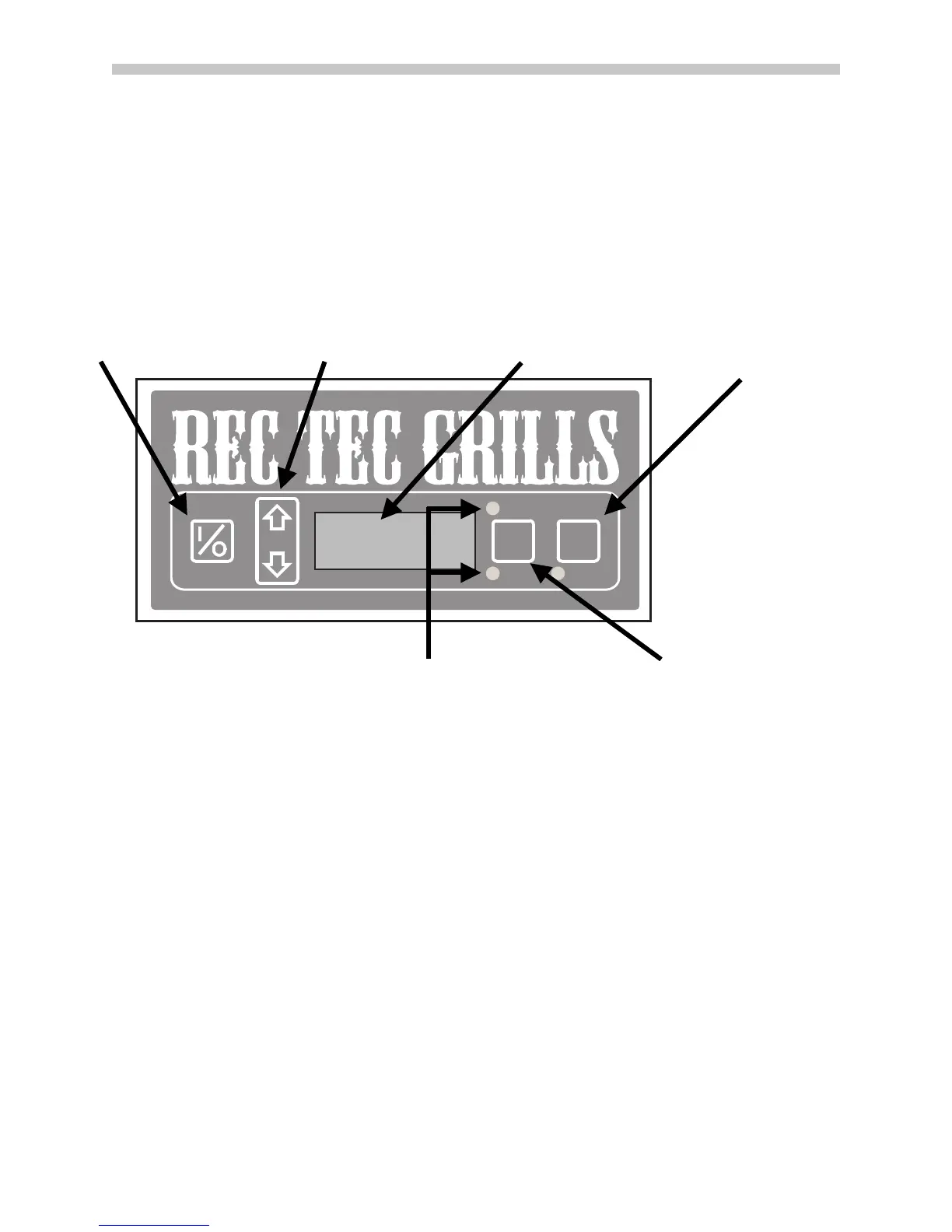
1 Control I/O, ON/OFF Touch Pad
This pressure sensitive touch pad is used to turn your Rec Tec Mini Grill on and off.
•
Turning the grill “on” activates the automatic startup mode and illuminates the digital LED
readout.
•
Pressing the touch pad again activates the shut down mode of your Grill.
•
If your grill fails to light itself within 20 minutes of startup, the Smart Grill Technology™
processor will turn off the grill and display ER-2 on the screen.
•
When the ON/OFF touch pad is used to turn off your grill, the Smart Grill Technology™
processor will stop adding pellet to the fire pot and the bellows fan will continue running to
completely burn the pellets remaining in the fire pot. During this cooling process, the LED screen
will display COOL.
•
When your grill has completely burned the remaining pellets in the fire pot, the Smart Grill
processor will finish shutting down your grill.
2 Temp (Temperature) Touch Pad
Each press of the up or down arrow adjusts the set point temperature in 5 degree increments. The
temperature setting range is 180º-500ºF. If the temperature is set to 500ºF, one more press of the up
11 ©2014, Rec Tec Industries, LLC
Actual
Set Point
Temp
Display
Temp
Smart Grill Technology™•www.RecTecGrills.com
Xtreme
Smoke
On
1 On/Off
6 Xtreme Smoke
Mode Toggle
(mode is always
on so button is
non-functioning)
3 Temperature Display
4 Display Indicator Lights 5 Temp Display Toggle
2 Temp Touch Pad


 To Next Page