EasyManua.ls Logo

reci FCA Series - User Manual

reci FCA Series
36 pages
Print Icon
To Next Page IconTo Next Page
Loading...
User Guide for
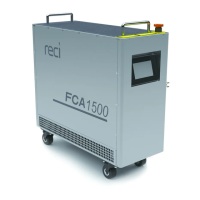
FCA series Handheld Laser Welding System
Beijing Reci Laser Technology Co., Ltd.
2022.02

Questions and Answers

  • P
    Patricia JenkinsAug 10, 2025
    What to do if my Reci Welding System shows a Power Supply Fault?
    • R
      Ryan JohnsonAug 10, 2025
      If the Reci Welding System displays a 'Power Supply Fault', the first step is to check the stability of the 220V AC power supply to the laser. If the power supply is stable and the fault persists, it indicates a more complex issue. In such cases, further assistance is needed.
  • J
    Jesse CampbellAug 14, 2025
    What should I do if my Reci Welding System displays a CurHard1 or CurHard2 Fault?
    • J
      joanmiddletonAug 14, 2025
      If the Reci Welding System is showing a 'CurHard1 Fault' or 'CurHard2 Fault', first check that the 220V AC power supply to the laser is stable. If the power supply is stable, try reducing the peak output power of the laser.
  • S
    Stephen GilbertAug 19, 2025
    What to do if my Reci Welding System displays a No Gas Fault?
    • Z
      Zachary YoungAug 19, 2025
      If your Reci Welding System shows a 'No Gas Fault', ensure that the air pressure at the GAS IN is greater than 5L/min. Then, restart the laser. This fault occurs when the air pressure at the GAS IN is lower than the set value.
  • K
    Kenneth BlackAug 25, 2025
    How to fix a QBH Fault on a Reci Welding System?
    • M
      murphymatthewAug 25, 2025
      If the Reci Welding System displays a 'QBH Fault', the contact between the QBH and the cutting head might not be correctly in place. Reconnect the QBH and weld head, then restart the laser. If the fault persists, pull out QBH with the ring contactor short circuit connected, and restart the laser.
  • J
    Jasmine JacobsAug 29, 2025
    How do I resolve an INTERLOCK Fault on my Reci Welding System?
    • J
      Jamie BaileyAug 29, 2025
      If the Reci Welding System displays an 'INTERLOCK Fault', it means that Pin 3 and Pin 4 of CTRL-INTERFACE are not shorted. Connect pin 3 and pin 4 to the safety door or short circuit them directly, and then restart the laser.
  • D
    Derrick RollinsSep 3, 2025
    What does IdleCur1 or IdleCur2 Fault mean on my Reci Welding System, and how do I fix it?
    • J
      Jordan BowmanSep 3, 2025
      If your Reci Welding System is showing an 'IdleCur1 Fault' or 'IdleCur2 Fault', restart the laser. This fault indicates that the current value when the laser is turned off exceeds the upper limit.

Summary

Chapter 1 Safety Information

1.2 Laser Classification

Classifies the FCA series as a Class 4 laser instrument, highlighting invisible light and potential skin/eye damage.

1.4 Safety Instructions for Optical Operation

Provides critical safety procedures for optical operation, emphasizing eye protection and avoiding direct beam exposure.

1.5 Safety Instructions for Electrical Operation

Details electrical safety measures, including proper grounding, voltage checks, and warnings about electric shock risks.

Chapter 2 Product Description

2.4 Operation Conditions

Specifies the environmental and power requirements, including voltage, temperature, humidity, and electromagnetic conditions.

2.6 Characteristic Parameters

Introduces a table detailing the optical, electrical, and other technical specifications for the FCA series lasers.

Chapter 3 Installation of the laser

3.4 Connection and Requirements

Outlines the requirements for connecting external circuits, including power and auxiliary gas systems.

3.5 Installation precautions

Provides crucial safety precautions for installing the laser, including fixing, power disconnection, and handling.

Chapter 4 Using of the product

4.4.1 CTRL-INTERFACE

Provides a detailed 12-pin definition table for the CTRL-INTERFACE, outlining its connections and remarks.

4.5 Laser Control

Describes the two control methods for the laser: touch screen and PC, covering parameter settings.

4.6 Touch screen Mode

Details settings and connections for operating the laser using the touch screen interface.

4.6.2 Sequence of operations

Provides a step-by-step guide for operating the laser via the touch screen, including parameter saving.

Chapter 5 Use of monitoring software

Chapter 6 Common faults treatment

6.2 Troubleshooting solution

Provides a comprehensive table of common fault messages, their descriptions, and recommended solutions.

reci FCA Series Specifications

General IconGeneral
Laser TypeFiber Laser
Cooling SystemWater Cooling
Wavelength1070nm
Applicable MaterialsStainless Steel, Carbon Steel, Aluminum
Operating Temperature10-40°C
Humidity5% to 85% (Non-condensing)
DimensionsVaries depending on model. Consult manufacturer specifications.
WeightVaries depending on model. Consult manufacturer specifications.