Beijing Reci Laser Technology Co., Ltd
User Guide for FCA Series Hand Laser Welding System
Display temperature sampling value.
Display the set current value corresponding to the current
power.
Display red indicator light current value.
The light is on to indicate that the corresponding fault has
occurred.
The number of the laser device.
The hardware version of the device.
The firmware version of the device.
The remaining time of the device.
The running time of the device.
5.3 Setting Page
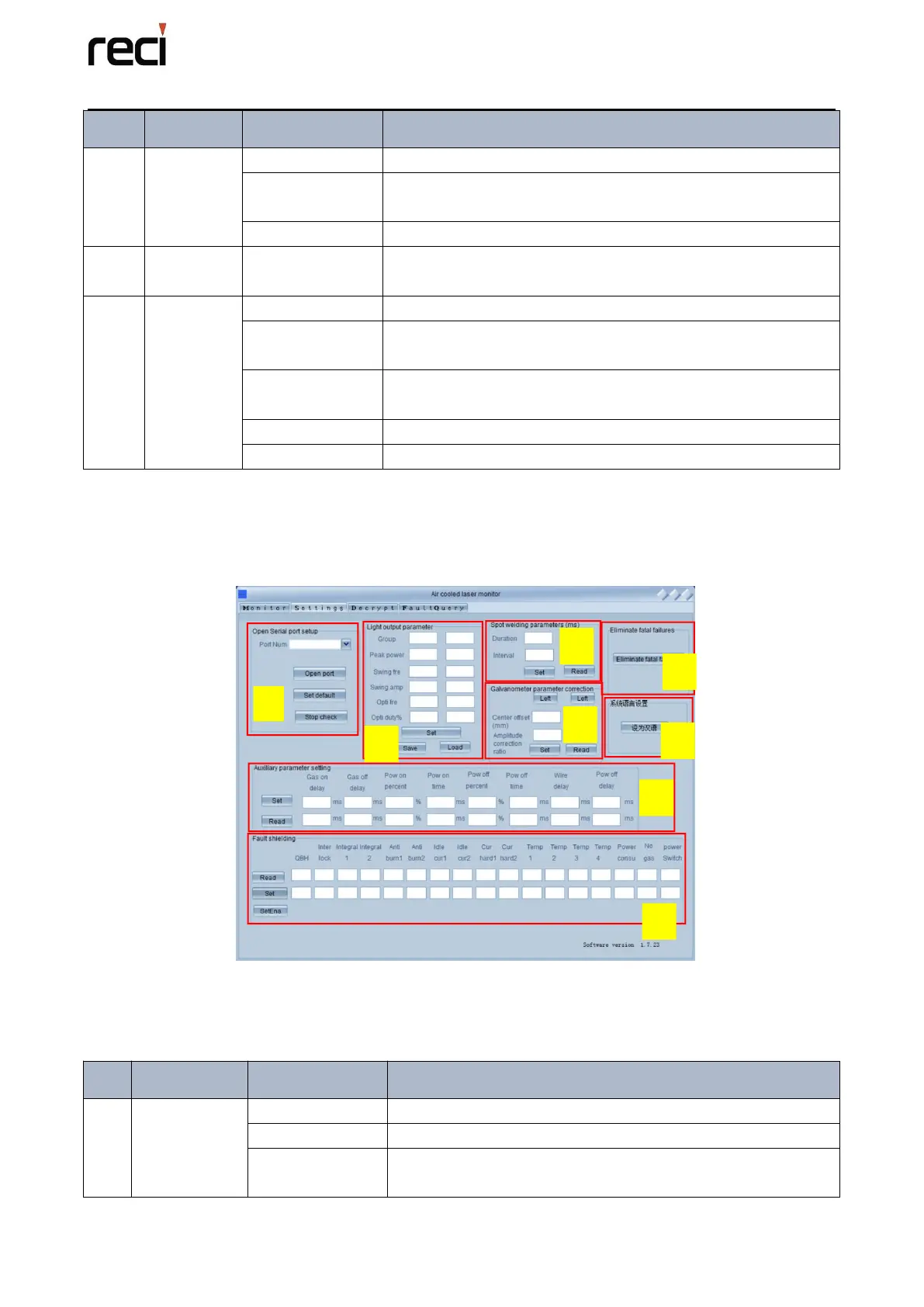
The Page is just as the figure 5.4. The function of the different button is as the following table
5.2.
Figure 5.4 Setting Page
The function of the setting page is shown in the table below:
Table 5.2 The function of the buttons on Setting Page
Drop-down box to select the corresponding serial port.
Open the corresponding serial port.
Set the corresponding serial port to the default serial port.
The next software restart will automatically open the serial


 To Next Page