RM-DPC Micro FP Documentation
RDN 10000531 7 13.05.2013
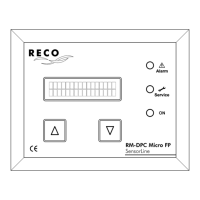
"Service" LED
This LED flashes if the set number of service hours has elapsed. This LED goes out when the
service hours counter is reset to 0 hrs. In order to do this, Parameter 10 "Maintenance
acknowledge ?" must be configured to "Yes".
The "ON" LED is lit if supply voltage is present.
Configuration keys
Press and hold for more than 3 seconds. Then press
until you see the required parameter in the display.
Setting the parameter value:
Once you have selected a parameter, press
and hold for more than 3 seconds. Then press
until you see the required parameter in the display. Then press
and hold for more than 3 seconds to save the configured value.
Then, if necessary, press
and select additional parameters to configure or check.
Returning to "Operation" mode:
The program automatically returns to "Operation" mode if no button is pressed in over
one minute.
Cancelling the parameter setting:
Press briefly. Then press
again briefly to return to "Operation" mode.


 To Next Page