7
2 3 4
61 5
31
Technical Dept. - All rights reserved - Reproduction is prohibited
11 - MENU ITEMS AND FUNCTION
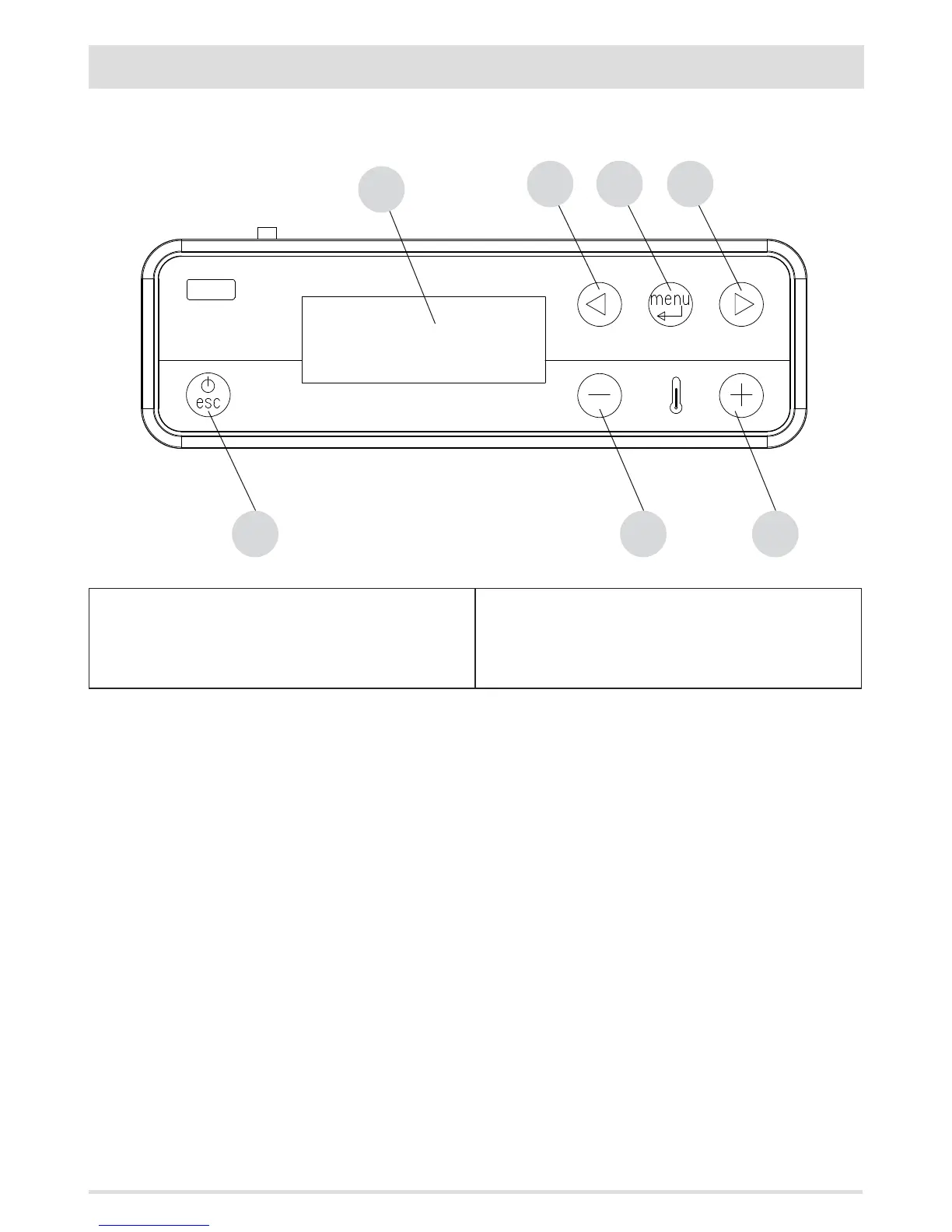
CONTROL PANEL DISPLAY
Menu options
KEY
1. Stove switch-on/switch-o
2. Scrolling down through the programming menu
3. Menu
4. Scrolling up the programming menu
5. Decrease set temperature / programming functions.
6. Increase set temperature / programming functions.
7. Display.
MAIN MENU
Press key 3 (menu) to access. The options accessed are:
• Date and Time
• Timer
• Sleep (only when stove is on)
• Settings
• Info
Date and time conguration
Congure the time and date as follows:
• Press the "menu" key.
• Select "Date and Time".
• Press "menu" to conrm.
• Scroll through with the arrow keys and select the variables to be edited one at a time: Day, Hour, Min, Num. day, Month, Year.
• Press "menu" to conrm
• Use the + and - keys to edit.
• Finally, press "menu" to conrm and "esc" to exit.



 To Next Page