Programming
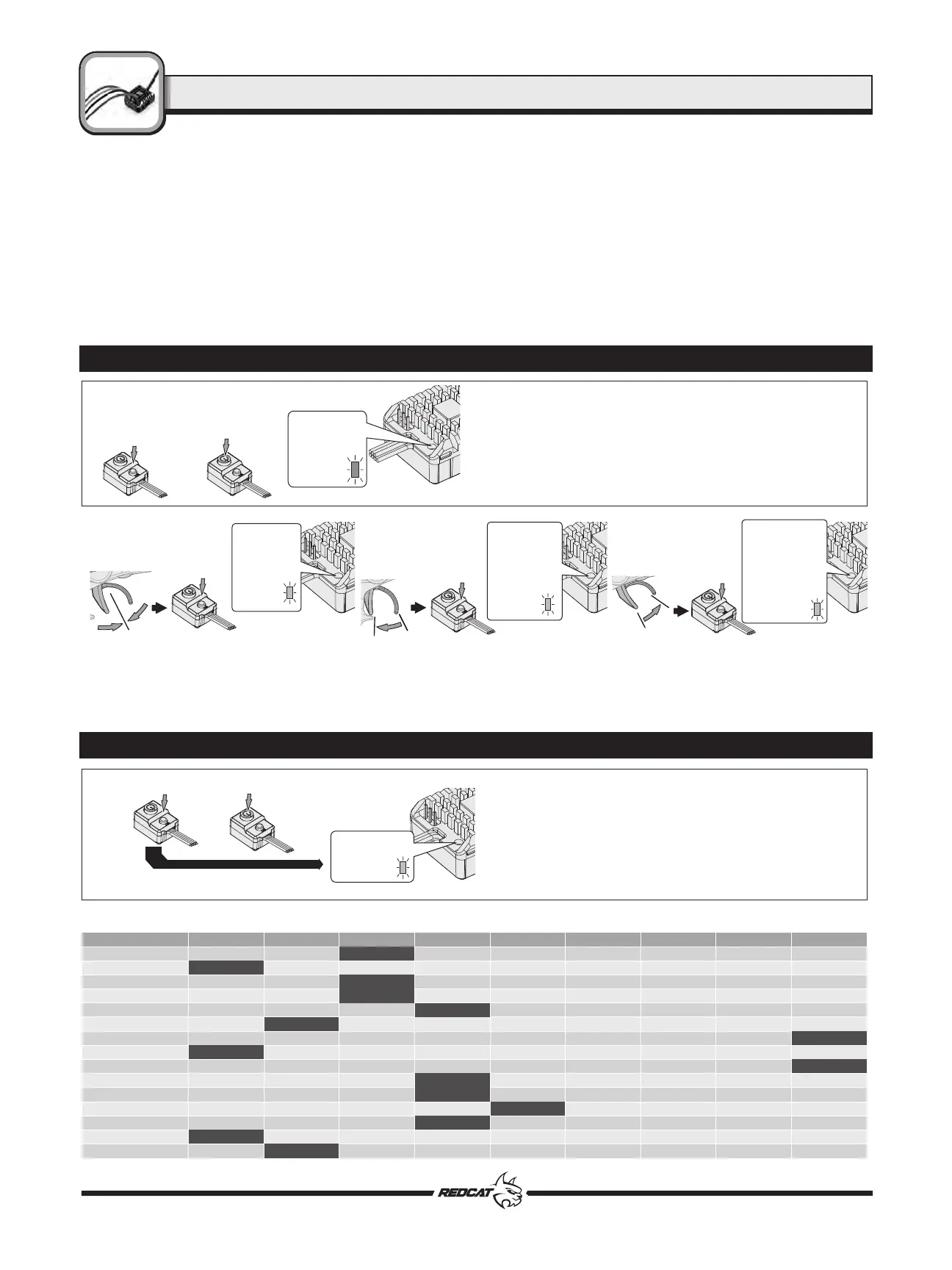
Calibration
Move the throttle trigger
to the neutral position and
press the SET button.
The Red
LED flashes
once and
motor emits
“Beep”
tone.
Pull the throttle trigger
to the end position of
forward and press the
SET button.
The Red LED
flashes twice
and motor
emits
“Beep-Beep”
tone.
Push the throttle trigger
to the end position of
reverse and press the
SET button.
The Red LED
flashes three
times and
motor emits
“Beep-Beep-
Beep” tone.
1. Turn on the transmitter, set parameters on the throttle channel like
“D/R”, “EPA” and “ATL” to 100% and the throttle “TRIM” to “0”. Disable
the “ABS braking function”, if available on your radio.
2. Start with the transmitter on and the ESC turned off but connected to
a battery. While holding the SET button, Turn ON the ESC, then release
the SET button when you see the RED LED on the ESC start to flash
(Note: the motor beeps at the same time). (The ESC will enter the
programming mode if the SET button is not released within 3 seconds,
which will then require you to restart from step 1.)
Press and hold
the SET button
Press the
ON/OFF
Button
Release the
SET button
once the LED
flashes.
1. Turn on the transmitter.
2. Press and hold the set button on the ESC ON/OFF switch.
3. Turn ON the ESC.
4. Continue to hold the set button for at least 3 seconds after the Red
LED begins to flash, entering set mode. The Red LED will then flash
the number of times that corresponds with the item # you wish to
adjust. Refer to the “Item #” column of the chart to determine the
number of Red LED flashes needed.
(1 flash =
Running Mode, 2 flashes = Battery Type, etc.)
Press and hold
the SET
button
Turn ON the ESC
The Red LED
flashes
3. To set the neutral point, leave the throttle trigger at the neutral position, press the SET button. The Red LED flashes 1 time and the motor beeps 1
time to accept the neutral position.
4. Pull the throttle trigger to the full throttle position and press the SET button. The Red LED blinks 2 times and the motor beeps 2 times to accept the
full throttle endpoint.
5. Push the throttle trigger to the full brake position, press the SET button. The Red LED blinks 3 times and the motor beeps 3 times to accept the full
brake endpoint. Release the trigger back to the neutral point. (The motor can be started 3 seconds after the ESC/Radio calibration is complete)
LED Status Indicator
• The Red LED dies out when the throttle trigger is in throttle neutral zone.
• The Red LED flashes when your vehicle runs forward and it turns solid Red when you pull the throttle trigger to the full throttle endpoint.
• The Red LED flashes when your vehicle brakes and turns solid Red when you push the throttle trigger to the full brake endpoint when the “maximum
brake force” is set to 100%.
• The Red LED flashes when the vehicle runs backward and turns solid Red when you push the throttle trigger to the full brake endpoint when the
“maximum reverse force” is set to 100%.
Restore the ESC to the default values
Press and hold the SET button for over 3 seconds anytime when the throttle is at the neutral position (except during the ESC calibration and
programming) can factory reset your ESC. The Red LED flashes a long flash (the motor beeps a long beep at the same time) and then a short, single
flash that repeats indicating that you have successfully restored all the default values within your ESC. Once you power the ESC off, and then back on,
your settings will be back in the default mode.
1. Running Mode
2. Battery Type
3. Cutoff Voltage
4. Initial Start Force
5. Max. Forward Force
6. Max. Reverse Force
7. Max. Brake Force
8. Initial Brake Force
9. Drag Brake
10. Drag Brake Rate
11. Neutral Range
12. Start Mode/Punch
13. PWM Frequency
14. BEC Voltage
15. Freewheeling
Option 1
Fwd/Brk
LiPo
Disabled
0%
25%
25%
0%
0%
0%
Level 1
0.02ms
Level 1
1K
6V
Enabled
Option 2
Fwd/Rev/Brk
NiMH
Auto (Low)
2%
50%
50%
12.5%
6.25%
5%
Level 2
0.03ms
Level 2
2K
7.4V
Disabled
Option 3
Fwd/Rev
Auto (Medium)
4%
75%
75%
25%
12.5%
10%
Level 3
0.04ms
Level 3
4K
Option 4
Auto (High)
6%
100%
100%
37.5%
18.75%
50%
Level 4
0.05ms
Level 4
8K
Option 5
8%
50%
25%
60%
Level 5
0.06ms
Level 5
16K
Option 6
10%
62.5%
31.25%
70%
Level 6
0.07ms
Level 6
Option 7
12%
75%
37.5%
80%
Level 7
0.08ms
Level 7
Option 8
14%
87.5%
43.75%
90%
Level 8
0.10ms
Level 8
Option 9
16%
100%
50%
100%
Level 9
0.12ms
Level 9
Programmable Item
The shaded options are the factory default settings which your ESC is already set to out of the box.
RCR-2CENR RADIO SYSTEM
ESC
TM
15



 To Next Page
 Loading...