EasyManua.ls Logo

RedLINK MHK2 - User Manual

RedLINK MHK2
64 pages
Print Icon
To Next Page IconTo Next Page
Loading...
RedLINK™ Wireless
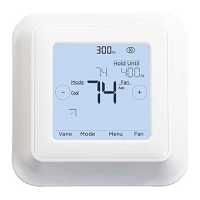
Remote Controller Kit
Operation Manual
MHK2:
MRCH2 Controller, MIFH2
Receiver, and MRC2 Cable
This manual is designed to help you get acquainted with your new MHK2 RedLINK™
Wireless Remote Controller. Check out the table of contents on page 2 to browse by
topic.
Welcome
Web: https://mhk2.meushvac.com/
Phone: 1-800-433-4822
Need Help? Get in Touch.
MHK2 is compatible with kumo
cloud
®
when connected with the
Wireless Interface 2 or later.
RedLINK
Technology
33-00447EFS_B.indd 1 10/17/2019 3:22:50 PM

Table of Contents

Question and Answer IconNeed help?

Do you have a question about the RedLINK MHK2 and is the answer not in the manual?

Summary

Welcome

Contact Information

Controller Features

Controller Overview

Adjusting the Temperature

Schedule Overrides

Temporary Hold

Overrides current temperature set point for a maximum of 24 hours.

Permanent Hold

Overrides current temperature set point permanently until manually changed.

Holiday Hold

Holds current system settings for a set time period, adjustable in one day increments.

Adjusting Temperature in Auto Mode

Selecting System Mode

Basic Modes: Heat, Cool, Dry

Select Heat for warm air, Cool for cold air, Dry for dehumidification.

Fan and Auto Modes

Use Fan to circulate air, Auto for automatic heating/cooling selection.

System Off Mode

Turns all systems off.

Setting the Fan Speed

Fan Speed Options

Includes Auto and Fixed Speed settings.

Setting the Vane Direction

Vane Direction Options

Controls airflow direction: Auto, Swing, Ceiling, High, Middle, Low, Floor.

Main Menu Overview

Alerts and Reminders

View, snooze, or dismiss active alerts and reminders.

Schedule and Hold Settings

Edit schedules, set holiday holds, and reset controller schedule.

Controller Configuration and Status

Configure screen lock, temperature scale, clock, date, clean screen, and view device/receiver status.

Scheduling Options

Residential Program Default Settings

Default daily settings for Wake, Leave, Return, Sleep periods.

Schedule Period Indicator

Shows which schedule period (Wake, Leave, Return, Sleep) is active.

Commercial Program Default Settings

Setting a Schedule

Reset Schedule

Screen Lock Settings

Screen Lock: Partial Lock

Only the temperature can be changed.

Screen Lock: Full Lock

No access allowed without a PIN code.

Setting the Date and Time

Cleaning the Controller Screen

Choosing Temperature Scale

Viewing Controller Information

Wi-Fi Connection Status

RedLINK Wireless Receiver LED Status

Battery Replacement

Alerts and Maintenance Reminders

Understanding Alert Codes

Details for alerts 181 (Filter), 405 (Battery Low), and 407 (Battery Critical).

Change Filter Notifications

Troubleshooting

Basic Troubleshooting Steps

Covers blank screen, system response, and temperature setting issues.

Understanding WAIT Screen

Controller receiving data or waiting for AC connection.

General System Information

Safety: Electrical Hazard

Can cause electrical shock or equipment damage. Disconnect power before installation.

Environmental: Electronic Waste Notice

Proper disposal of end-of-life equipment to prevent environmental consequences.

Regulatory Information

FCC Compliance and Warnings

Covers compliance, warnings, and interference statements for FCC.

RF Exposure and RSS-GEN

Covers RF exposure limits and Industry Canada RSS-GEN requirements.

ADA Compliance

RedLINK MHK2 Specifications

General IconGeneral
Power Source24V AC
Wireless CommunicationRedLINK
Frequency2.4 GHz
ConnectivityWireless
TypeThermostat
DisplayLCD
RangeUp to 200 feet
Product TypeThermostat Controller
ApplicationResidential and light commercial