12
Reset Schedule
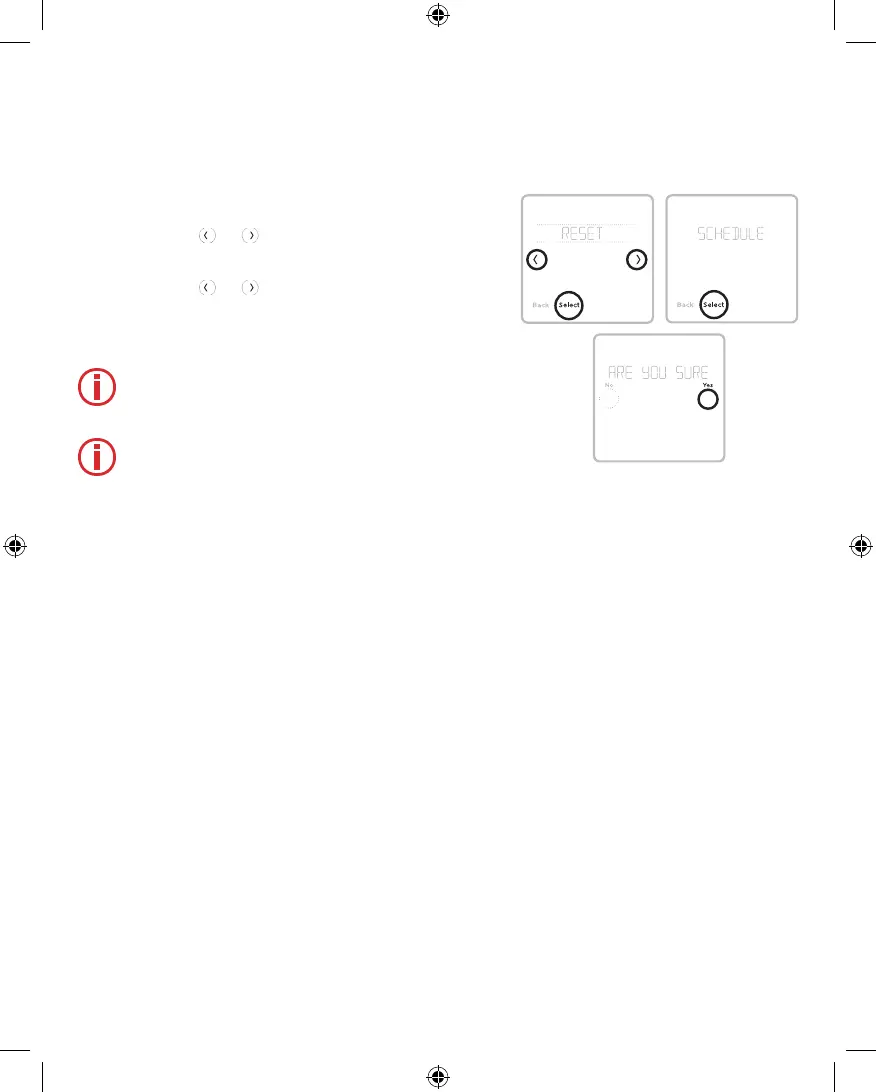
To reset the controller schedule back to the default
temperature settings (see "Scheduling Options" on
page 10), follow steps below.
1 Touch Menu on the controller screen.
2 Touch the or arrows until you see
RESET, then touch Select.
3 Touch the
or arrows until you see
SCHEDULE, then touch Select.
4 Touch Yes to confirm.
Note: The reset schedule menu option is
available only if the schedule is enabled in
the controller Installer Setup menu.
Note: If you switch from a previously saved
program, either Residential or Commercial,
to Commercial or Residential respectively,
you must also enable a Schedule Reset
after saving the change to reflect the correct
program defaults.
33-00447EFS_B.indd 12 10/17/2019 3:22:55 PM


 To Next Page