45
USER INTERFACE / ATC
ATC Main Menu (Tool Changing)
1
2
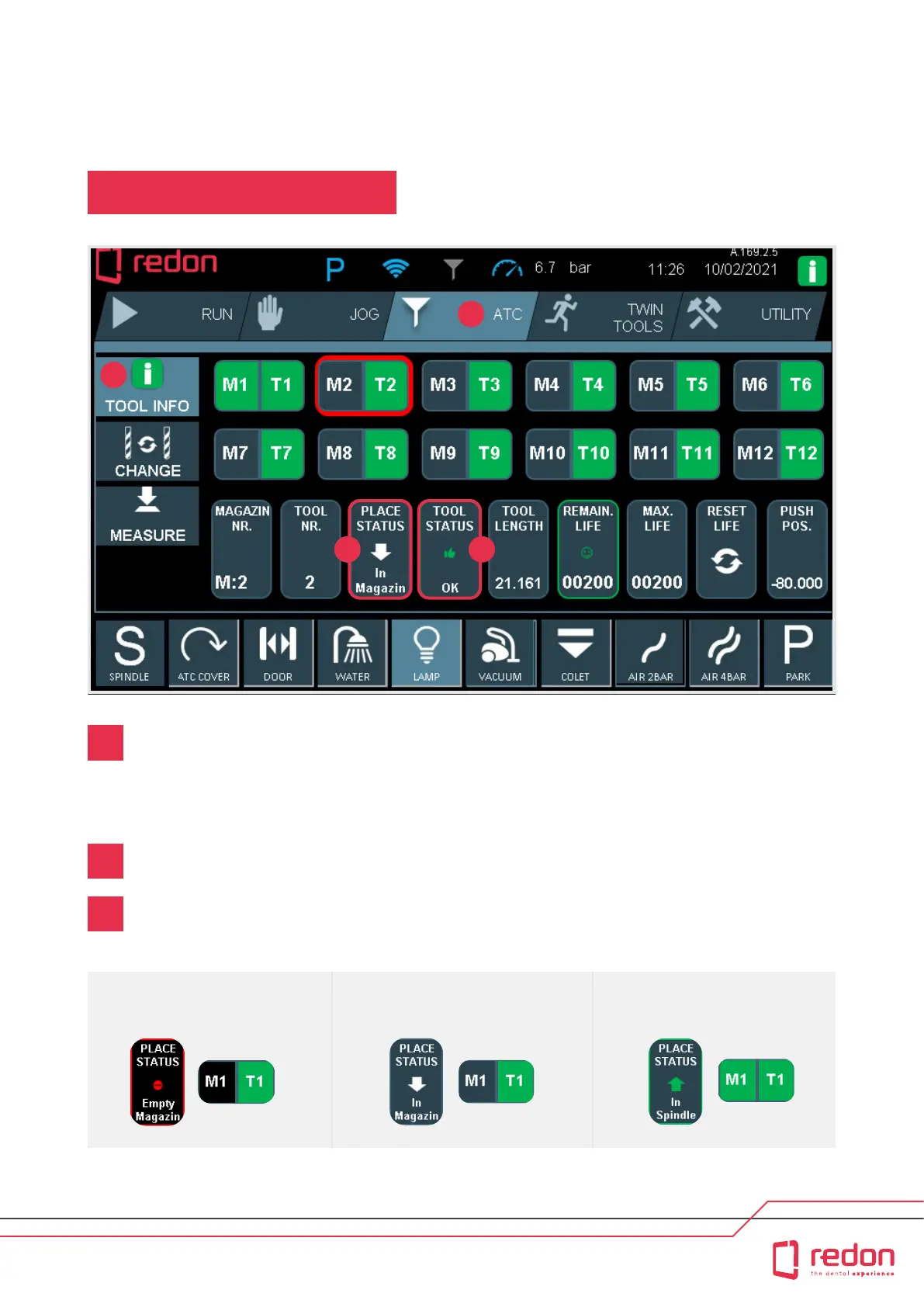
ATC MAIN MENU (Tool Changing menu). Use the “ATC MAIN MENU” to change old or broken tools, empty the
tool on the spindle, determine or reset tool life, and measure tool lengths. The tool capacity of the magazine is
12, and there is a separate buon for each tool. Although the number of tool nests in the magazine is 12, tools
can be optionally assigned to any magazine nest.
*M1: Field indicating the magazine number. *T1: Field indicating the tool number.
Use this tab to change old or broken tools, send the tool on the spindle to the magazine and determine
or reset tool life.
Place status : Indicates the place of the tool. It shows 3 dierent statuses. Assuming that the T1 tool is available,
3 dierent statuses of M1 are shown as in the sample images when the Place Status buon is pressed.
M1 - BLACK
Magazine is empty
M1 - DARK BLUE
Tool is in the magazine
M1 - GREEN
Tool is on the spindle
1
2
3
43



 To Next Page