PROBLEM SOLUTION
.
The walking belt is
off-center or slips
when walked on
a,
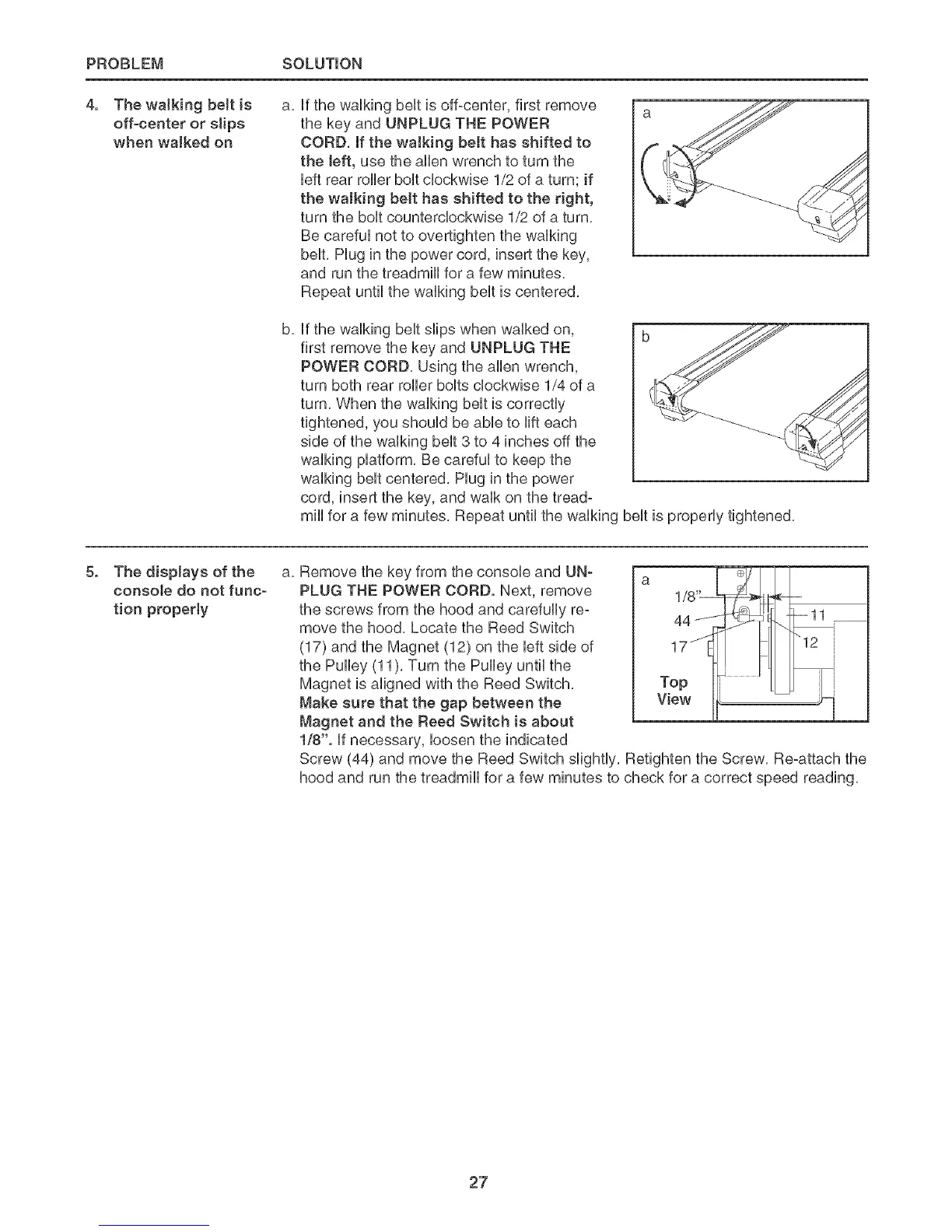
Hfthe waHking bent is off-center, first remove
the key and UNPLUG THE POWER
CORD, If the walking belt has shifted to
the [eft, use the aHHenwrench to turn the
Heftrear roHHerboHtcHockwise 1/2 of a turn; if
the walking belt has shifted to the right,
turn the boHtcountercHockwise 1/2 of a turn,
Be carefuHnot to overtighten the waHking
bent, Hug in the power cord, insert the key,
and run the treadmHHfor a few minutes,
Repeat until the waHkingbentis centered,
b,
Hfthe waHMngbentships when waHked on, b
first remove the key and UNPLUG TNE
POWER CORD, Using the aHHenwrench,
turn both rear roHHerboHtscHockwise 1/4 of a
turn, When the waHkingbentis correctly
tightened, you shouHdbe abHeto Hilteach
side of the waHkingbent3 to 4 inches off the
waHkingpHatform, Be carefuHto keep the
waHkingbentcentered, Hug in the power
cord, insert the key, and waHkon the tread°
mirthfor a few minutes, Repeat untiHthe waHking bent is properHytightened,
.
The displays of the
console do not func-
tion property
a,
Remove the key from the consoHeand UN_
PLUG THE POWER CORD. Next, remove
the screws from the hood and carefuHHyre-
move the hood, Locate the Reed Switch
(17) and the Magnet (12) on the Heftside of
the PuHHey(11), Turn the PuHHeyuntiHthe
Magnet is aHignedwith the Reed Switch,
Make sure that the gap between the
Magnet and the Reed Switch is about
1/8". Hfnecessary, Hoosenthe indicated
1/8_
44 ....... _
Top
View 11'
Screw (44) and move the Reed Switch sHghtHy,Refighten the Screw, Re-attach the
hood and run the treadmiHHfor a few minutes to check for a correct speed reading,
27








 To Next Page