EasyManua.ls Logo

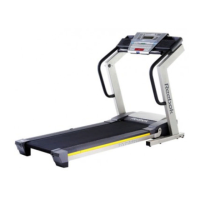
Reebok 8000 ES RBTL69908.0 - User Manual

Reebok 8000 ES RBTL69908.0
36 pages
Print Icon
To Next Page IconTo Next Page
Loading...
Serial Number
Decal
Model No. RBTL69908.0
Serial No.
CAUTION
Read all precautions and instruc-
tions in this manual before using
this equipment. Save this manual
for future reference.
USER’S MANUAL
QUESTIONS?
As a manufacturer, we are com-
mitted to providing complete cus-
tomer satisfaction. If you have
questions, or if parts are missing,
PLEASE DO NOT CONTACT
THE STORE; please contact
Customer Care.
IMPORTANT: You must note the
product model number and
serial number (see the drawing
above) before contacting us:
CALL TOLL-FREE:
1-877-994-4999
Mon.–Fri. 6 a.m.–6 p.m. MST
Sat. 8 a.m.–4 p.m. MST
ON THE WEB:
www.reebokservice.com
Write the serial number in the space
above for future reference.
Visit our website at
www.reebokhomefitness.com
new products, prizes,
fitness tips, and much more!
®
®
With Universal Dock for iPod
®

Questions and Answers

  • K
    kristina39Jul 29, 2025
    How to turn on my Reebok 8000 ES RBTL69908.0 Treadmill?
    • C
      Christopher EricksonJul 29, 2025
      To address this issue, make sure the power cord is properly connected to a surge suppressor and the surge suppressor is plugged into a grounded outlet. Ensure the surge suppressor meets the specifications outlined on page 13 of the manual. Note that the treadmill is incompatible with GFCI-equipped outlets. Also, verify that the key is fully inserted into the console after plugging in the power cord. Finally, check the reset/off circuit breaker located on the treadmill frame near the power cord. If the switch is protruding, the breaker has tripped; wait five minutes before pressing it back in to reset it.
  • C
    Cory WashingtonAug 1, 2025
    What to do if my Reebok 8000 ES RBTL69908.0 Treadmill turns off during use?
    • P
      Patricia HeathAug 2, 2025
      If your Reebok Treadmill turns off during use, first check the reset/off circuit breaker. Also, ensure the power cord is securely plugged in; if it is, unplug it, wait five minutes, and then plug it back in. Another step is to remove and re-insert the key from the console. If the issue persists, consult the front cover of this manual for further assistance.
  • P
    Paul WilliamsAug 6, 2025
    Why does the walking belt on my Reebok Treadmill slow down when I walk on it?
    • E
      Edward BeanAug 6, 2025
      If the walking belt on your Reebok Treadmill slows down when you walk on it, use a single-outlet surge suppressor that meets the specifications described on page 13. Also, if the belt is too tight, remove the key and unplug the power cord. Then, use a hex key to turn both rear roller bolts counterclockwise by 1/4 of a turn. The belt should be properly tightened when you can lift each edge 2 to 3 inches off the platform. If the issue continues, consult the front cover of the manual.
  • B
    Brian FordAug 10, 2025
    What to do if the walking belt is off-center or slips on my Reebok 8000 ES RBTL69908.0 Treadmill?
    • K
      Kevin GuerreroAug 11, 2025
      If the walking belt on your Reebok Treadmill is off-center, remove the key and unplug the power cord. If the belt is shifted left, turn the left rear roller bolt clockwise 1/2 turn with a hex key. If it's shifted right, turn the bolt counterclockwise 1/2 turn. If the belt slips, remove the key and unplug the cord, then turn both rear roller bolts clockwise 1/4 turn with the hex key. Correct tightness allows lifting each side of the belt 2-3 inches off the platform.
  • M
    Mrs. Jennifer LynchAug 15, 2025
    What to do if the incline doesn't change correctly on my Reebok 8000 ES RBTL69908.0?
    • M
      mariahcooperAug 15, 2025
      If the incline on your Reebok Treadmill isn't changing correctly, insert the key into the console and press an Incline button. While the incline is adjusting, remove the key, wait a few seconds, and then re-insert it. The treadmill should rise to its maximum incline and then return to the minimum level automatically.
  • D
    Douglas DayAug 19, 2025
    How to turn off the console displays on my Reebok 8000 ES RBTL69908.0 after removing the key?
    • M
      monica67Aug 19, 2025
      The console on your Reebok Treadmill may be in display demo mode. To disable it, press and hold the Stop button for a few seconds. If the displays remain lit, refer to THE INFORMATION MODE on page 22 to turn off the demo mode.
  • S
    Samuel ClaytonAug 23, 2025
    How to fix the displays of the console on my Reebok 8000 ES RBTL69908.0?
    • S
      stewartjenniferAug 23, 2025
      To fix console display issues on your Reebok Treadmill, remove the key and unplug the power cord. With assistance, carefully lower the Uprights. Check for two M4.2 x 16mm screws at the bottom of the Belly Pan; remove them if present. Remove the three M4.2 x 19mm Hood Screws and pivot the Hood off. Locate the Reed Switch and the Magnet on the left side of the Pulley. Align the Magnet with the Reed Switch, ensuring a gap of about 1/8 inch (3 mm). Run the treadmill briefly to check the speed reading.

Summary

Warning Decal Placement

Important Precautions

Before You Begin

Assembly

Operation and Adjustment

The Pre-Lubricated Walking Belt

Details on the walking belt's lubricant and care instructions.

How to Plug in the Power Cord

Instructions for connecting the power cord and surge suppressor.

Console Diagram

Features of the Console

Describes the console's features like manual mode, workouts, and fitness journal.

How to Turn on the Power

How to Personalize Console Settings

How to Identify Yourself as User 1 or User 2

How to Use the Manual Mode

How to Use a Personal Trainer Workout

How to View the Fitness Journal

How to Reset the Fitness Journal

How to Use the Stereo Sound System

The Information Mode

The Optional Chest Pulse Sensor

How to Fold and Move the Treadmill

How to Fold the Treadmill for Storage

Instructions for folding the treadmill into its storage position.

How to Move the Treadmill

Steps for safely moving the folded treadmill.

How to Lower the Treadmill for Use

Troubleshooting

Problem: The power does not turn on

Steps to diagnose and resolve power-on issues.

Problem: The power turns off during use

Steps to diagnose and resolve power interruption during use.

Problem: The console displays remain lit when you remove the key from the console

Addresses console display staying lit after key removal.

Problem: The displays of the console do not function properly

Steps for troubleshooting non-functional console displays.

Exercise Guidelines

Exercise Intensity

Guidance on setting intensity levels based on heart rate zones.

Workout Guidelines

Recommendations for warming up, training, and cooling down.

Exercise Frequency

Advice on how often to exercise for optimal results.

Suggested Stretches

Part List

Ordering Replacement Parts

Limited Warranty

Reebok 8000 ES RBTL69908.0 Specifications

General IconGeneral
BrandReebok
Model8000 ES RBTL69908.0
CategoryTreadmill
LanguageEnglish

Related product manuals