20.When using iFIT.com CDe and videos, an
electronic "chirping" sound will alert you
when the speed and/or incline of the treadmill
is about to change. Always listen for the
•'chirp" and be prepared for speed and/or ino
oiine changes. In some instances, the speed
and/or incline may change before the per-
sonal trainer describes the change.
21. When usi ng iFIT.com CDe and videos, you can
manually override the speed and incJine set-
tinge at any time by pressing the speed and in=
dine buttons. However, when the next "chirp"
is heard, the speed and/or incline will change
to the next settings of the CD or video program.
22. Always remove iRT.com CDs and videos from
your CD player or VCR when you are not
using them.
23. inspect and properly tighten aJl parts of the
treadmill every three months.
24. Never drop or insert any object into any open-
ing.
=5.DANG EF{:AJwaye..plugthepower
cord immediately after use, before deaning
_he treadmill, and before performing the main=
tenance and adiuetment procedures de-
scribed in this manual Never remove the
motor hood unless instructed to do so by an
authorized service representative. Servicing
other than the procedures in this manual
should be performed by an authorized service
representative only.
26. The treadmill is intended for in-home use
oniyo Do not use the treadmill in any
commercial rental or institutional setting.
WA F{NING: Sefo,ebeginningtheeoranye.erciseprogram,eoneu,you,phyeie an7his
is especially important for persons over the age of 35 or persons with pro-existing heaJth problems.
Read aH instructions before using, iCON assumes no responsibility for personal injury or property
damage sustained by or through the use of this product.
SAVE THESE mNSTRUCTIONS
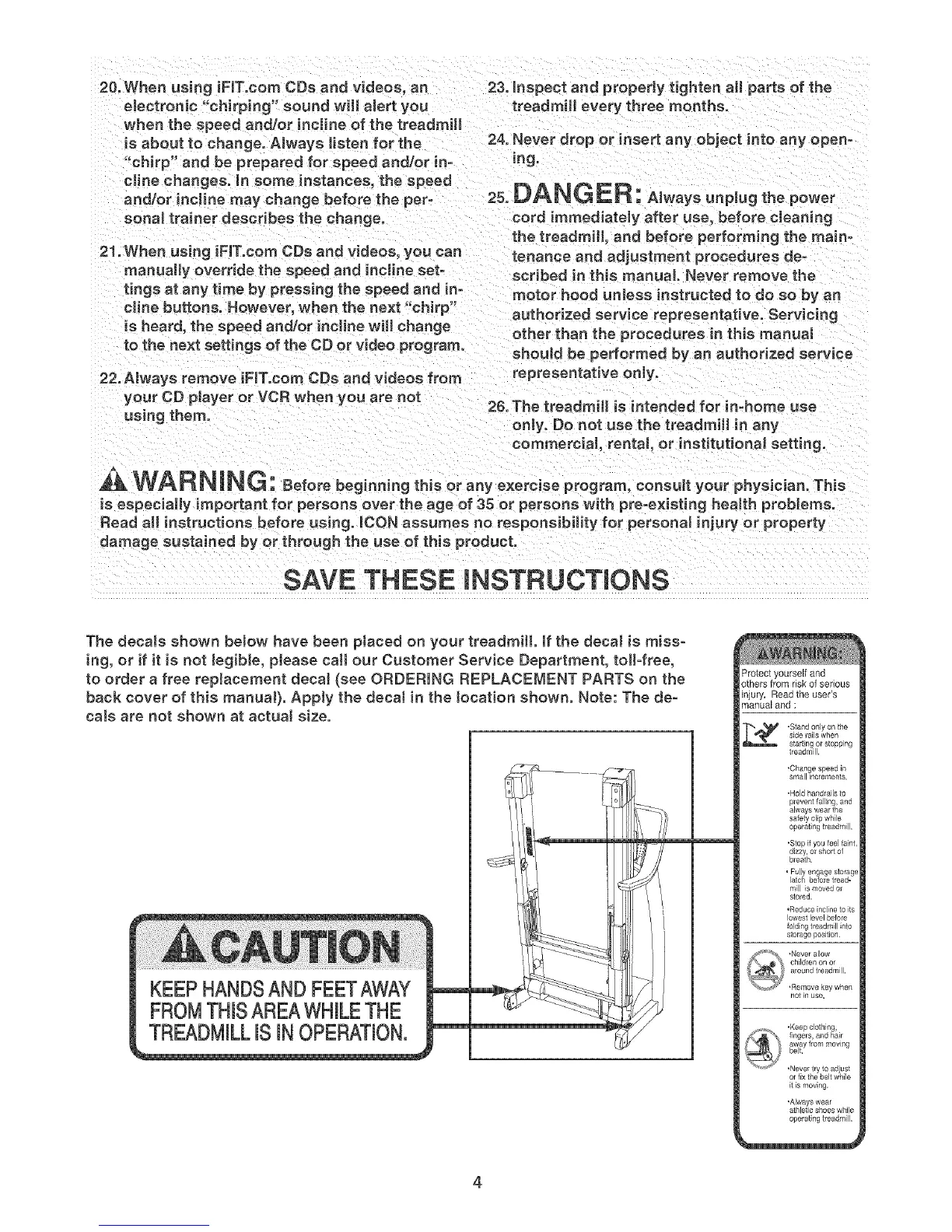
The decaJs shown below have been pJaced on your treadmill if the decal is miss-
ing, or if it is not legible, please call our Customer Service Department, toll-free,
to order a free replacement decal (see ORDERING REPLACEMENT PARTS on the
back cover of this manuaJ). Appty the decaJ in the tocation shown. Note: The de-
cals are not shown at actuaJ size.
KEEPHANDSAND FEETAWAY
FROMTHISAREAWHILETHE
TREADMILLIS iN OPERATION.
_mtect yourself and
gthers from risk of serious
njury. Read the user's
"nanual and ;
.Stand only on the
side rails when
starting or stopping
treadmill.
•Hold handrails to
prevent lalling, and
always wear the
safety clip while
operating treadmill,
"Stop if you feel faint,
dizzy, onshort of
bleath.
• Fully engage storage
latch before tread=
mill is moved or
stored.
,Reduce incline to its
lowest level befole
folding treadmill nto
storage position
notin use,
,Keepclothing,
fingers, and hair
away frommoving
belt.
,Never try to adiust
ol fix the belt while
it is moving,
operating treadmill,
4









 To Next Page