]
pERSONAL TRAINER _ CREI\T[ _ YOUR OWN
1 /
2 12 I
', Matrix Pdority Dbplay
,,:":.:;i"..../
/ //
\ _ _AN , t _, 'ERSQN L A Nt;R / H STAR[ J J 'k_ _ _ _ EA T /_ E CON DE/ / / L)ISPL/W / /
" ', ',' 'C OneTuu_h mNCLm_E_ ....... ,'"; _
\_ I [_'!_ I "_ 2 " 3 4 5 6 , 7 8 9 / 10 ,/ //
( , , OneTo,_ch SPEED ....... ' " }
1 2 3 ",i 4 ' 5 6 7 8 9 10 ;: 11 12
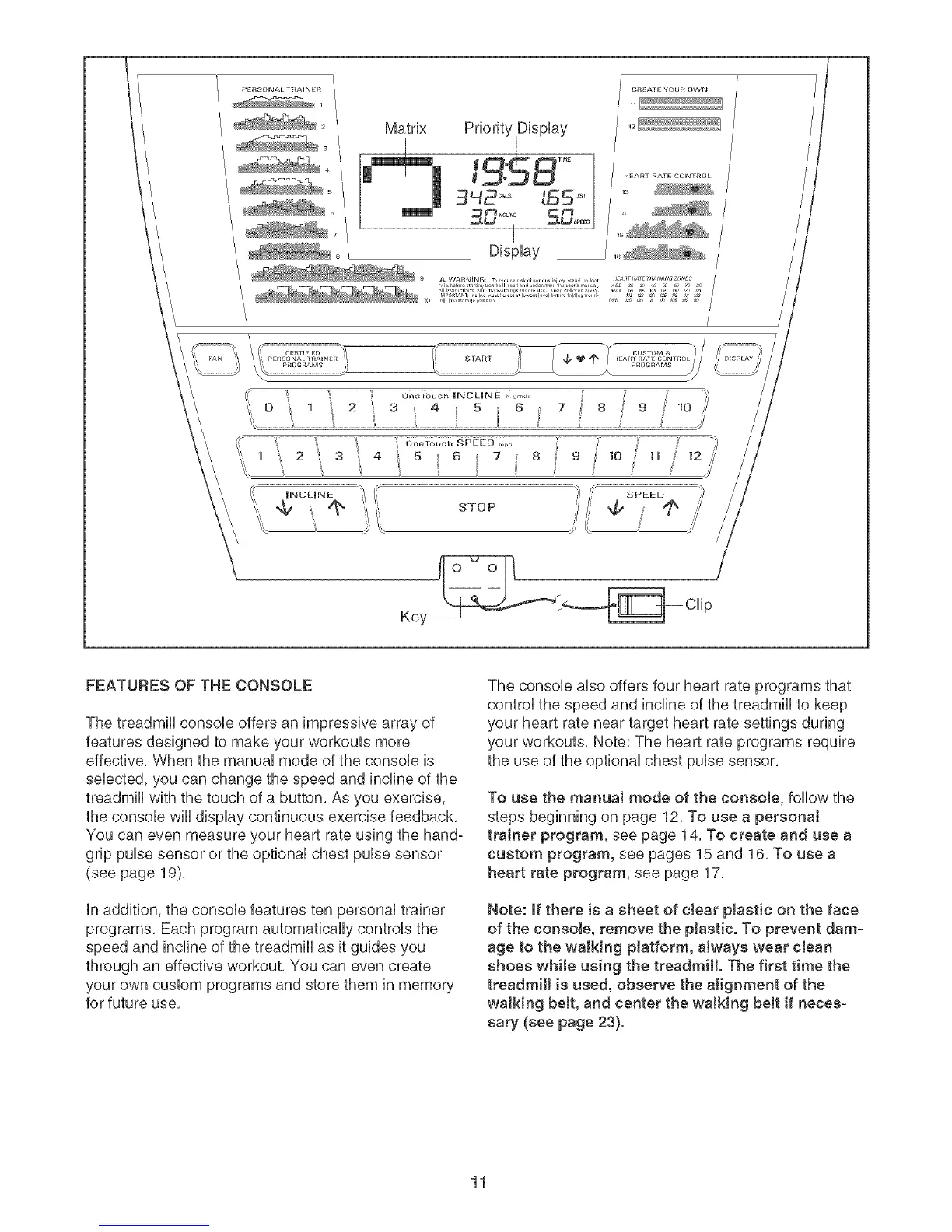
FEATURES OF THE CONSOLE
The treadmill console offers an impressive array of
features designed to make your workouts more
effective, When the manual mode of the console is
selected, you can change the speed and incline of the
treadmill with the touch of a button, As you exercise,
the console will display continuous exercise feedback,
You can even measure your heart rate using the hand°
grip pulse sensor or the optional chest pulse sensor
(see page 19),
in addition, the console features ten personal trainer
programs, Each program automatically controls the
speed and incline of the treadmill as it guides you
through an effective workout, You can even create
your own custom programs and store them in memory
for future use,
The console also offers four heart rate programs that
control the speed and incline of the treadmill to keep
your heart rate near target heart rate settings during
your workouts, Note: The heart rate programs require
the use of the optional chest pulse sensor,
To use the manual mode of the console, follow the
steps beginning on page 12, To use a personal
trainer program, see page 14, To create and use a
custom program, see pages 15 and 16, To use a
heart rate program, see page 17,
Note: If there is a sheet of c_ear plastic on the face
of the console, remove the p_astic. To prevent dam-
age to the walking platform, a_ways wear clean
shoes while using the treadmill. The first time the
treadmill is used, observe the alignment of the
walking be_t, and center the walking be_t if neces-
sary (see page 23}.
11



 To Next Page