reedinstruments
w ww
c om
6
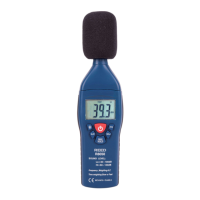
1. Windscreen
If you operate at wind speeds over 10m/sec, please put protective
accessories in front of the microphone.
2. Display
3. Power ON/OFF Button
Turn the meter power ON/OFF
4. Backlight Button
Turn the display backlight ON/OFF
5. A-Weighting/C-Weighting Select Button A/C
A: A-Weighting. For general sound level measurements.
C: C-Weighting. For checking the low frequency content of noise.
(If the C-Weighted level is much higher than the A-Weighted level,
then there is a large amount of low-frequency noise)
6. Time Weighting Select Button F/S
F (Fast Response): For normal measurements (fast varying noise)
S (Slow Response): For checking average level of uctuating noise
7. Level Range Select Button
Lo/Hi
LO: 30~100dB; HI: 60~130dB
When “OVER” is indicated, the meter automatically switches to the
other measurement range.
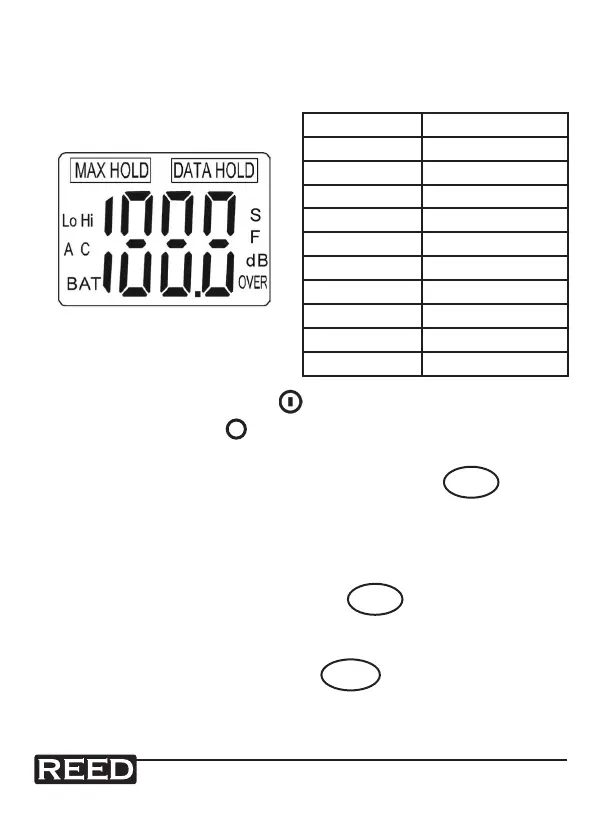
SYMBOL FUNCTION
LCD 4-digits
MAX Max. value hold
OVER Over range
F Fast response
S Slow response
A A-weighting
C C-weighting
LO Low range
HI High range
BAT Low battery



 To Next Page