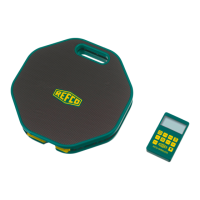
It is often convenient to know the relative amount of gas
remaining in a gas cylinder (tank). The REFSCALE-S Tank
Capacity Mode allows a continuous display of the percentage of
gas remaining in a tank. In order to compute the percentage
accurately, the REFSCALE must be trained with the weights of
an empty and full tank. To train the REFSCALE Tank Capacity
Mode, perform the following steps:
1. press , to enter the menu
2. press , navigate to Tank Capacity
3. press , confirm
4. press , navigate to «SET»
5. press , confirm
6. The display shows 0%, indicating that the weight of an empty
container needs to be registered.
Place an empty gas cylinder (or a load equal to the weight of
an empty gas cylinder) on the platform. Wait 5 seconds for
the load to stabilize.
7. press , confirm
8. The display shows 100%, indicating that the weight of a full
cylinder needs to be registered.
Place a full gas cylinder (or a load equal to the weight of a full
gas cylinder) on the platform. Wait 5 seconds for the load to
stabilize.
9. press , confirm
10. The training process is now completed and the 100% display
goes out.



 To Next Page