77
Owner's Information
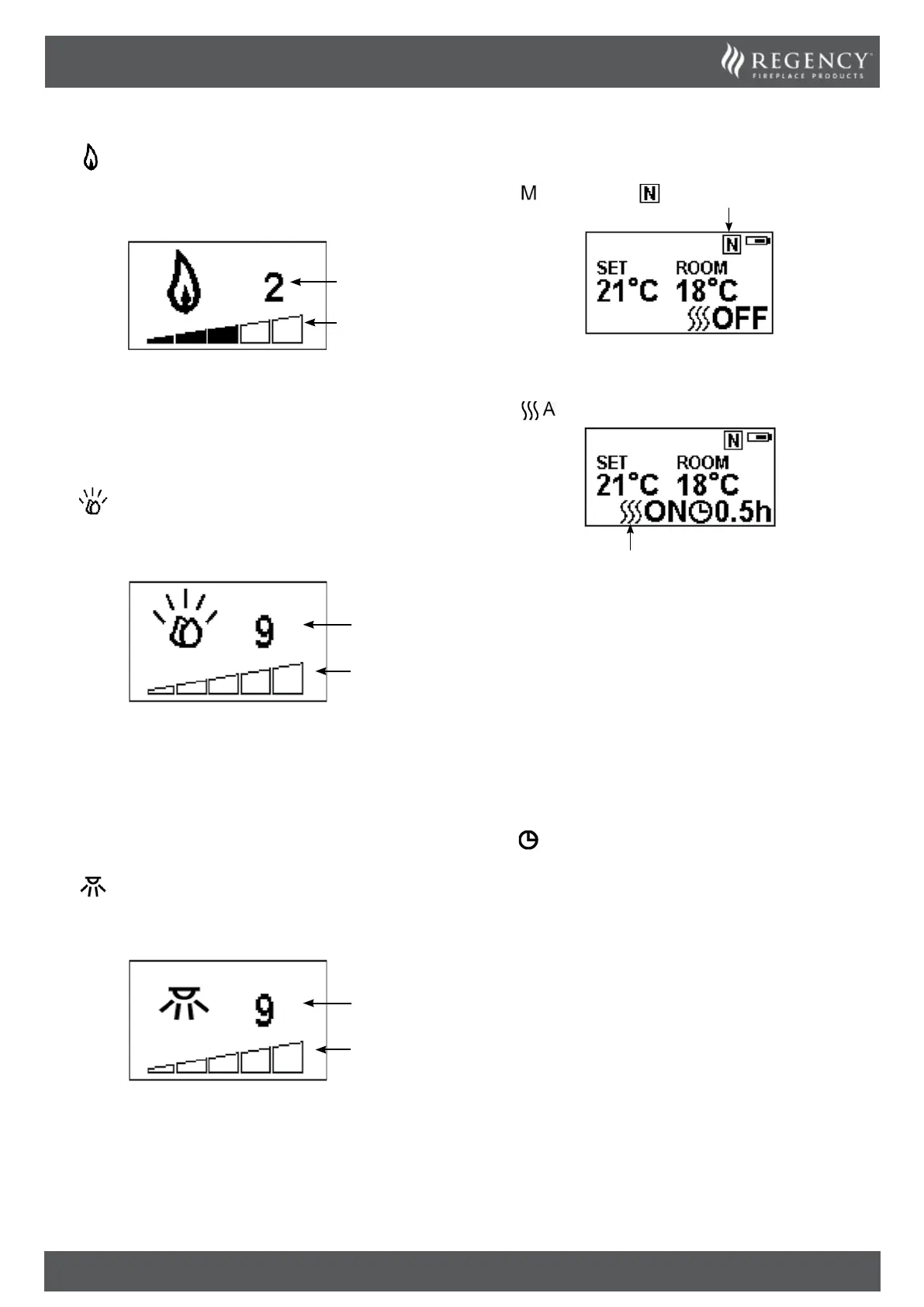
FLAME COLOUR ADJUSTMENT
Press button.
There are 3 flame colour options.
There are 5 levels of brightness, including off.
Brightness
Level
Colour
Option
Press the ‘’ or ‘’ button to cycle through the flame colour
options.
Press the ‘+’ button to increase the flame brightness.
Press the ‘-’ button to decrease the flame brightness until off.
FUEL BED COLOUR ADJUSTMENT
Press to enter the fuel bed light adjustment screen.
There are 14 fuel bed colour options.
There are 5 levels of brightness, including off.
Brightness
Level
Colour
Option
Press the ‘’ or ‘’ button to cycle through the fuel bed colour
options.
Press the ‘+’ button to increase the fuel bed brightness.
Press the ‘-’ button to decrease the fuel bed brightness until off.
MOOD LIGHTING COLOUR ADJUSTMENT
Optional. Must be purchased separetely. See manual for details.
Press
to enter the Mood light adjustment screen.
There are 14 colour options.
There are 6 levels of brightness, including off.
Brightness
Level
Colour
Option
Press the ‘’ or ‘’ button to cycle through the colour options.
Press the ‘+’ button to increase the brightness.
Press the ‘-’ button to decrease the brightness until off.
NORMAL CONTROL MODE
Normal Control Mode is the default setting.
Press
button until the logo is shown
Press the ‘+’ or ‘-’ button to adjust the setting temperature from
17 ℃ to 25℃.
Press
button to turn the heat on/off.
Note: It is normal for the fan heater to stop running for periods
of time. This happens if the room temperature is higher than the
temperature set on the control.
The heater indicator will be turned off after 10s if the flame is
switched ON. The heater indicator will stay ON if only the heating
function is used.
When in Normal Control Mode switching the appliance off
with the remote will stop both the light and heat output.
COUNT DOWN TIMER
This setting is only in normal heating control mode. It allows the
appliance to be returned to Standby after a set period of time. The
heater must be switched on to use this function.
Press
to cycle through the setting from Off and 0.5 hours to 9
hours. Timer logo and remaining time will show on the screen.
The heater of appliance can be automatically run by using daily
timer and weekly timer.
WEEK TIMER HEATING
The following heating periods have been preset, these can be
altered if desired:
From Monday to Friday
06:00 until 08:30
17:00 until 22:00
From Saturday to Sunday
06:30 until 09:30
11:00 until 13:00
17:00 until 22:00



 To Next Page