 Need help?
Do you have a question about the Reichert ABBE MARK III and is the answer not in the manual?
 General
| Brand | Reichert |
|---|---|
| Model | ABBE MARK III |
| Category | Measuring Instruments |
| Language | English |
Cautions regarding electrical shock and sensitive electronic components within the instrument.
Warnings against using strong solvents and adhering to user guide instructions for safe operation.
Caution against defeating the earth ground connection on the power input connector.
Explanation of various symbols displayed on the instrument for user understanding.
Details input voltage range, frequency, fuse specification, and supplied power cords.
Instrument dimensions, weight, display size, illumination, and prism assembly material.
Specifies measurement ranges, readability, precision, and compatible sample types.
Details temperature compensation range, control features, and data interfaces.
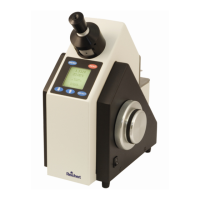
Eyepiece, Color Dispersion Wheel, and Shadowline Knob for optimizing image clarity.
Menu, Up/Down, Select, and Read keys for navigating and operating the instrument.
LCD display, serial ports for data, and the power switch for instrument control.
Components related to sample presentation and illumination for taking measurements.
Mention of calibration oil as an accessory used for calibration procedures.
Includes unpacking, placement, power connection, and temperature stabilization.
Covers sample application, bubble removal, focusing, and shadowline adjustment.
Instructions for taking measurements and switching between reading modes.
Requirements for shaping, polishing, sizing, and using contact fluids for solid samples.
How to enter the menu and select options using the instrument's keys.
Overview of main menu sections like Calibrate, Mode, Language, and others.
Emphasizes routine calibration and proper cleaning for maintaining accuracy.
Detailed steps for performing a single-point calibration using distilled water.
Steps for multi-point calibration using distilled water and up to six additional standards.
Procedures for modifying stored calibration data and saving changes.
Explains how temperature affects refractive index and concentration measurements.
Details the TC function, its calculation factors, and use of custom channels.
Description of DB9 ports for data download and custom channel management.
Recommended software, settings, and baud rate matching for computer interfacing.
Guidance on connecting a printer using RS232 ports and a null modem cable.
How to configure the output text string for printer or computer data.
Description of the pre-programmed sucrose/Brix scale for measurements.
Details on creating and using custom channels for specific measurement units.
Step-by-step instructions for transferring custom channels to the instrument.
Procedures for checking loaded data and removing stored custom channels.
Options for Set Point, Span Point, Edit Data, and Restore Factory settings.
How to select measurement channels and reading modes (Index, Brix, etc.).
Settings for display language and automatic sample temperature stabilization.
Password protection, RS232 Baud rate, Time, Date, Contrast, and User ID settings.
Explains the use of water bath circulators for temperature control and connection.
Details maximum head, pressure, and temperature ranges for the attachment.
Advice on tubing flexibility to prevent prism damage during operation.
Precautions to avoid thermal shock when raising or lowering prism temperature.
Guidance on setting circulator temperature based on the instrument display.
Importance of cleaning prism surfaces before and after sample use for accuracy.
Methods for cleaning prisms and instrument body using various solutions.
Warnings about chemical compatibility with seals and avoiding abrasives on optical surfaces.
Lists optional accessories like printers, cables, paper, and replacement fuses.
Details NIST certified calibration oils and Bromonapthalene for solid samples.
Information on the warranty duration and terms for manufacturing defects.
Guidance on using factory-trained technicians and contact details for support.

 To Next Page