16
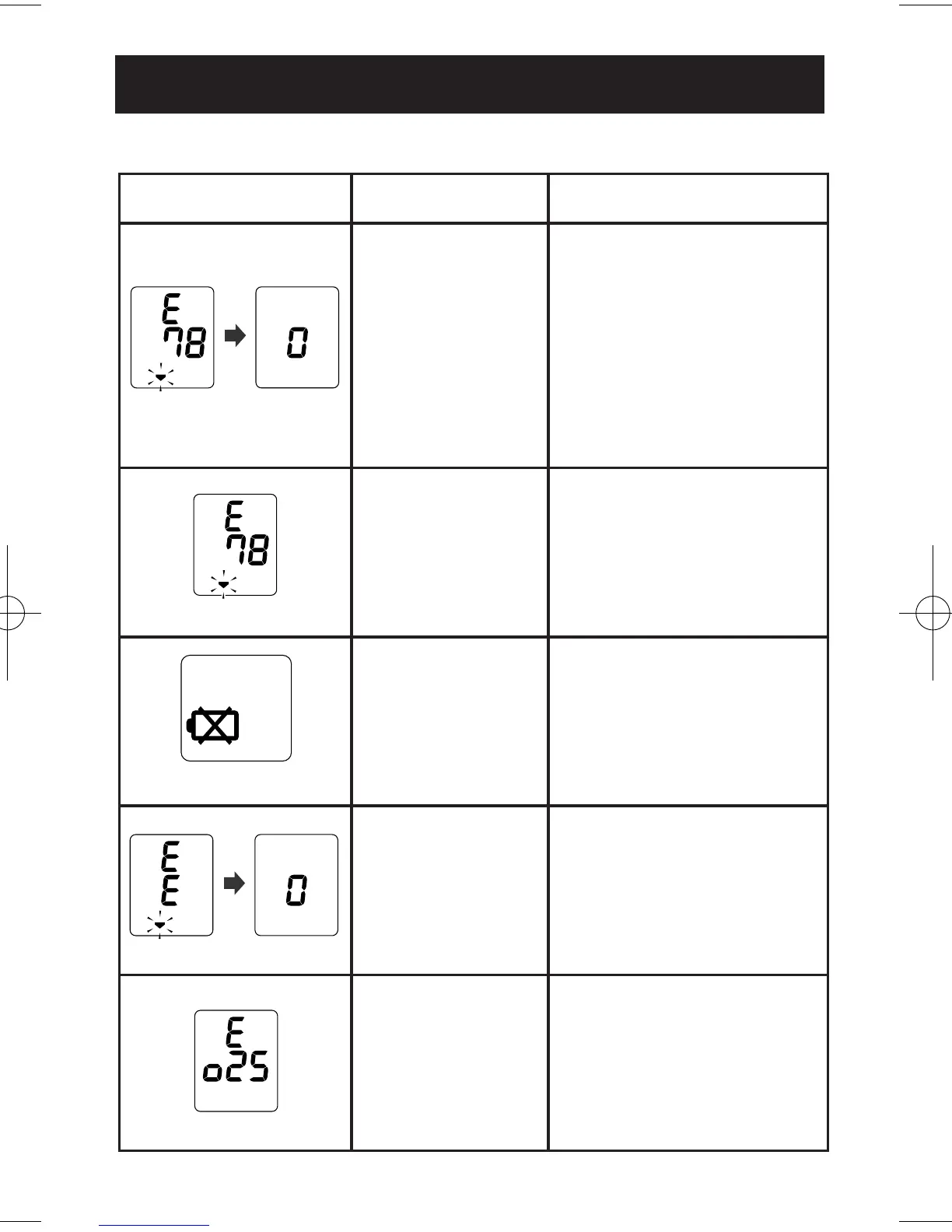
SYMBOL CAUSE CORRECTION
Movement during
measurement.
Press the ON/OFF START
button to turn the unit off.
Remove the monitor from
your wrist. Refer to
“Taking a Measurement”.
Wait 2-3 minutes.
Take another measurement.
The cuff is not
wrapped securely.
Remove the monitor from
your wrist. Read, “Applying
the Wrist Cuff”.
Wait 2-3 minutes. Take
another measurement.
Batteries are worn.
Replace the two “AAA”
batteries. Refer to “Battery
Installation”.
Cuff
over-inflated.
Remove the monitor from
your wrist. Read, “Applying
the Wrist Cuff”.
Wait 2-3 minutes.
Take another measurement.
Abnormal
unit function.
Repair Service Required.
Refer to “Warranty”.
ERROR INDICATORS AND TROUBLESHOOTING TIPS
Blinks or lights
ERROR INDICATORS


 To Next Page