11
Step 1
The meter memory can store up to ten (10)
results at one time. The results will be saved
in the order it was measured and you can
view stored results by pushing the
button.
Step 2
When the button is pushed, number ‘1’ will
appear on the screen for one (1) second
and then the result will be shown. This
is the most recent test result that is saved in the memory. To go
on to the second recent result, press the button again. Now
number ‘2’ will appear for one (1) second and the next result will be
displayed. By repeating this process, you can go through to result
number 10 which is the oldest data saved in the memory. To exit
from the memory mode, press and hold down the button for
about two (2) seconds. The meter will turn o.
dry cloth
A used test strip was inserted.
-> Remove the strip and reinsert a new
test strip.
The blood or control solution sample
was applied before the symbol
appeared.
-> Repeat the test with a new test strip
and wait until the symbol appears
before applying the blood or control
solution sample.
The temperature during the test was
above or below the operating range.
-> Move to an area where the
temperature is within the operating
range (50–104˚F/10–40°C) and repeat
the test after the meter and test strips
have reached a temperature within
the operating range.
The blood sample has abnormally high
viscosity or insucient volume.
-> Repeat the test after inserting a new
test strip.
Step 1
Make sure that the meter is turned o.
Push the cover down slightly and in
the direction of the arrow to open the
battery compartment.
Step 2
Remove the used battery and insert a
new battery with the '+' side facing up.
Make sure the battery is inserted rmly.
- The meter will not operate if the
battery is inserted upside down.
Step 3
Place the cover on the battery
compartment. Push cover in the
direction of the arrow to close.
A click may be heard.
This error message may appear when
the wrong blood glucose test strip
is used instead of the ReliOn™ Premier
Blood Glucose Test Strip.
-> Repeat the test with a ReliOn™
Premier Blood Glucose Test Strip.
There is a problem with the meter.
-> Do not use the meter. Contact
Customer Service: 1-855-776-0662.
We have validated Clorox® Germicidal Wipes
with 0.55% sodium hypochlorite as the active
ingredient for disinfecting the ReliOn™ Premier
Compact Meter and lancing device. It has been
shown to be safe for use with the meter and
lancing device. This disinfectant is available
commercially in towelette form. In addition
to ReliOn™ Premier Compact User Manual,
please read the instructions provided by the
manufacturer of Clorox® Germicidal Wipes before using it.
Pre-Cleaning and Disinfection Procedure
This study shows that there could be variation of up to 4.1%.
Alternate Site Testing Evaluation
Comparison of various AST with respect to the results of YSI
measurements.
• Alternate site test results for glucose concentration < 75 mg/dL
Precision: Precision studies were performed in a
laboratory using the ReliOn™ Premier Compact System.
Open the cap of the Clorox® Germicidal Wipes container
and pull out one (1) towelette and close the cap.
Repeat the same procedure for the lancing
device (step
to step
).
• To minimize the risk of transmission of bloodborne pathogens,
the pre-cleaning and disinfection procedure should be performed
as recommended in the instructions below.
• Wash your hands thoroughly with soap and water after handling
the meter, lancing device or test strips.
• If the meter is being operated by a second person who is
providing testing assistance to the user, the meter and lancing
device should be disinfected prior to use by the second person.
Pre-cleaning and Disinfection
The pre-cleaning procedure is needed to clean dirt as well as
blood and other body uids on the exterior of the meter and
lancing device before performing the disinfection procedure.
The disinfection procedure is needed to prevent transmission of
bloodborne pathogens.
• For the meter and lancing device, this pre-cleaning and
disinfection procedure should be performed once per week.
NOTE
• After the pre-cleaning and disinfection procedure, the control
solution should be tested to conrm that the meter works
properly before using the meter.
• Control solution tests should be performed with two dierent
levels of ReliOn™ Premier Control Solutions (Level 1 and/or
Level 2).
•
Verify that the test results are within the range printed on the
test strip vial. See page 7 for how to do a control solution test.
The performance of ReliOn™ Premier Compact Blood Glucose
Monitoring System has been evaluated in laboratory and
clinical tests.
Accuracy
The ReliOn™ Premier Compact Blood Glucose Monitoring
System is calibrated to yield results equivalent to plasma glucose
concentrations. The accuracy of the ReliOn™ Premier Compact
System (Model GM505VAA) was tested by comparing blood
glucose results obtained by patients with those obtained using
a YSI Model 2300 Glucose Analyzer, a lab instrument. The results
below were obtained by diabetic patients at clinic centers.
Warranty
The manufacturer warrants that the ReliOn™ Premier Compact Meter
shall be free of defects in material and workmanship in normal use
for a period of 5 years.
The meter must have been subjected to normal use. The warranty
does not cover improper handling, tampering, use or service of the
meter.
Any claim must be made within the warranty period.
The manufacturer will, at its discretion, repair or replace a defective
meter, or meter part that is covered by this warranty.
As a matter of warranty policy, the manufacturer will not reimburse
the consumer's purchase price.
Obtaining Warranty Service
To obtain warranty service, you must return the defective meter or
meter part along with proof of purchase.
Returns
For instruction on how to return your meter, contact Customer
Service: 1-855-776-0662, 7 a.m. to 7 p.m. Central time, 7 days a week.
Meters returned without this authorization will not be accepted.
NOTE
• If the error messages persist, contact Customer Service:
1-855-776-0662, 7 a.m. to 7 p.m. Central time, 7 days a week.
NOTE
• The life span of a ReliOn™ Premier Compact Meter is 5 years.
We recommend disinfecting both the meter and lancing device
at least once per week. We have validated a total of 260 cleaning
and disinfecting cycles (260 pre-cleaning and 260 disinfection
cycles) to represent weekly cleaning and disinfecting over the
use life of your meter and lancing device.
1 pre-cleaning and 1 disinfection cycles per week x 52 weeks per
year x 5 years = 260 pre-cleaning and 260 disinfection cycles.
NOTE
• If any of the following deterioration signs appear after
pre-cleaning or disinfecting, please stop using the system
and contact Customer Service: 1-855-776-0662, 7 a.m. to 7 p.m.
Central time, 7 days a week.
- The inscriptions on the exterior of the meter (or lancing device)
have been removed.
- The color of the meter (or lancing device) has changed
or faded.
- Cracks or roughness develop on the meter (or lancing device).
- A part of the segment on the meter display does not ash.
- Control solution test results do not fall within the stated range
on the test strip vial.
Caution
• Do not use other cleaners or disinfectants because other
chemicals have not been validated and may damage the meter.
• Do not get uids inside the meter through the test strip port or
battery compartment. Never immerse the meter or hold it under
running water because this will damage the meter.
Storage and Handling
• Keep the meter in a cool and airy place.
• Do not expose the meter to direct sunlight or heat for extended
periods of time.
• Do not let dirt, dust, blood or water enter into the meter’s test
strip port.
• Do not drop the meter or subject it to strong shocks.
• Do not try to x or alter the meter in any way.
• Strong electromagnetic radiation may interfere with the proper
operation of this device. Keep the device away from sources of
strong electromagnetic radiation.
• Store all meter components in the carrying case to prevent loss.
NOTE
• For additional information or technical assistance contact
Customer Service: 1-855-776-0662, 7 a.m. to 7 p.m. Central time,
7 days a week.
Caution
• There is a risk of explosion if the battery is replaced with an
incorrect type. Please dispose of the used battery according to
your local regulations.
NOTE
• The disinfectant products can be purchased online retailers (e.g.
Walmart) or by telephone at the manufacturer.
• To nd out where to purchase the disinfectant product, please
contact the manufacturer or visit their websites as listed above.
Front
Back
Both sides
Dispose of the used towelette in a trash bin.
Allow exteriors to remain wet for one (1) minute, then wipe
the meter using a dry cloth
.
Dispose of the used towelette in a trash bin.
Pull out one (1) new towelette and wipe the entire surface of the
meter three (3) times horizontally and three (3) times vertically
using a new towelette to remove bloodborne pathogens.
DISTRIBUTED BY:
Wal-Mart Stores, Inc.
Bentonville, AR 72716
www.ReliOnBGM.com
Customer Service
1-855-776-0662
7 a.m. to 7 p.m. Central time, 7 days a week.
At all other times or in case of emergency, contact your
healthcare professional or emergency medical response.
©2019. All Rights Reserved.
P/N 5540-02 Rev. 03/19
PGUAA-0000014 Rev2 03/2019
• Accuracy results for glucose concentration < 75 mg/dL
The ReliOn™ Premier Compact Meter uses one 3.0 V lithium battery
(non-rechargeable, replaceable, type CR2032).
Before using the meter, check the battery compartment and insert
battery if empty.
If blinks when the meter is turned on or a test strip is
inserted, it means there is not enough power for tests. So, the
battery needs to be changed.
The test results might not be saved if the battery runs out.
10 - Viewing Test Results in Meter Memory
11 - Understanding Error Messages
12 - Caring for the ReliOn™ Premier
Compact System
Name Clorox® Germicidal Wipes
Manufacturer Clorox® Professional Products Company
Phone: 1 800 537 1415
Website: www.cloroxprofessional.com
EPA registration
number
67619-12
Active
ingredients
Sodium Hypochlorite: 0.55%
Wipe the entire surface of the meter three (3) times horizontally
and three (3) times vertically using one towelette to pre-clean
blood and other body uids.
13 - Replacing the Battery
14 - Performance Characteristics
Obtained by
healthcare
professionals
Obtained by
lay users
Slope 1.023 1.032
Y-intercept -1.86 mg/dL -3.63 mg/dL
Correlation coecient(r) 0.995 0.985
Number of sample 110 105
Range tested 30-485 mg/dL 67-413 mg/dL
Within ± 5 mg/dL Within ±10 mg/dL Within ±15 mg/dL
14/17 (82%) 17/17 (100%) 17/17 (100%)
•
Accuracy results for glucose concentration ≥ 75 mg/dL
Within ± 5 % Within ± 10 % Within ± 15% Within ± 20 %
54/93 (58%) 82/93 (88%) 93/93 (100%) 93/93 (100%)
Within Run Precision
Blood avg. 38 mg/dL SD = 1.9 mg/dL
Blood avg. 86 mg/dL SD = 3.2 mg/dL
Blood avg. 125 mg/dL CV = 4.1%
Blood avg. 189 mg/dL CV = 2.6%
Blood avg. 334 mg/dL CV = 2.8%
Total Precision
Control avg. 35 mg/dL SD = 1.2 mg/dL
Control avg. 116 mg/dL CV = 2.4 %
Control avg. 324 mg/dL CV = 2.3%
Within ± 5 mg/dL Within ±10 mg/dL Within ±15 mg/dL
Fingertip 1/2 (50%) 2/2 (100%) 2/2 (100%)
Forearm 1/2 (50%) 2/2 (100%) 2/2 (100%)
Palm 2/2 (100%) 2/2 (100%) 2/2 (100%)
Thigh 1/2 (50%) 2/2 (100%) 2/2 (100%)
Calf 1/2 (50%) 2/2 (100%) 2/2 (100%)
Within ±
5 %
Within ±
10%
Within ±
15 %
Within ±
20 %
Fingertip
27/48(56.3%) 46/48(95.8%) 48/48(100%) 48/48(100%
Forearm
19/48(39.6%) 42/48(87.5%) 47/48(97.9%) 48/48(100%)
Palm
28/48(58.3%) 38/48(79.2%) 46/48(95.8%) 48/48(100%)
Thigh
17/48(35.4%) 36/48(75.0%) 46/48(95.8%) 48/48(100%)
Calf
27/48(56.3%) 46/48(95.8%) 48/48(100%) 48/48(100%)
• Alternate site test results for glucose concentration ≥ 75 mg/dL
15 - Warranty Information
1
2
3
4
5 6 8
9
10
12
13
14
15 16 17 18
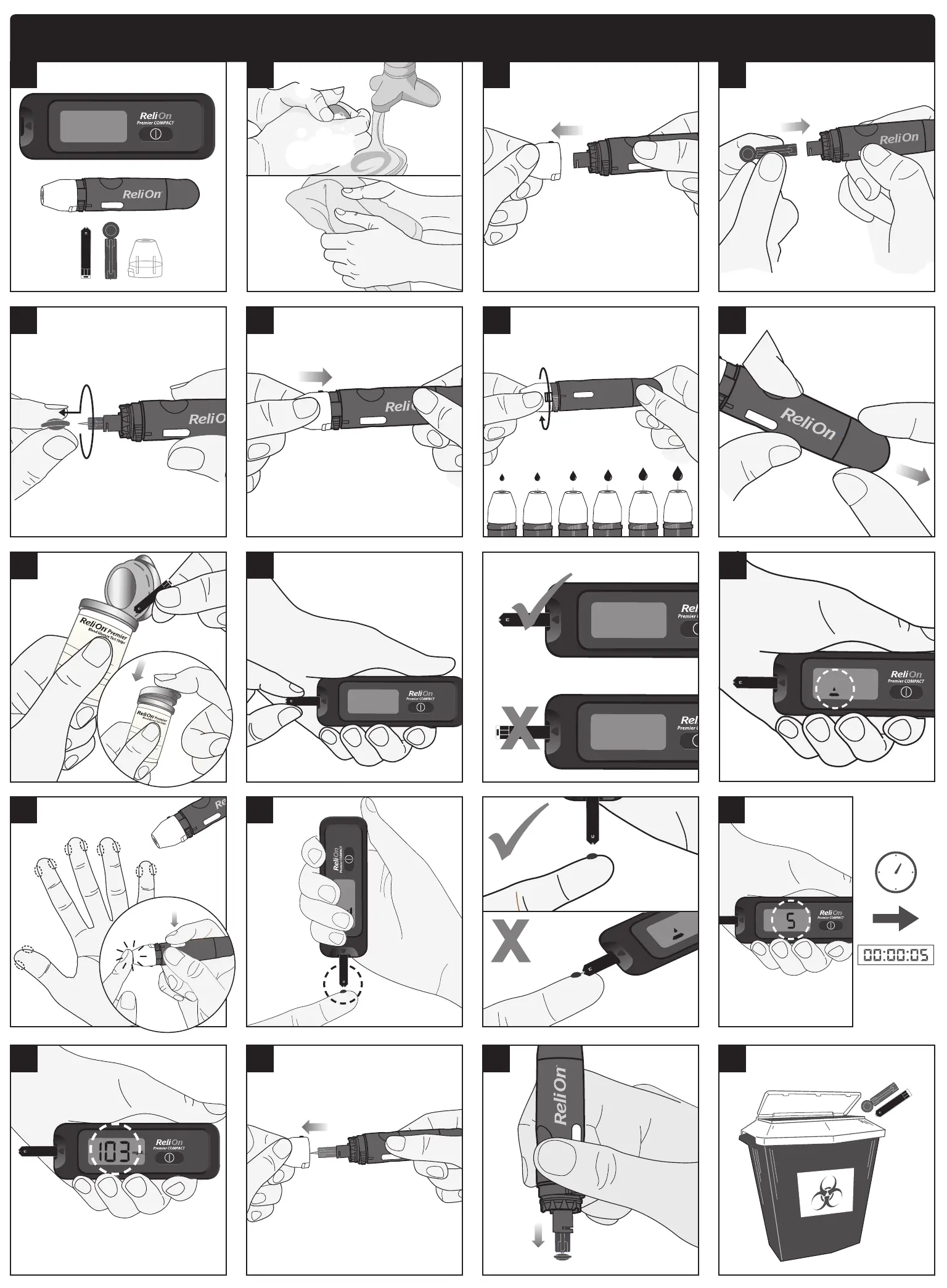
ReliOn® Premier Compact Quick Reference Guide
7
mg/dL
16 18 20 22
15 17 19 21


 To Next Page
 Loading...







