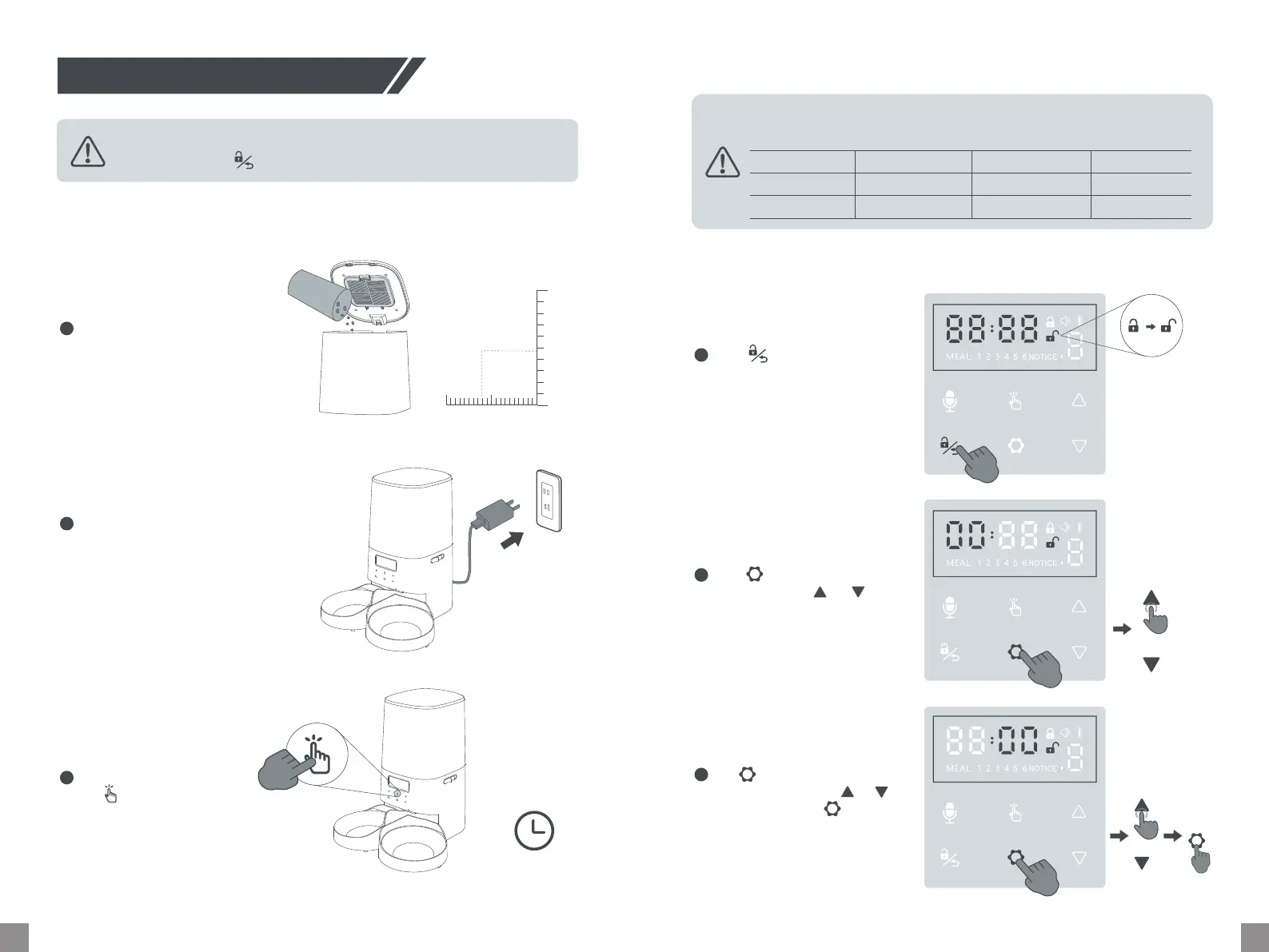
Hold for 2s to enter current
time setting. Tap or to
adjust the hour.
0807
Using Your Pet Feeder
Fill food tank with d pet food
(0.07-0.47 inch). Cap the lid
back and press to snap in place.
1
Hold for 3s to unlock the
control panel. If no operation
is done in 60s, it will be locked
again.
1
Plug in the included power
adapter. The LED display will
light up indicating the feeder
is on.
2
With the feeder unlocked,
tap once to feed 1
poion manually. You can
also set automatic feeding
plan as follows.
3
Manual Feeding
Scheduling Feeding Plan
Step 1 - Setting Current Time
OR
Manual Feeding
Automatic
Feeding Plan
•Make sure that pet feeder is properly installed before lling the food tank.
•Unlock rst (hold for 3s) before using the control panel.
If no feeding plan is set, the feeder will car out the default feeding plan as
follows.
mm
02 1
1 inch
12mm/0.47 inch
X1
Meal
Time
Poion
1
8:00
8
2
12:00
8
3
18:00
8
2
Tap once to save and move
to minute setting. Tap or
to adjust, then tap to save
and exit.
3
3S
2S
X1
X1


 To Next Page