In the unlocked status, hold
and simultaneously for 7s until
a beep is heard to restore to
facto settings.
The recording will not be cleared.
To update the meal call, hold
to record a new one.
1009
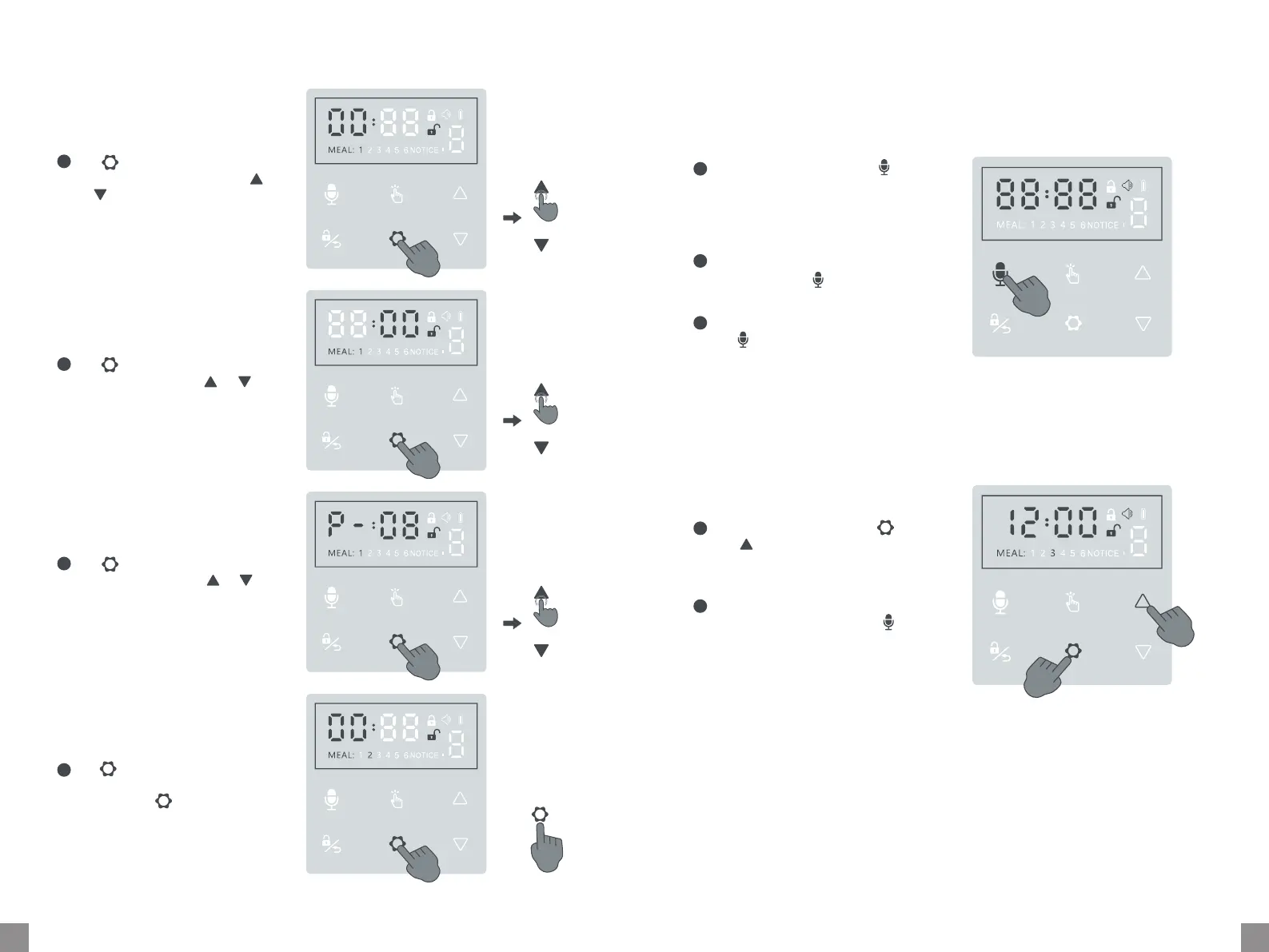
Step 2 - Setting Feeding Time & Poion
Recording a Meal Call
Additional Features
Tap once to enter feeding
time setting (for MEAL 1). Tap
or to adjust the hour.
1
Tap once to save and move
to minute setting. Tap or
to the minute.
2
In the unlocked status, hold
for 2s until a beep is heard. Keep
holding to record your voice (Max.
10s). Release to end or record for
10s.
The recording plays automatically.
You can also tap twice to play
manually.
To turn on/o recording function,
tap three times within 1s.
1
2
3
2S
Tap once to save and move
to poion setting. Tap or
to adjust the poion (Max. 48)
for meal 1.
3
Tap once to save and repeat
for the rest meals (2~ 6). Or
you can hold for 2s to save
the current meal and exit.
4
2S
OR
Repeat for Meal 2~6 Save and Exit
Clearing All Settings
1
2
7S
7S
X1
X1
X1
X1


 To Next Page