0605
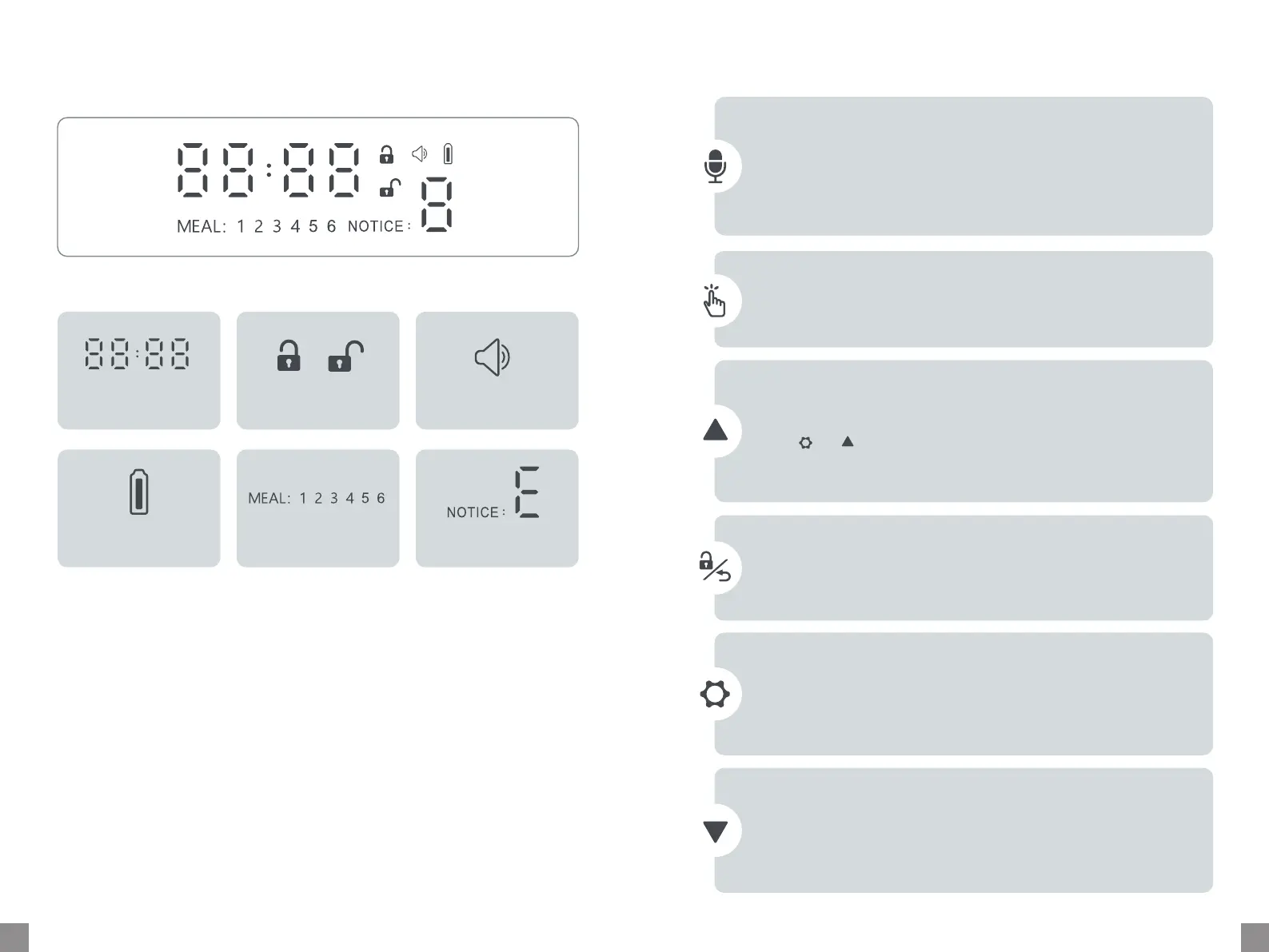
LED Display
Control Panel
Time (24-Hour) /
Poion (P: 1-48)
Locked / Unlocked Recording
Back-up Batte Status Meal Plan: 1-6 Food Stuck / Error
Unlocked Status:
•Hold for 2s until a beep is heard to sta recording (Max. 10s) and release
to stop.
•Double tap to play.
•Triple tap (within 1s) to turn on/o recording function.
Recording
•Tap once to dispense one poion of food. Tap repeatedly to dispense more
poions.
Manual Feeding
Unlocked Status:
•Tap to increase number.
•Hold and for 7s to restore to facto settings.
Locked Status:
•Tap to check feeding plan.
Increase
Unlocked Status:
•Tap to decrease number.
Locked Status:
•Tap to check feeding plan.
Decrease
Unlocked Status:
•Hold for 2s to set current time.
•Tap once to set meal plan.
•During setting, hold for 2s to conrm and exit.
Settings
•Hold for 3s to lock or unlock the control panel.
•Auto lock if no operation is done in 60s.
•During setting, tap to return to the previous step.
Lock / Unlock / Return
Unlocked Status:


 To Next Page