HOW TO USE BACK BUTTON
Push the <BACK> button to return to the previous
screen.
Vehicle information can be checked and various set-
tings can be adjusted on the display.
NOTE
Designs and items displayed on the screen may
vary depending on the models and specifications.
HOW TO USE INFO BUTTON
Push the <INFO> button to display the following
menu items on the display screen.
Available items:
•
[Traffic Messages]
•
[Eco Score]
[Traffic Messages] (where fitted)
Traffic Messages can be displayed on the display
screen when available. Refer to the separate Navi-
gation System Owner’s Manual for details.
[Eco Score] (where fitted)
The [Eco Score] feature analyses driving behaviour
and provides an overall score. Refer to the separate
Navigation System Owner’s Manual for details.
HOW TO USE BUTTON
Designs and items displayed on the screen may
vary depending on the models and specifications.
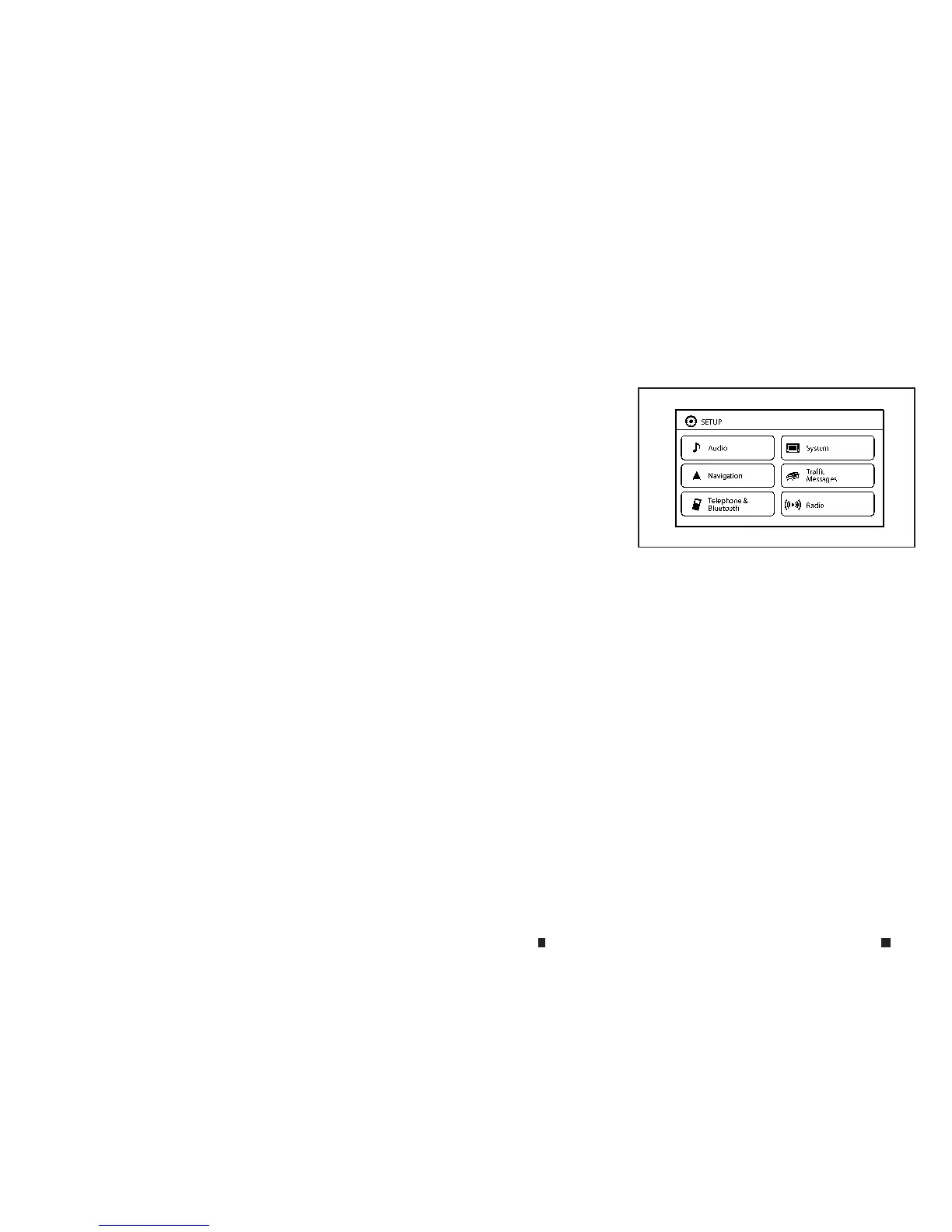
Push the <SETUP> button to view and adjust the
following setting items.
Available items:
•
[Audio]
•
[System]
–[Display]
–[Clock]
–[Language]
–[Camera Settings]
–[Temperature Unit]
–[Touch Click]
–[Beep Tones]
–[Factory Settings]
JVH0647XZ
Example
VEHICLE INFORMATION AND SETTINGS (models with navigation system)
4-4 Display screen, heater and air conditioner, and audio system


 To Next Page