AUDIO CONTROL
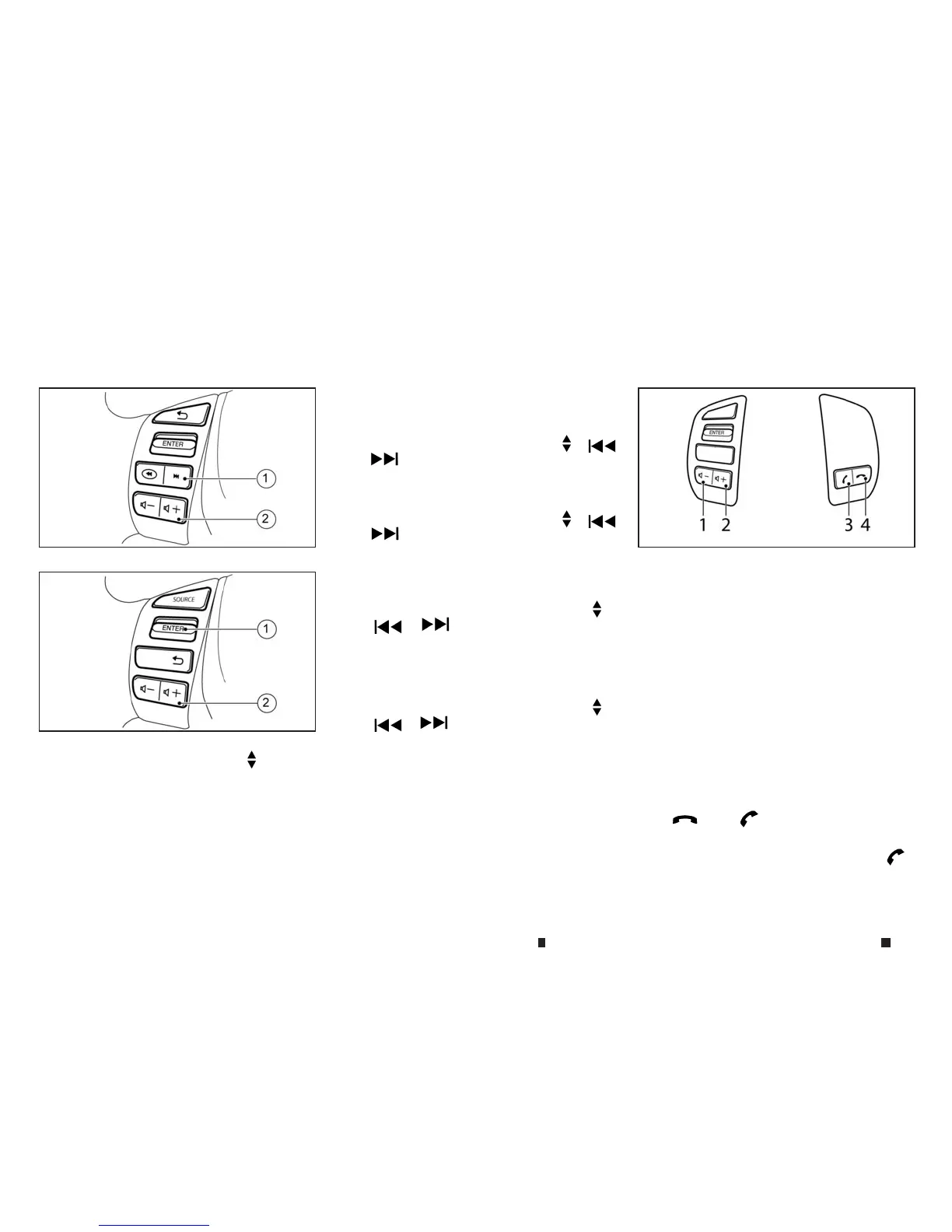
➀
Tuning buttons (Type A)/Tuning
switch
(Type B)
➁
Volume buttons
Tuning/track select switch
Push the switch to select achannel, or track.
•
Preset station change (radio mode)
Push the up/down scrolling button (
,
or )for less than 1.5 seconds to select one
of the preset radio stations.
•
Seek tuning (radio mode) —where fitted
Push the up/down scrolling button ( ,
or )for more than 1.5 seconds to seek for
the next or previous radio station.
•
Track up/down (CD, iPod, USB memory or Blue-
tooth audio* mode) —*:where fitted
–Push the up/down scrolling button (
,
or )for less than 1.5 seconds to
select the next track or to return to the begin-
ning of the present track. Push (up/down)
several times to skip through or skip back the
tracks.
–Push the up/down scrolling button (
,
or )for more than 1.5 seconds to
select the next folder or the previous folder.
Volume control buttons
Push the volume control button (+ or −)toincrease
or decrease the volume.
PHONE CONTROL BUTTONS
➀
Volume down button
➁
Volume up button
➂
Phone accept button
➃
Phone decline button
Steering wheel phone control buttons
The hands-free mode can be operated using the
controls on the steering wheel.
Volume control buttons:
The volume control buttons allow you to adjust the
volume of the speakers by pushing the <+> or <−>
buttons
➀
and
➁
.
Phone buttons:
The <
>,or< >buttons
➂
and
➃
allow
you to:
•
Accept an incoming call by pressing the < >
button.
NAA1533
Type A
NIC3125
Type B
NIC3126
STEERING WHEEL SWITCH FOR AUDIO CONTROL (where fitted)
4-58 Display screen, heater and air conditioner, and audio system



 To Next Page