STARTING, STOPPING THE ENGINE
3
Driving - 147
Vehicle with card
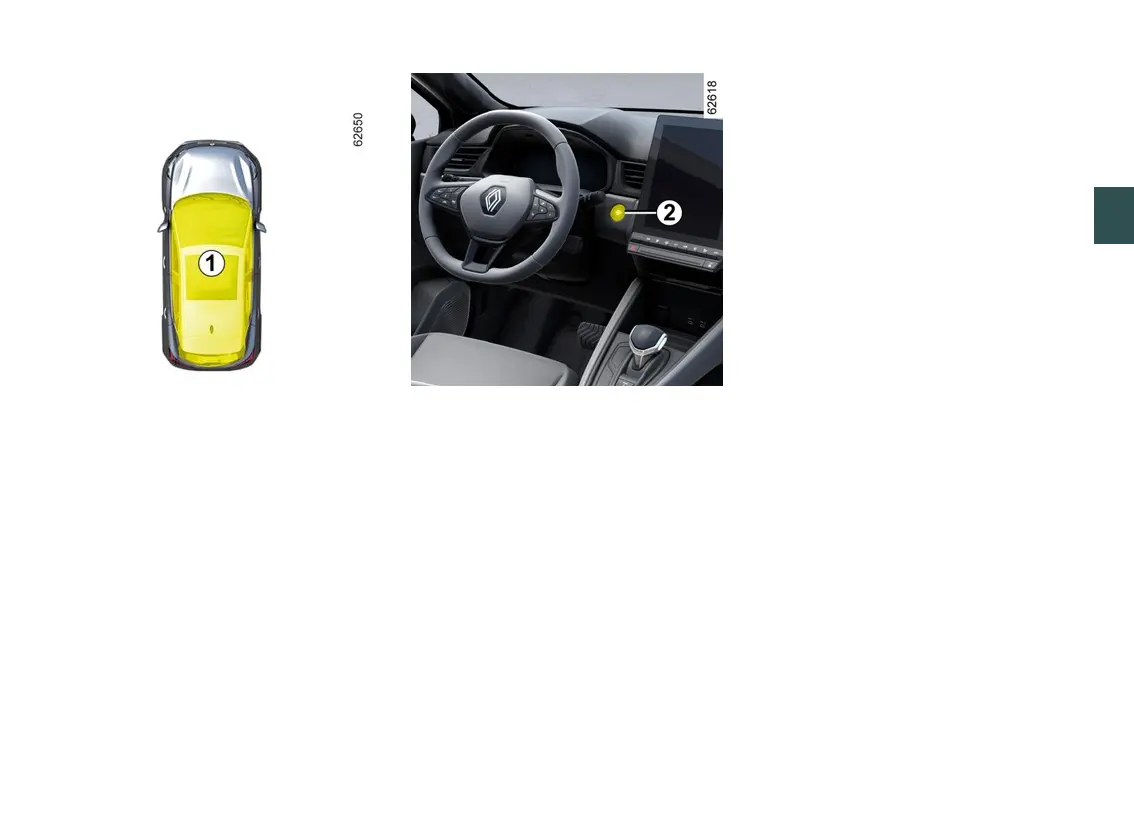
The card must be in the detection zone
1
.
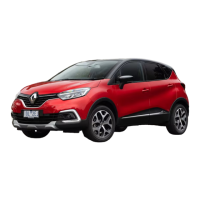
To start:
– on vehicles equipped with an
automatic gearbox, while in P position,
press the brake pedal and button
2
.
– in P position, press the brake pedal
and button
2
.
On E-Tech Full hybrid versions, the
READY message is displayed on the
instrument panel accompanied by a
beep.
The message disappears when the
vehicle speed is above approximately
3 mph (5 km/h).
Release the brake pedal once the
engine has started;
– on vehicles with a manual gearbox,
press the brake pedal and press
button
2
, then release the brake pedal
once the engine has started. If a gear
is engaged, also press the clutch
pedal.
Special features
– If one of the conditions required for
starting is not met, the "Press brake +
START" or "Press clutch + START" or
"Set gearbox to P" message appears
on the instrument panel;
– in some cases it is necessary to
move the steering wheel while
pressing the start button
2
to help
unlockthesteeringcolumn–inthis
casetheTurnsteeringwheel+
START" message will inform you.
Note: on vehicles equipped with a
manual gearbox, in the event of engine
stalling the "Press clutch" message is
displayed on the instrument panel.
Fully press the clutch pedal to restart
the engine.





 To Next Page