ADDITIONAL DRIVING AID FUNCTIONS
3
226 - Driving
In the case of a steep descent, the
system may not maintain the cruising
speed: the stored speed flashes in red
on the instrument panel and a beep
sounds at regular intervals to inform
you.
If the cruise control is no
longer available (after
several attempts to
activate it), contact an
Approved Dealer.
Putting the function on standby
The function is set to standby if you:
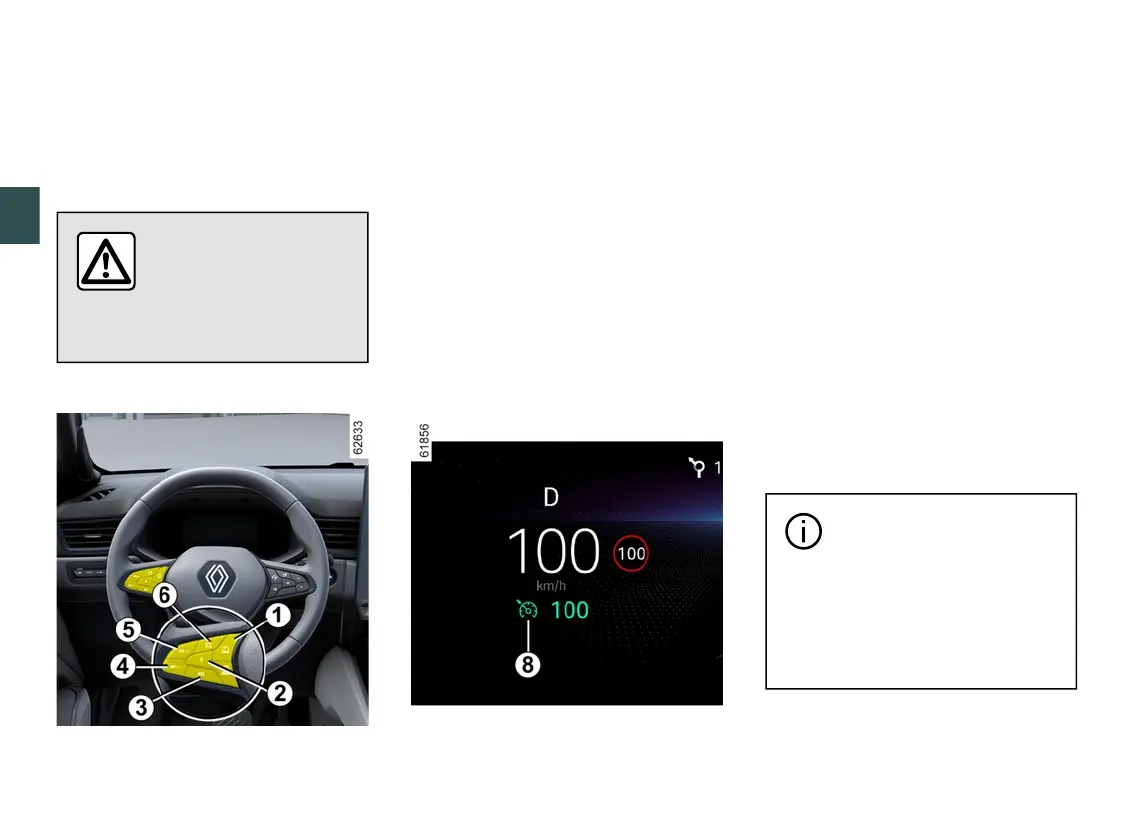
– the switch
2
(0);
– the brake pedal;
– press the clutch pedal or shift to
neutral (automatic gearbox);
– depending on the vehicle, the clutch
pedal for a prolonged period or upon
prolonged neutral position.
The cruising speed is stored and
displayed in grey on the instrument
panel.
Returning to the cruising speed
If a speed is stored, it can be recalled,
once you are sure that the road
conditions are suitable (traffic, road
surface, weather conditions, etc.).
Press the switch
3
(RES) if the vehicle
speed is above 19 mph (30 km/h).
When the speed is stored, cruise
control activation is confirmed by the
display in green of the cruising speed
and, depending on the vehicle, the
warning light
8
appears.
Note: if the speed previously stored is
much higher than the current speed,
the vehicle will accelerate more rapidly
to reach this threshold.
When the cruise control is on standby,
press switch
4
or
5
to reactivate the
cruise control function without taking
into account the stored speed: it is the
speed at which the vehicle is moving
that is taken into account.
Switching off the function
The cruise control function is
interrupted when you press the switch
1
to deselect the cruise control. In this
case, the speed is no longer stored.
To exit the driving
assistance, press switch
1
as many times as
necessary until OFF. The
message "Driving Assistance
deactivated" appears on the
instrument panel.


 To Next Page
 Loading...









