PARKING AIDS
3
260 - Driving
Operation
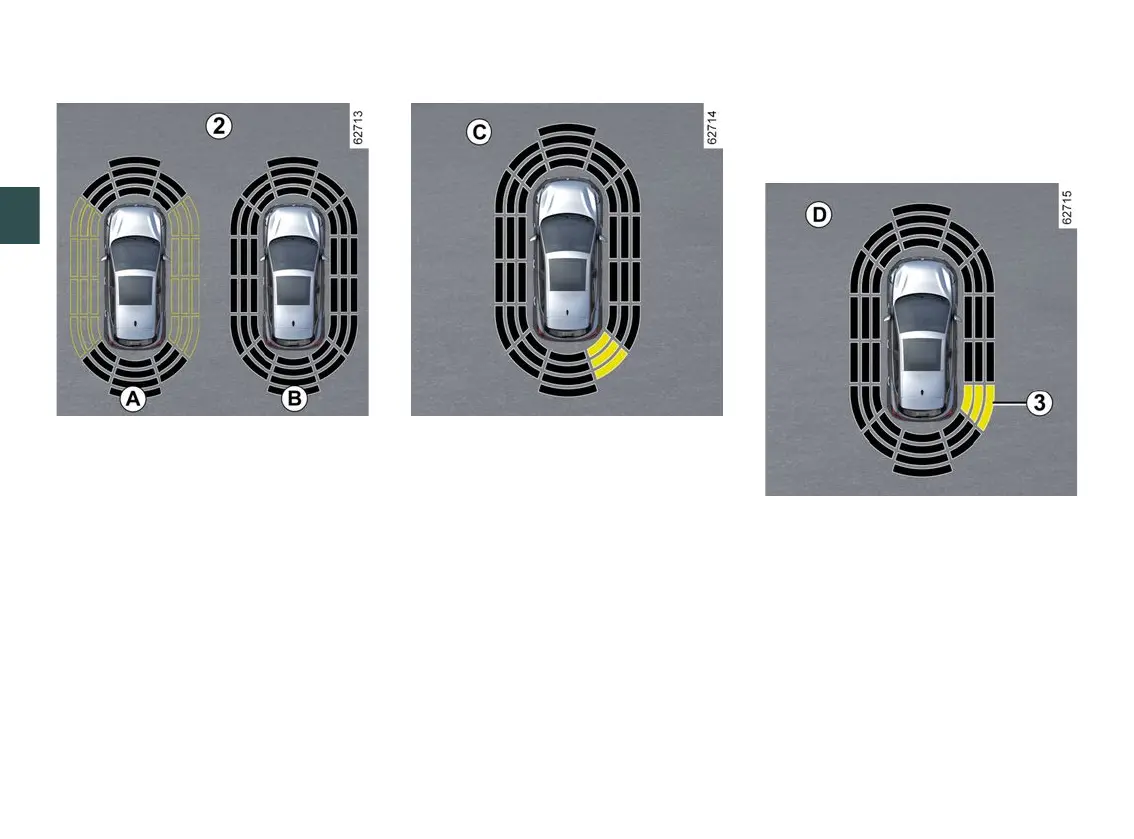
The display
2
shows the vehicle
surroundings and emits beeps.
Depending on the equipment, it may
be necessary to travel a few metres
before the side detection is activated.
If all areas have a grey background,
the whole area around the vehicle is
being monitored:
– Display
A
: analysis of vehicle
surroundings in progress;
– Display
B
: analysis of vehicle
surroundings complete.
Obstacle detection
The system is able to detect most
obstacles located near the rear and,
depending on the equipment, near the
front and sides of the vehicle.
The audible signal frequency will
increase as the vehicle approaches on
obstacle, until it becomes a solid beep
at approximately 20 cm for an obstacle
detected on the sides and
approximately 30 cm for an obstacle
detected to the front or rear.
The area where the obstacle has been
detected is displayed (display
C
).
Depending on the vehicle, the area is
displayed in green, orange (or yellow
depending on the vehicle) or red,
depending on the proximity of the
detected obstacle.
Special case of obstacles on the
side
Depending on the direction of the
wheels, the system determines the
trajectory of the vehicle and notifies
the driver if there is a risk or not of a
collision with an obstacle
3
to the side
of the vehicle.
If a side obstacle is detected:
– the beeps become faster and then
sound continuously as the obstacle
gets nearer. The area where the
obstacle
3
has been detected is
displayed (display
D
);










 To Next Page