QXBIUDB*T[G3DJH
MEGANE SCENIC MONOSPACE NU 641-1
C:\Documentum\Checkout\nu641-1_eng_T3.WIN 21/2/2001 11:49
-page15
3.15
AUTOMATIC AIR CONDITIONING (continued)
Personalised operation
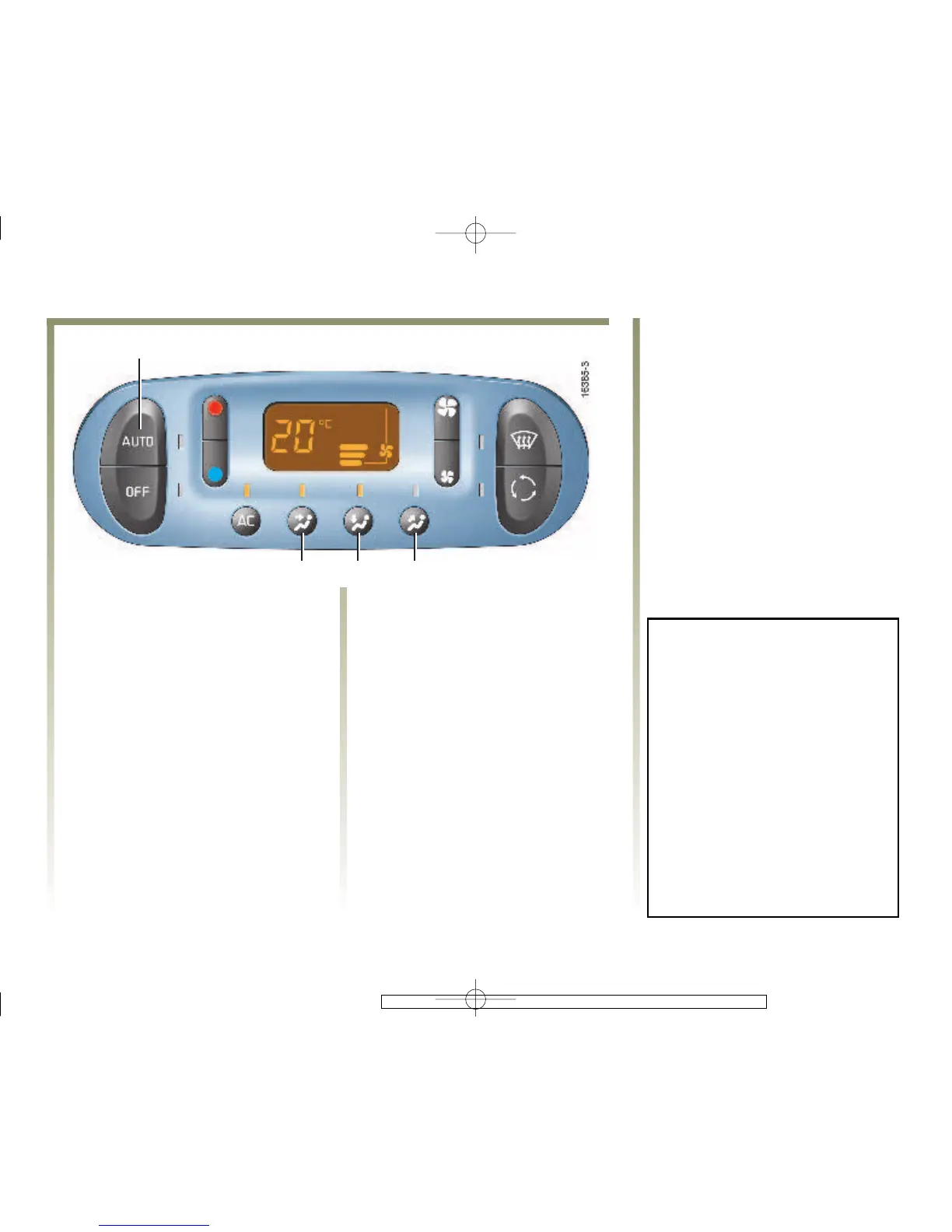
O Selection of air flow
distribution
The system normally operates in
automatic mode but you can
alter the standard settings used
by the system (quantity of air,
etc.).
The automatic mode is switched off
by pressing one of the following
buttons.
The tell-tale light in button 1 will go
out.
Button 8
The air flow is distributed between
the demisting vents (for the
windscreen and the side windows).
Button 9
The air flow is distributed to the
front and rear footwells only.
Button 10
The air flow is mainly distributed to
the dashboard vents.
Personalised operation allows a
maximum of two air distribution
combinations to be selected. (An
exception is the combination of
buttons 8 and 10,whichisnot
possible.)
If an automatic selection is
altered, the AUTO tell-tale light 1
goes out, but only the altered
function is no longer controlled
by the automatic system.
To return to automatic mode,
press the AUTO key.














 To Next Page