display ..................................................(up to the end of the DU)
indicators:
instrument panel .............................(up to the end of the DU)
instrument panel ...................................(up to the end of the DU)
control instruments ...............................(up to the end of the DU)
energy consumption .............................(up to the end of the DU)
1.67
ENG_UD55802_5
Afficheurs et indicateurs (X10 - Renault)
Displays and indicators
DiSPl AYS AND iNDiCATOr S (1/2)
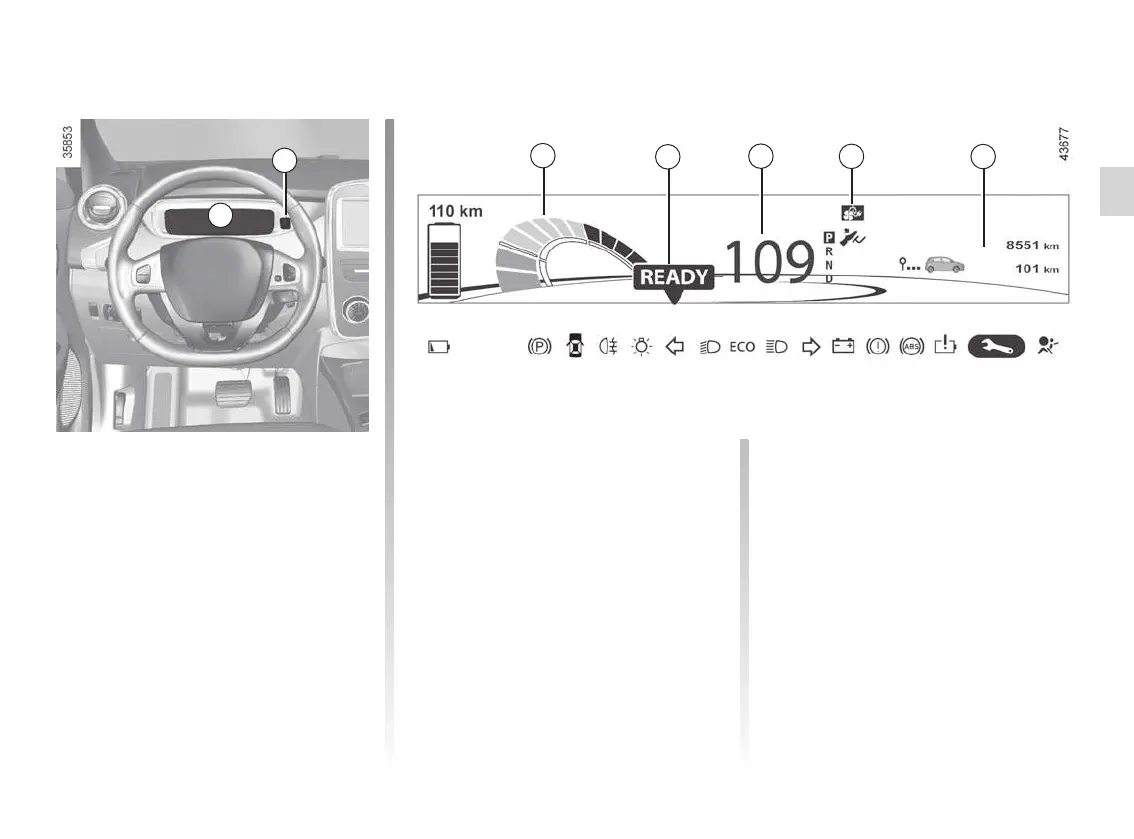
You may customise your instrument
panel A with content and colours of
your choice.
Press the switch 1 repeatedly to obtain
the desired display.
Charge meter 2
Please refer to the information on the
“Charge meter” in Section 2.
The presence and operation of the display and indicators DEPENDS ON ThE lEvEl OF EQUiPmENT AND ThE COUNTr Y.
message indicating vehicle
ready for driving 3
The message rEADY comes on when
the engine is started.
Speedometer 4
Vehicle speed is limited to approxi-
mately 80 mph (135 km/h).
indicator of charging
programming and/or air
conditioning 5
A
1
2
4
6
3
5
On-board computer display 6
Please refer to the information on the
“Trip computer: general information” in
Section 1.
instrument panel in miles
It is possible to switch to km/h.
On the multimedia display, select
“Menu”, “System ”, “System settings ”,
“Set units ” and confirm. To return to the
previous mode, repeat the same opera-
tion.











 To Next Page