The above recharge times are based on conditions when no load is connected.
NOTE
Recharging via Solar
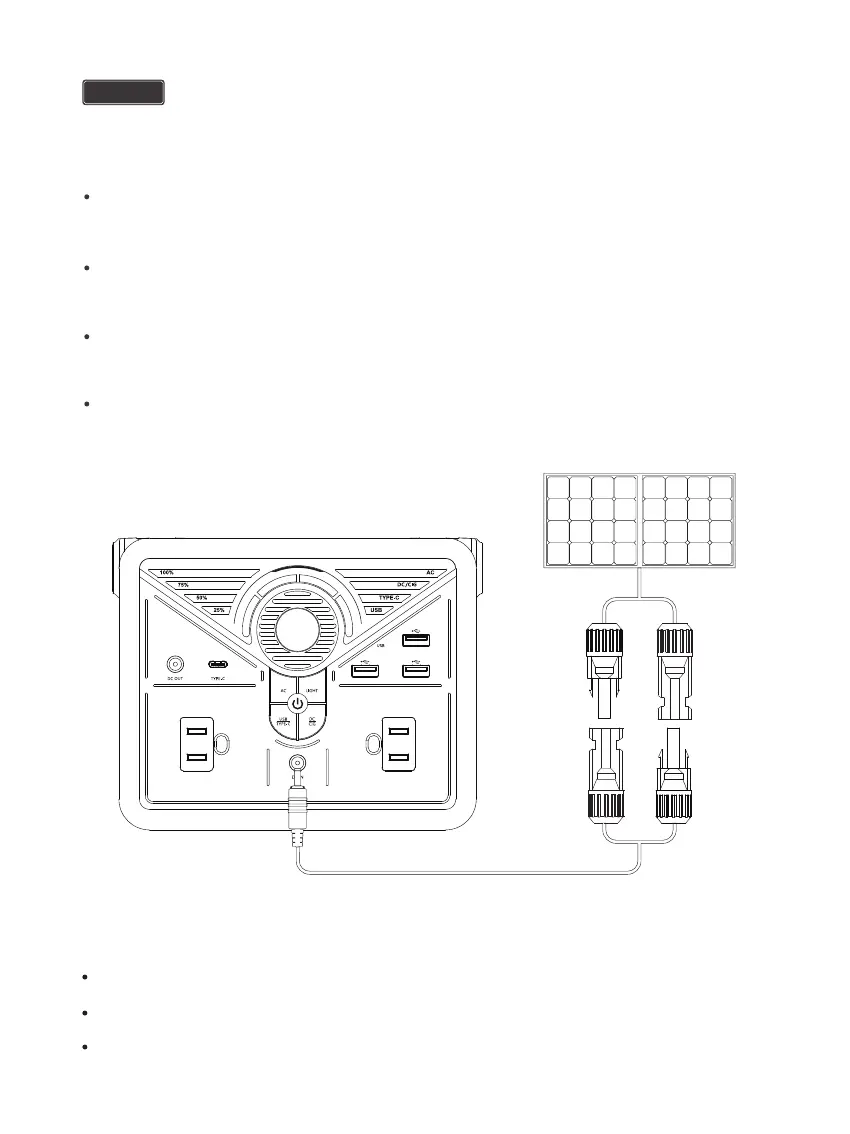
The PHOENIX 200 will begin to recharge automatically and one of the Battery Level LED Indicators will flash.
The flashing LED indicates the unit’s current battery level.
Use a MC4 to 5.5mm DC adapter cable (not included) to connect the solar panel to the DC Input Port of your
PHOENIX 200 and place your PHOENIX 200 in the shade to prevent it from overheating.
Place the solar panel under direct sunlight. Steer clear of trees or branches that can shade the solar panel
and slow down the recharging process.
For optimal recharging performance, it is strongly recommended to recharge your PHOENIX 200 using a
solar panel with 30W or higher rated power (not included) on bright sunny days free of scattered clouds.
Recommended Solar Panels:
Renogy ECLIPS Series Solar Panel: 50W
Renogy Flexible Solar Panel: 50W
Renogy Monocrystalline Solar Panel: 50W
- 08 -


 To Next Page