BATTERY LEVEL LED INDICATORS
RECHARGING YOUR PHOENIX 200
AC Outlet (2)
Total Continuous Output
110V / 60Hz (US, JP, CA)
220V / 50Hz (AU, EU, CN)
150W Rated, 200W Surge
Modified Sine Wave
200W Max
CIG Port
DC Output Port
9.6-12.6V / 10A Max
9.6-12.6V / 5A Max
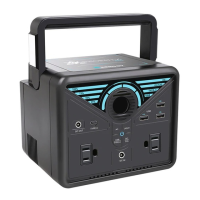
When recharging your PHOENIX 200, one of the Battery Level LED Indicators will flash. The flashing LED
indicates the unit’s current battery level. Once your PHOENIX 200 is fully recharged, all Battery Level LED
Indicators will be lit and remain solid.
When the battery level of PHOENIX 200 is lower than 20%, the last Battery Level LED Indicator will flash twice
per second.
As you use your PHOENIX 200 to power other devices, the Battery Level LED Indicators will go out one by
one to indicate the remaining battery capacity.
Four Battery Level LED Indicators indicate the battery level of the PHOENIX 200, approximating 25% - 50%
- 75% - 100% capacity.
To shorten the recharge time of PHOENIX 200, it is recommended to disconnect all loads while
recharging the unit.
NOTE
To maximize battery life, be sure to fully recharge your PHOENIX 200 before operating or
storing.
If the Battery Level LED Indicators flash in an unusual way, your PHOENIX 200 may need
special attention. Please refer to the TROUBLESHOOTING section for help.
Recharge Time
Recharge via Car Socket: 8 Hours
Recharge via AC/DC Adapter: 7 Hours
Recharge via Solar: 7 Hours
CAUTION
CAUTION
- 07 -


 To Next Page