We strongly advise NOT to change these parameters after the ventilation system has been
calibrated by a skilled and qualified installer. Changing these parameters can influence the
proper functioning of the ventilation system. Ask your installer for advice.
9.1.3.3 • Installer menu (for the installer)
The Installer menu allows you to alter the operating parameters of the ventilation system.
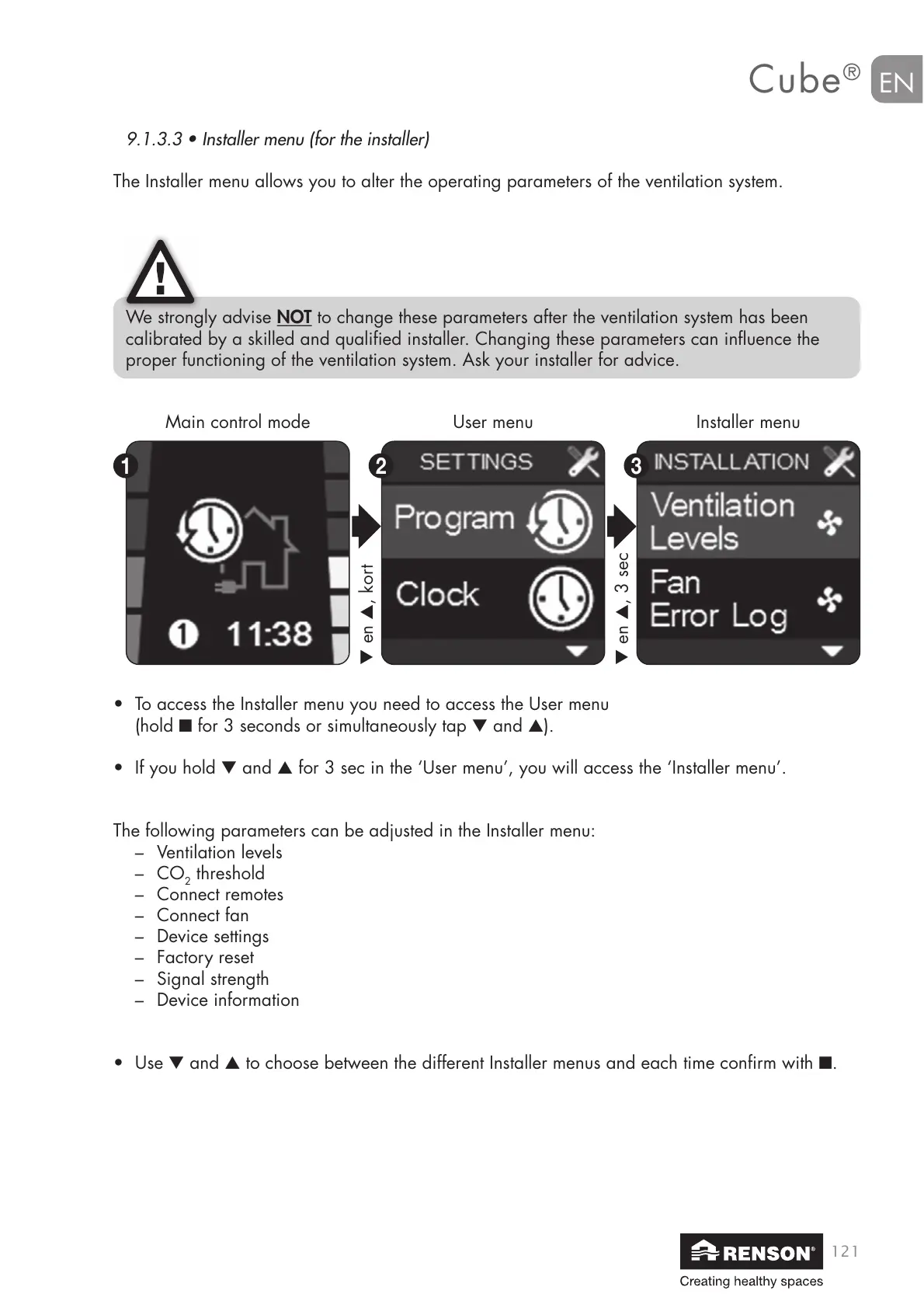
Main control mode User menu Installer menu
• To access the Installer menu you need to access the User menu
(hold ■ for 3 seconds or simultaneously tap ▼ and ▲).
• If you hold ▼ and ▲ for 3 sec in the ‘User menu’, you will access the ‘Installer menu’.
The following parameters can be adjusted in the Installer menu:
– Ventilation levels
– CO
2
threshold
– Connect remotes
– Connect fan
– Device settings
– Factory reset
– Signal strength
– Device information
• Use ▼ and ▲ to choose between the different Installer menus and each time confirm with ■.
▼ en ▲, kort
▼ en ▲, 3 sec


 To Next Page