Need help?
Do you have a question about the Reolink Duo 2 WiFi and is the answer not in the manual?
Lists the items included in the product package for setup and use.
Guides users through adding and configuring the camera using the mobile application.
Instructions for securely attaching the camera to a wall surface.
Instructions for securely attaching the camera to a ceiling surface.
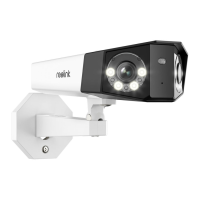
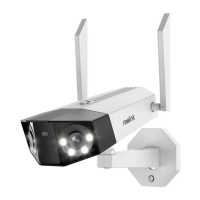
The Reolink Duo 2 WiFi is a sophisticated security camera designed to provide comprehensive surveillance with advanced features for both indoor and outdoor use. Its primary function is to capture and stitch two distinct views into a single, seamless image, eliminating gaps and overlapping areas commonly found in multi-camera setups. This innovative two-camera combination ensures a smoother and wider field of view, offering enhanced situational awareness.
The core functionality of the Duo 2 WiFi revolves around its dual-lens system, which creates a panoramic view without distortion. This allows for a more complete picture of the monitored area, making it easier to track movement and identify objects. Beyond basic video capture, the camera incorporates intelligent detection capabilities. It is engineered to distinguish between different types of motion, specifically identifying moving people, vehicles, and even pets like cats and dogs. This smart detection helps to reduce false alarms and ensures that users are notified only about relevant events.
A key communication feature is the built-in microphone and speaker, enabling two-way audio. This allows users to not only hear what's happening in the camera's vicinity but also to speak through the camera. This is particularly useful for interacting with visitors, deterring intruders, or even communicating with pets from a remote location. The ability to respond to a coming person, car, or pet in real-time adds a layer of interactive security and convenience.
For night vision, the camera is equipped with IR LEDs, which provide clear black-and-white images in low-light or no-light conditions. Additionally, a spotlight is integrated to illuminate the scene, enabling color night vision when needed. This combination ensures visibility around the clock, adapting to varying light environments. A daylight sensor automatically manages the transition between day and night modes, optimizing image quality and power consumption.
The camera's connectivity is primarily through WiFi, offering flexible placement options without the need for extensive cabling for data transmission. However, it also supports an Ethernet connection for initial setup or for situations where a wired connection is preferred for stability. Local storage is facilitated by a Micro SD card slot, allowing for continuous recording or event-triggered footage storage directly on the device.
Setting up the Reolink Duo 2 WiFi is designed to be user-friendly, primarily managed through a dedicated mobile application. The initial setup involves powering on the camera and connecting it to a router via an Ethernet cable, ensuring the camera and the user's phone are on the same network. The app guides users through the process, starting with tapping an icon to add a new device.
Users can add the device by scanning a QR code located on the back of the camera. For environments with poor lighting, a "Light" option is available within the app to enable a flashlight, aiding in QR code scanning. If scanning is not feasible, manual input of the camera's unique 16-digit UID is an alternative. Once the device is recognized, users are prompted to create a strong password for the camera, enhancing security.
Naming the camera is the next step, allowing for easy identification, especially when managing multiple devices. The app then facilitates connecting the camera to the desired WiFi network. Users select their WiFi network from a list, enter the password, and save the configuration. This establishes the wireless connection, allowing the camera to operate without the Ethernet cable (after initial setup). The app also provides a "WiFi test" feature to ensure a stable wireless connection.
The camera offers flexible mounting options, suitable for both wall and ceiling installations. For wall mounting, users first drill holes according to a provided mounting template. The mounting plate is then secured to the wall with two upper screws, and the camera is hung on it before being fixed in position with a lower screw. For ceiling mounting, a similar process is followed, ensuring the mounting plate is secured to the ceiling.
Adjusting the camera's view is straightforward. An adjustment screw on the security mount can be loosened with a screwdriver (included in the package), allowing the camera to be rotated to achieve the desired viewing angle. Once the optimal view is set, the adjustment screw is tightened firmly to keep the camera in position, preventing accidental shifts.
The Reolink Duo 2 WiFi is designed with ease of maintenance in mind. The physical components, such as the lens and IR LEDs, are robust and intended for long-term outdoor use, featuring a waterproof lid to protect internal components from environmental elements. The mounting bracket provides a secure and stable base, minimizing the need for frequent re-adjustments once installed correctly.
Software maintenance is primarily handled through the mobile application. The app serves as the central hub for managing camera settings, viewing live feeds, and accessing recorded footage. This includes configuring detection zones, adjusting sensitivity for people, vehicle, and pet detection, and setting up notification preferences. Firmware updates, which often include performance enhancements, bug fixes, and new features, are typically delivered and installed through the app, ensuring the camera remains up-to-date with the latest functionalities and security patches.
The Micro SD card slot allows for easy access to replace or upgrade the storage card if needed. Regular checks of the card's health and capacity can be performed through the app. In case of connectivity issues, the camera's ability to reconnect to the router via Ethernet for a WiFi test provides a simple troubleshooting step. A reset button is also included, offering a way to revert the camera to its factory settings if more extensive troubleshooting is required, or if the camera needs to be reconfigured from scratch.
The inclusion of a power adapter and a 4.5m power extension cable provides flexibility in power source placement, simplifying installation and reducing the need for additional electrical work. The overall design emphasizes durability and user-friendliness, aiming to minimize the need for frequent physical intervention or complex technical maintenance.
 General
| Field of View | 180° |
|---|---|
| Smart Features | Motion detection, Person/Vehicle detection |
| Weatherproof Rating | IP66 |
| Pan & Tilt | No |
| Video Codec | H.265 |
| Operating Frequency | 2.4 GHz / 5 GHz |
| Wireless Security | WPA-PSK/WPA2-PSK |
| Connectivity | WiFi |
| Night Vision | Infrared and Color Night Vision |
| Audio | Two-way audio |
| Power Source | DC 12V/1A |
| Image Sensor | 1/2.7" CMOS |
| Video Resolution | 4K |
| Digital Zoom | 16x |
| Frame Rate | 25 fps |
| Wireless Standard | IEEE 802.11 a/b/g/n |
| Storage | MicroSD card (up to 256GB), Reolink Cloud |

 To Next Page