17
NAVIGATING THE S8 COMPACT MENUS
ENGLISH
S8 COMPACT MENUS
You can view and change settings when the S8 COMPACT is in standby mode.
To navigate and make selections within the Patient, Clinical and Reminder menus, use:
• the Up and Down keys to scroll through items in the menu, and scroll through
setting choices within a menu item.
• the Left key to enter the menu and to apply a setting option.
• the Right key to exit the menu.
The parameters in the menus are listed in Table 2 on page 19.
PATIENT MENU
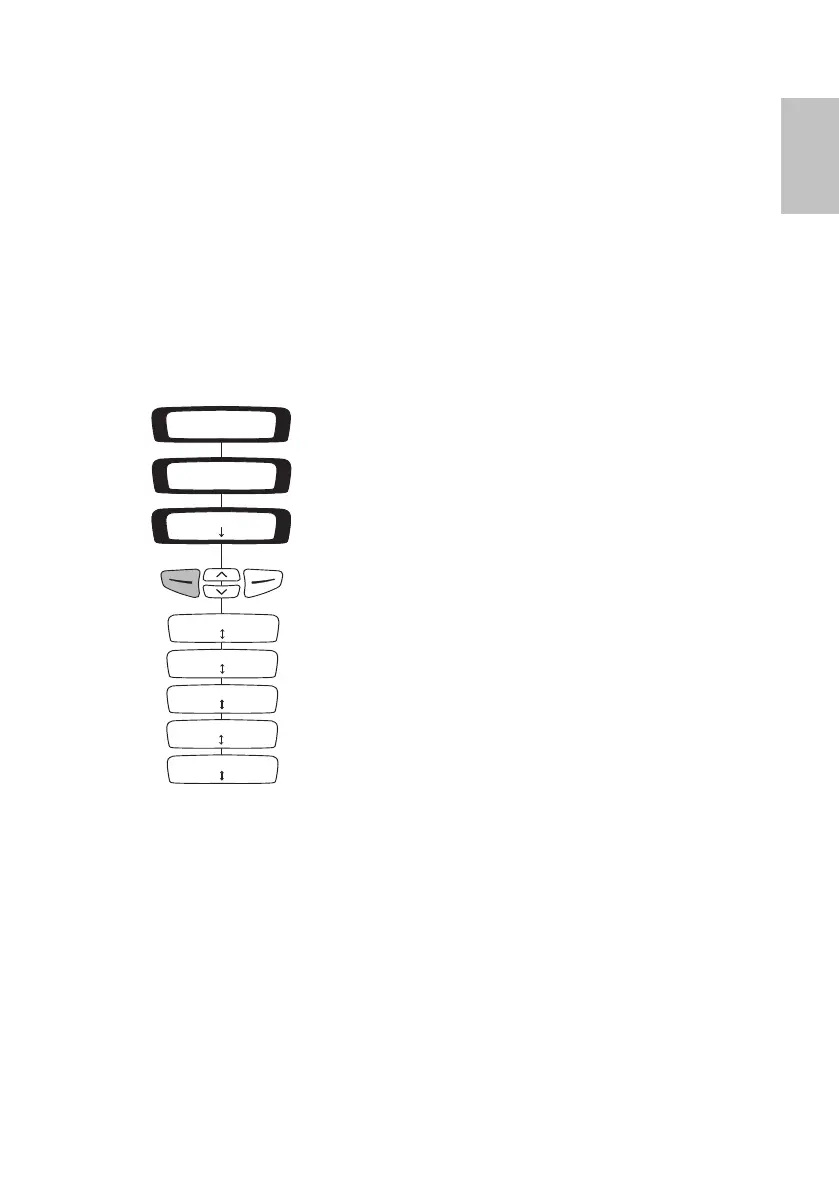
Enter the Patient Menu by pressing the Left key while in the standby (RAMP) screen.
Figure 2 summarizes the Patient Menu screens.
Figure 2: Screens in the Patient Menu
CLINICAL MENU
Enter the Clinical Menu from the standby screen by holding down the Down and
Right keys simultaneously for at least three seconds.
Figure 3 summarizes the Clinical Menu screens.
S8 COMPACT
S8 CLASSICRAMP 20min
Menu
S8 CLASSIC
PATIENT MENU
ALT: 0-2000ft
Change Exit
USED HRS: 960
Exit
USAGE: 120/180
Exit
SW: SX123456789
Exit
LANG: ENGLISH US
Change Exit
338251r1.book Page 17 Friday, June 10, 2005 5:03 PM






 To Next Page