This document describes the ReSound OMNIA Receiver-In-Ear (RIE) hearing aids, available in models 312 and 13. These devices are intended to compensate for hearing impairment by amplifying and transmitting sound to the ear. They are designed for adults and children 12 years or older, to be used by lay persons and fitted by qualified hearing care professionals. The therapeutic indications include sensorineural, conductive, or mixed hearing loss.
Important Warnings and Cautions
- Read the booklet carefully before use.
- Battery Safety: Never put a hearing aid battery in your mouth. Keep batteries away from pets, children, and individuals with cognitive, intellectual, or mental health challenges. Swallowing batteries can cause serious injuries; seek immediate medical attention if ingested. Dispose of used batteries according to local regulations or return them to your hearing care professional. Batteries are harmful to the environment and should not be burned.
- Battery Leakage: Batteries may leak. Remove batteries if not using hearing aids for a few days. Battery leakage can cause chemical burns; rinse immediately with lukewarm water and seek medical attention if exposed. Never attempt to charge zinc-air batteries, as this can cause leakage or a small explosion. Always use new zinc-air batteries with a minimum remaining shelf life of one year.
- Device Handling: Do not use alcohol or other cleaning solutions, as this can damage the hearing aids or cause skin reactions. Ear wax or other residue can cause infection; clean hearing aids as instructed. Never immerse hearing aids in liquid. Keep them away from excessive heat and direct sunlight. Do not swim, shower, or steam bathe while wearing them.
- Foreign Objects: Never try to put the bristles of the small brush or cleaning wire into the microphone inlets, as this can damage the hearing aids. If you suspect a dome or wax guard is stuck in your ear, consult your hearing care professional immediately to avoid harm or infection.
- Programming: If you have two hearing aids, they may be programmed differently. Do not swap them, as this could damage your hearing. If not color-coded, ask your hearing care professional to add color coding (Left = blue, Right = red).
- Sound Levels: Power hearing aids can produce very loud sounds. If amplification seems too loud or the hearing aid malfunctions (e.g., distorted sound), contact your hearing care professional to prevent further hearing damage. Exposure to loud sounds can damage hearing; reduce exposure or use hearing protection.
- Modifications: Do not try to modify the shape of your hearing aid or accessories, as this can cause skin reactions or scratches. No modification of the device is allowed. Do not change the outer casing or any parts of a hearing aid unless appropriately protected against ESD.
- Radiation Exposure: Do not wear hearing aids while exposed to radiation (e.g., MRI or CT scanners), as this can affect settings and cause damage. Other radiation types (e.g., burglar alarms, mobile phones) will not damage hearing aids but may briefly affect sound quality or create undesired sounds.
- Explosive Environments: Never use hearing aids in places with explosive gases (e.g., mines, oil fields) unless certified for hearing aid use, as this can be dangerous.
- Drying: Do not attempt to dry hearing aids in an oven, microwave, or other heating equipment, as this will melt them and cause burns.
- Skin Irritation: If you have a sore or injury where your hearing aid touches your ear or head, continued use may worsen it. Consult your hearing care professional.
- Sharing: Your hearing aids are tuned to your hearing. Do not allow others to use them, as this can cause damage to their hearing.
- Wireless Functions: When using wireless functions, hearing aids use low-powered digitally coded transmissions. Other electronic devices may be affected; move the hearing aid away from affected devices if this occurs. Turn off wireless functionality when required.
- Children: The developed sound pressure level in children's ears can be substantially higher than in average adults. RECD measurement is recommended to ensure correct OSPL90 target. Children and physically or mentally disabled users require guardian supervision while wearing the TSG hearing aid. Adjustment of TSG settings via a smartphone app should only be performed by a parent or legal guardian for minors.
Function Description
The ReSound OMNIA RIE hearing aids are designed to enhance hearing and offer various features to improve the user's listening experience.
Models:
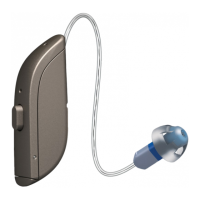
- Model 312: Features microphones, receiver wire, push button, receiver, dome, and battery compartment.
- Model 13: Features microphones, receiver wire, multi-function button, receiver, dome, and battery compartment.
Domes and Earmolds:
- Available dome types include Tulip, Closed, Open, and Power domes, all light gray.
- Custom earmolds are also available.
- Receivers may have a microphone.
- Hearing aids are color-coded for left (blue) and right (red) ears.
Sports Lock:
- An optional sports lock helps keep hearing aids in place during physical activity. It tucks into the concha (outer ear). Sports locks may become stiff, brittle, or discolored over time and can be replaced by a hearing care professional.
Turning On/Off:
- To turn on, close the battery door.
- To turn off, open the battery door with a fingernail.
- Smart Start: Delays hearing aid activation (5 or 10 seconds) after closing the battery door, providing time to put them on without whistling. This feature can be deactivated by a hearing care professional.
Listening Programs:
- Hearing care professionals can activate multiple listening programs for specific situations:
- All-Around: General use.
- Restaurant: For noisy places and social gatherings.
- Music: For listening to music.
- Acoustic phone: Special program for phone conversations.
- Outdoor: For outdoor use.
- Telecoil phone + Mic: For phones with a telecoil.
- Telecoil loop + Mic: For places with a teleloop system (theaters, places of worship).
- Front Focus/Ultra Focus: For very noisy places (more focused than Restaurant program).
Push Button (Model 312):
- Changing Programs: Press the button to switch programs. Beeps confirm the change, and the number of beeps indicates the selected program. Keep scrolling or turn off/on to return to the default program. If synchronization is enabled, changes apply to both hearing aids.
- Streaming Sound: Press and hold the button for three seconds to start streaming from a paired audio device.
Multi-Function Button (Model 13):
- Changing Programs: Press the top of the button and hold for three seconds. Beeps confirm the change. Continue pressing to scroll through programs. Keep scrolling or turn off/on to return to the default program. If synchronization is enabled, changes apply to both hearing aids.
- Controlling Volume:
- Briefly press the top part of the button to increase volume.
- Briefly press the bottom part of the button to reduce volume.
- Streaming Sound: Press the bottom part of the button and hold for three seconds to start streaming from a paired audio device.
- The multi-function button can be configured by a hearing care professional for different actions (e.g., short press up/down for volume, long press up/down for program change or streaming activation).
Telecoil (Optional):
- Helps improve speech understanding with Hearing Aid Compatible (HAC) telephones and in teleloop-equipped venues.
- Picks up signals from teleloop or HAC phone when activated.
- Requires a teleloop or HAC phone to function.
- Sound from teleloop and hearing aid microphones can be mixed.
- Change to another listening program to stop telecoil function.
Using a Telephone:
- Hold the telephone up to the ear canal or close to the hearing aid microphones.
- If whistling occurs, hold the phone in the same position for a few seconds.
- Try holding the telephone slightly away from the ear.
- Wireless accessories can enhance mobile phone listening.
- A function specifically for telephone use may be activated by a hearing care professional.
- Mobile devices can be paired for direct connection.
Phone Now (Optional):
- Automatically switches to the telephone program when a magnet on the telephone receiver is close to the ear.
- Returns to the previous listening program when the receiver is removed.
- Warnings: Swallowing the magnet is harmful; keep out of reach of children and pets. The magnet may affect sensitive medical devices (e.g., pacemakers); keep 30 cm (12") away.
- Placement: Clean the receiver surface, remove foil from the magnet, and place it on the phone.
- Usage: Lift the telephone to your ear; a short melody indicates the phone program is active.
- Troubleshooting: If signal loss or noise occurs, move the magnet. Only use ReSound-supplied magnets.
- Comfort Phone: If enabled, the hearing aid on the non-phone ear automatically attenuates.
- Do not cover the phone loudspeaker opening with the magnet.
- If the function doesn't work, reposition the magnet or add more.
Flight Mode / Wireless Communication Off Mode (Optional):
- Turns off wireless communication for situations like flights.
- Activating Flight Mode: Open and close the battery door on each hearing aid three times within 10 seconds. A 10-second double tone (♫♫) confirms Flight Mode. Wait 15 seconds before opening/closing the battery compartment again, or wireless communication will reactivate.
- Activating Wireless Communication: Open and close the battery door on each hearing aid once. Wireless communication activates after 10 seconds.
Advanced Options:
- Made for iPhone, iPad, and iPod touch: Allows direct audio streaming (including hands-free calls from iPhone 11 or later, iPad Pro 12.9-inch (5th generation), iPad Pro 11-inch (3rd generation), iPad Air (4th generation), and iPad mini (6th generation) with iOS 15.3/iPadOS 15.3 or later) and control from these devices.
- Streaming from Android™ smartphone: Some Android smartphones (Android 10 or newer with Android Streaming for Hearing Aids feature) can stream audio directly.
- ReSound Smart 3D™ app: Controls hearing aids, adjusts volume, changes programs, and streams from other devices. Use only this app, do not disable notifications, and install updates.
- ReSound Assist and ReSound Assist Live (optional): Allows remote adjustments by a hearing care professional without an in-person visit. Requires a compatible mobile device with internet. Keeps hearing aids updated. ReSound Assist Live offers face-to-face assistance from home.
Important Technical Specifications
General:
- RF Signals: Transmits and receives RF signals in the 2.4 GHz - 2.48 GHz frequency range.
- Magnetic Induction Radio: Operates on 10.66 MHz frequency. Max magnetic field strength: -24 dBµA/m at 10 m distance.
- Water and Dust Resistance (IP68 certified):
- IP6X: Protection against ingress of dust.
- IPX8: Protection against ingress of water. Avoid extensive dust and water exposure; do not swim, shower, or sauna while wearing.
TSG (Tinnitus Sound Generator) Module:
- Audio Signal Technology: Digital.
- Available Sounds: White noise signal, shaped with high-pass and low-pass filters.
- High-pass filters: 500 Hz, 750 Hz, 1000 Hz, 1500 Hz, 2000 Hz.
- Low-pass filters: 2000 Hz, 3000 Hz, 4000 Hz, 5000 Hz, 6000 Hz, 8000 Hz.
- Modulation: White noise signal can be modulated in amplitude with an attenuation depth of up to 14 dB.
- Output Level: The maximum output falls into the range that can cause hearing loss according to OSHA regulations. Users should not use the sound generator for more than eight (8) hours a day when set to 85 dB SPL or above, and no more than two (2) hours per day when set to 90 dB SPL or above.
RIE — LP/MP Receiver (Models: RU961-DRW, RU761-DRW, RU561-DRW, RU962-DRW, RU762-DRW, RU562-DRW)
- Reference Test Gain (60 dB SPL input):
- LP: HFA 32 dB
- MP: HFA 37 dB
- Full-on Gain (50 dB SPL input):
- LP: Max 53 dB, HFA 46 dB
- MP: Max 58 dB, HFA 52 dB
- Maximum Output (90 dB SPL input):
- LP: Max 113 dB SPL, HFA 108 dB SPL
- MP: Max 116 dB SPL, HFA 114 dB SPL
- Total Harmonic Distortion:
- 500 Hz: LP 0.5%, MP 0.6%
- 800 Hz: LP 0.2%, MP 0.6%
- 1600 Hz: LP 0.4%, MP 0.7%
- Telecoil Sensitivity (1 mA/m input)*:
- LP: Max 83 dB SPL, HFA 92 dB SPL, Full-on 76 dB SPL
- MP: Max 90 dB SPL, HFA 97 dB SPL, Full-on 83 dB SPL
- Equivalent Input Noise (w/o noise reduction):
- LP: 20 dB SPL, 1600 Hz 7 dB SPL
- MP: 20 dB SPL, 1600 Hz 7 dB SPL
- Frequency Range IEC 60118-0: 2015:
- LP: 100-9410 Hz
- MP: 100-9160 Hz
- Current Drain (Quiescent/Operating) (DRW models only): 0.81/1.04 mA
RIE — HP/UP Receiver (Models: RU961-DRW, RU761-DRW, RU561-DRW, RU962-DRW, RU762-DRW, RU562-DRW)
- Reference Test Gain (60 dB SPL input):
- HP: HFA 40 dB
- UP: HFA 47 dB
- Full-on Gain (50 dB SPL input):
- HP: Max 65 dB, HFA 59 dB
- UP: Max 75 dB, HFA 65 dB
- Maximum Output (90 dB SPL input):
- HP: Max 122 dB SPL, HFA 117 dB SPL
- UP: Max 130 dB SPL, HFA 124 dB SPL
- Total Harmonic Distortion:
- 500 Hz: HP 0.3%, UP 1.0%
- 800 Hz: HP 0.7%, UP 1.3%
- 1600 Hz: HP 0.7%, UP 0.1%
- Telecoil Sensitivity (1 mA/m input)*:
- HP: Max 95 dB SPL, HFA 100 dB SPL, Full-on 88 dB SPL
- UP: Max 106 dB SPL, HFA 108 dB SPL, Full-on 95 dB SPL
- Equivalent Input Noise (w/o noise reduction):
- HP: 20 dB SPL, 1600 Hz 7 dB SPL
- UP: 22 dB SPL, 1600 Hz 9 dB SPL
- Frequency Range IEC 60118-0: 2015:
- HP: 100-7140 Hz
- UP: 100-5010 Hz
- Current Drain (Quiescent/Operating) (DRW models only): 0.81/1.04 mA
RIE — MM Receiver (Models: RU961-DRW, RU761-DRW, RU561-DRW, RU962-DRW, RU762-DRW, RU562-DRW)
- Reference Test Gain (60 dB SPL input): HFA 33 dB
- Full-on Gain (50 dB SPL input): Max 53 dB, HFA 47 dB
- Maximum Output (90 dB SPL input): Max 115 dB SPL, HFA 110 dB SPL
- Total Harmonic Distortion:
- 500 Hz: 0.1%
- 800 Hz: 0.9%
- 1600 Hz: 0.4%
- Telecoil Sensitivity (1 mA/m input)*: Max 82 dB SPL, HFA 93 dB SPL, Full-on 75 dB SPL
- Equivalent Input Noise (w/o noise reduction): 20 dB SPL, 1600 Hz 7 dB SPL
- Frequency Range IEC 60118-0: 2015: 100-9100 Hz
- Current Drain (Quiescent/Operating) (DRW models only): 0.82/1.04 mA
Usage Features
Inserting Hearing Aids:
- Domes: Hang the hearing aid over the ear, hold the receiver wire where it bends, and gently push the dome into the ear canal until the wire rests against the head. Check in a mirror for correct fit to avoid whistling.
- Earmolds: Hold the earmold between thumb and index finger, position the sound outlet into the ear canal. Slide the earmold in with a gentle, twisting movement, moving it up and down and pressing gently. Opening and closing your mouth may assist. Place the hearing aid behind the ear, ensuring a snug and comfortable fit. Pulling the ear up and back with the opposite hand may help.
Removing Hearing Aids:
- Domes: Lift the hearing aid off the ear. Hold the receiver wire with thumb and forefinger where it bends and pull the dome out of the ear canal.
- Earmolds: Lift the hearing aid from behind the ear, letting it hang. Use thumb and index finger to gently pull the earmold (not the hearing aid or wire) loose. If a removal cord is present, pull it gently. Remove by twisting gently.
Wireless Accessories:
- To access a paired wireless device, press the push button for a maximum of 2 seconds. The hearing aid will emit a sound to confirm connection.
- Compatible accessories include TV streamers, basic and advanced remote controls, phone clips, body-worn microphones, wireless microphones (doubles as table mic, built-in telecoil, FM receiver connector, mini-jack input), and the ReSound Smart 3D™ app.
- Only use ReSound wireless accessories with your ReSound wireless hearing aids.
Maintenance Features
Cleaning Tools:
- Soft cloth.
- Brush with a battery magnet.
- Wax filters (may be provided by hearing care professional).
General Care:
- Turn off hearing aids by opening battery doors completely at night to allow moisture to evaporate and prolong lifespan.
- Wipe hearing aids with a soft cloth after removal to keep them clean and dry.
- If using a drying agent, only use recommended products.
- Apply cosmetics, perfume, after-shave, hairspray, lotions, etc., BEFORE putting on hearing aids to prevent damage or discoloration.
- Never immerse hearing aids in liquid.
- Keep hearing aids away from excessive heat and direct sunlight.
- Do not swim, shower, or steam bathe while wearing hearing aids.
Daily Care:
- Wipe hearing aids with the supplied cloth.
- Swipe the small brush across the microphones, including any microphone on the receiver.
Changing Domes:
- Change domes every 3 months or as advised by your hearing care professional. Incorrect replacement can leave a dome in the ear.
- Standard Domes: Pull off the old dome. Push the new dome over the ribbed end of the receiver. Check that the collar completely covers the ribbed end. The dome should appear slightly angled when correctly placed.
- Tulip Domes: Pull off the old dome. Push the largest petal back, then press the tulip dome over the ribbed end of the receiver. Check that the collar completely covers the ribbed end. Push the larger petal forward. Ensure the large petal is outside the small petal.
Changing the Wax Filter:
- Replace regularly as advised by your hearing care professional. Remove the dome if present.
- Use the wax filter tool (has a removal tip and a replacement tip with a white filter).
- Removing: Insert the removal tip into the used wax filter and pull straight out.
- Inserting: Insert the other end of the tool (with the new filter) into the sound outlet. Gently press straight in until the outer ring touches the sound outlet. Pull the tool straight out; the new filter will remain in place. Re-attach the dome.
Storing Hearing Aids:
- Store in the case they came in.
- When not worn, keep them dry by leaving the battery doors open.
Expected Service Lifetime:
- Hearing aid: 5 years
- Dome: 3 months
- Receivers: 2 years
- Electronic accessories (e.g., wireless accessories): 5 years
Temperature, Transport, and Storage Information:
- Tests: Subjected to tests between -25 °C (-13 °F) and +70 °C (+158 °F).
- Normal Operation: +5 °C (+41 °F) to +40 °C (104 °F) at 15-90% relative humidity (non-condensing, water vapor partial pressure < 50 hPa). Atmospheric pressure: 700-1060 hPa.
- Transport/Storage: Temperature should not exceed -25 °C (-13 °F) to +5 °C (41 °F), or +5 °C (41 °F) to +35 °C (95 °F) at up to 90% relative humidity (non-condensing), or >+35 °C (95 °F) to +70 °C (158 °F) at water vapor partial pressure up to 50 hPa.
- Warm-up/Cool-down time: 5 minutes.

 Need help?
 General




 To Next Page