EasyManua.ls Logo

ReSound OMNIA RU9ITC-DWC-LP - User Manual

ReSound OMNIA RU9ITC-DWC-LP
60 pages
Print Icon
To Next Page IconTo Next Page
Loading...
resound.com
ReSound OMNIA
User guide
ReSound Custom hearing aids, Rechargeable
Question and Answer IconNeed help?

Do you have a question about the ReSound OMNIA RU9ITC-DWC-LP and is the answer not in the manual?

Overview

This document is a user guide for ReSound OMNIA Custom hearing aids, which are rechargeable. These hearing aids are designed to compensate for hearing impairment by amplifying and transmitting sound to the ear. They are intended for use by adults and children 12 years of age or older, and by lay persons, but should be fitted by qualified hearing care professionals. The therapeutic indications include sensorineural, conductive, or mixed hearing loss.

Important Technical Specifications:

The hearing aids are available in In-the-canal (ITC) and In-the-ear (ITE) models.

  • Maximum Output:
    • Low Power (LP) models (ITC only): 114 dB SPL (typical)
    • All Medium Power (MP) models: 118 dB SPL (typical)
    • All High Power (HP) models: 121 dB SPL (typical)
    • All Ultra Power (UP) models: 130 dB SPL (typical)
  • Battery Lifetime: Up to 24 hours.
  • Wireless Communication: The device transmits and receives RF signals in the frequency range of 2.4 GHz - 2.48 GHz. Nominal RF output power transmitted at 2.4 GHz is: -0.49 dBm.
  • Magnetic Induction Radio: All above-mentioned hearing aids contain a magnetic induction radio operating at 10.66 MHz frequency. The magnetic field strength of the radio is: Max. -24 dBµA/m at a 10 m distance. Charging output power at 135.6 KHz is: 500 mW.
  • Environmental Conditions:
    • Temperature test, operation, transport and storage information: The hearing aids are subjected to various tests in temperature and damp heating cycling between -25 °C (-13 °F) and +70 °C (+158 °F) according to internal and industry standards.
    • During normal operation: Temperature should not exceed +5 °C (+41 °F) to +40 °C (104 °F), at a relative humidity range of 15% to 90%, non-condensing, but not requiring a water vapour partial pressure greater than 50 hPa. An atmospheric pressure between 700 hPa and 1060 hPa is appropriate.
    • While charging: Ambient temperature should not exceed +5 °C (+41 °F) to +30 °C (86 °F).
    • During transport or storage: Temperature should not exceed -25 °C (-13 °F) to +5 °C (41 °F) or +5 °C (41 °F) to +35 °C (95 °F) at a relative humidity up to 90%, non-condensing or >+35 °C (95 °F) to +60 °C (140 °F) at a water vapour pressure up to 50 hPa.
    • Warm-up time: (from -25 °C (-13 °F) when placed at 20 °C (68 °F)): 15 minutes.
    • Cool-down time: (from +60 °C (140 °F) when placed at 20 °C (68 °F)): 20 minutes.
  • Ingress Protection (IP) Rating: The device is certified to IP68 for water and dust resistance. This means it has IP6X protection against ingress of dust and IPX8 protection against ingress of water. It can be submerged in water, but should not be used during swimming, showering, or sauna.
  • Expected Service Lifetime:
    • Hearing aid: 5 years
    • Built-in rechargeable battery: 5 years
    • Electronic accessories, e.g. wireless accessories: 5 years

Usage Features:

  • Rechargeable Battery: The hearing aids are supported by a non-removable rechargeable lithium-ion battery cell.
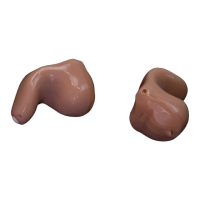
  • Left and Right Identification: Left hearing aids have a blue marking on the shell, and right hearing aids have a red marking on the shell. They are custom-made to fit exactly into your left and right ear respectively.
  • Automatic Mute Function while Charging: When placed in the charger, the hearing aids will be muted (so as not to whistle) and charging will begin. The charging status is indicated by front LEDs.
  • Turning ON/OFF:
    • Automatic: When removed from the powered charger, they will beep, indicating they are turning on. They start in program 1 at the pre-set volume.
    • Manual ON: Push and hold the button for at least 4 seconds. The LED will light up for two seconds and the hearing aid turns on.
    • Manual OFF: Push and hold the button for at least 4 seconds. The LED will emit 3 quick flashes and the hearing aid turns off.
  • Indicator Lights:
    • Hearing aid: 2-second green blink for ON, 1-second green blink for OFF.
    • Front of charger: Constant green light for fully charged, fast blinking for error.
    • Back of charger: Constant green light when plugged in and ready to charge.
  • Adjusting Volume: The hearing aid automatically adjusts volume depending on your listening situation. Volume can also be adjusted via a ReSound remote control or the ReSound Smart 3D™ app. When changing volume, the hearing aid responds with a beep. If two hearing aids are used with Synchronised Volume Control, adjusting one will automatically adjust the other.
  • Listening Programs:
    • All-Around: Best option if you want only one program.
    • Front Focus/Ultra Focus: For use in very noisy places (more focused than the Restaurant program).
    • Restaurant: For use in noisy places such as restaurants and social gatherings.
    • Music: For listening to music.
    • Acoustic phone: A special program for phone conversations.
    • Outdoor: For outdoor use (to reduce wind noise).
  • Changing Programs: Push the button briefly to switch from one program to the next. The number of beeps indicates which program you have selected. If two hearing aids are used with synchronisation enabled, changing a program on one hearing aid automatically applies to the second hearing aid.
  • Customising Button Actions: The push button on one hearing aid can be set to reduce the volume, and the button on the other hearing aid can be set to increase the volume. Any increase or decrease made on one hearing aid will also apply to the other. Default settings for button actions include:
    • Short press (left/right hearing aid): Change program
    • Long press (maximum 2 seconds): Activate paired wireless device
    • Long press (at least 4 seconds): Turn hearing aid OFF or ON
  • Using a Telephone: Hold the telephone up to your ear canal as usual. If you hear whistling, try holding the telephone in the same position for a few seconds. The hearing aid may be able to cancel the whistling. You can also try holding the telephone slightly away from the ear.
  • Advanced Options (with iPhone, iPad, iPod touch, and Android smartphones):
    • Direct Audio Streaming: Allows for direct audio streaming, including hands-free phone calls, and control from mobile devices.
    • ReSound Smart 3D™ app: Sends and receives signals between the hearing aids and mobile devices. Used to obtain updates, find hearing aids, check battery status, or as a remote control to change programs or adjust the volume.
    • ReSound Assist and ReSound Assist Live: Allows for remote assistance from hearing care professionals.
  • Wireless Accessories: A comprehensive range of seamlessly integrated wireless accessories are available to stream high quality stereo sound and speech directly to your hearing aids. These include:
    • TV streamer: Streams audio from a TV and most other audio sources.
    • Basic remote control: Adjusts volume, mutes hearing aids, and changes programs.
    • Advanced remote control: Adjusts volume, mutes hearing aids, changes programs, and displays your settings.
    • Phone clip: Streams phone conversations and stereo sound to both hearing aids and doubles as a remote control.
    • Body-worn microphone: Improves speech comprehension in noisy situations.
    • Wireless microphone: Works like the body-worn microphone, but doubles as a table microphone. It has a built-in telecoil that allows it to connect with a teleloop system, a connector for a FM receiver, and a mini-jack input for wired streaming of audio from a computer or music player.
    • App: Can be installed on your mobile device to enable streaming and control directly from your mobile device.
  • Flight Mode / Wireless Communication Off Mode:
    • Turning off: Turn off your hearing aid, press the button for 9 seconds. Your hearing aid will double-flash four times, and you will hear double tones for about 10 seconds, meaning the hearing aid is now in Flight Mode.
    • Activating: Turn your hearing aid off and then on. Wireless communication will be activated after 10 seconds.
  • Tinnitus Management (optional): The ReSound hearing aid includes the Tinnitus Sound Generator (TSG) module, a tool for generating sounds to be used in tinnitus management programs to temporarily relieve suffering from tinnitus.
    • TSG Sound Generator module: Generates sounds to be used in a Tinnitus Management Program to temporarily relieve patients suffering from Tinnitus. The target population is primarily the adult population over 18 years of age.
    • TSG volume control: The sound generator is set to a specific loudness level by the hearing care professional. The volume control provides the ability to adjust the volume, or amount of stimulus, to the liking of the user.
    • TSG with smartphone apps: The tinnitus sound generator control via hearing aid push buttons can be enhanced with wireless control from a TSG control app on a smartphone or mobile device.
    • TSG Technical Specifications: Audio signal technology: Digital. Available sounds: White noise signal which can be shaped with the following configurations:
      • High-pass filter: 500 Hz, 750 Hz, 1000 Hz, 1500 Hz, 2000 Hz.
      • Low-pass filter: 2000 Hz, 3000 Hz, 4000 Hz, 5000 Hz, 6000 Hz, 8000 Hz.
      • The white noise signal can be modulated in amplitude with an attenuation depth of up to 14 dB.

Maintenance Features:

  • Cleaning Tools: A soft cloth, a brush with a battery magnet, and a cleaning wire (not shown) are provided. Your hearing care professional may provide a set of wax filters.
  • Daily Care and Maintenance:
    • Wipe your hearing aids with a soft cloth.
    • Swipe the small brush across the microphones.
    • Use the supplied cleaning wire to clean the vent that goes through the hearing aid (V). Insert the wire from the outside of the hearing aid to push out any debris. Never use alcohol or other cleaning solutions.
  • Replacing the Wax Guards: Custom hearing aids may have wax guards that protect against wax and moisture. The top end of the tool is for removal of the old wax guard from the sound outlet opening. The sound outlet is found in the part of the hearing aid that goes into the ear. The bottom end holds the new wax guard which is to replace the removed wax guard.
    • To remove the old wax guard, insert the removal end of the wax guard tool into the used wax guard so that the shaft of the tool is touching the rim of the wax guard. Slowly pull the wax guard straight out.
    • To insert the new wax guard, gently press the replacement end of the wax guard tool straight into the hole of the sound outlet until the outer ring lies flush with the outside of the receiver. Pull the tool straight out - the new wax guard should remain in place.
  • Replacement of the Filter Ring: The push button is surrounded by a replaceable filter ring. The filter ring is to be replaced at regular intervals.
  • Storing Rechargeable Hearing Aids: When not in use, place your hearing aids in the plugged-in charger and charge them. If the hearing aids are not to be used for some time, place them in the charger while it is plugged into a power outlet. Then remove the charger from the power outlet. Both the charger and the hearing aids will turn off. If you don't want to store the hearing aids in the charger, you can also just turn them off manually.

ReSound OMNIA RU9ITC-DWC-LP Specifications

General IconGeneral
BrandReSound
ModelOMNIA RU9ITC-DWC-LP
CategoryHearing Aid
LanguageEnglish

Related product manuals