13
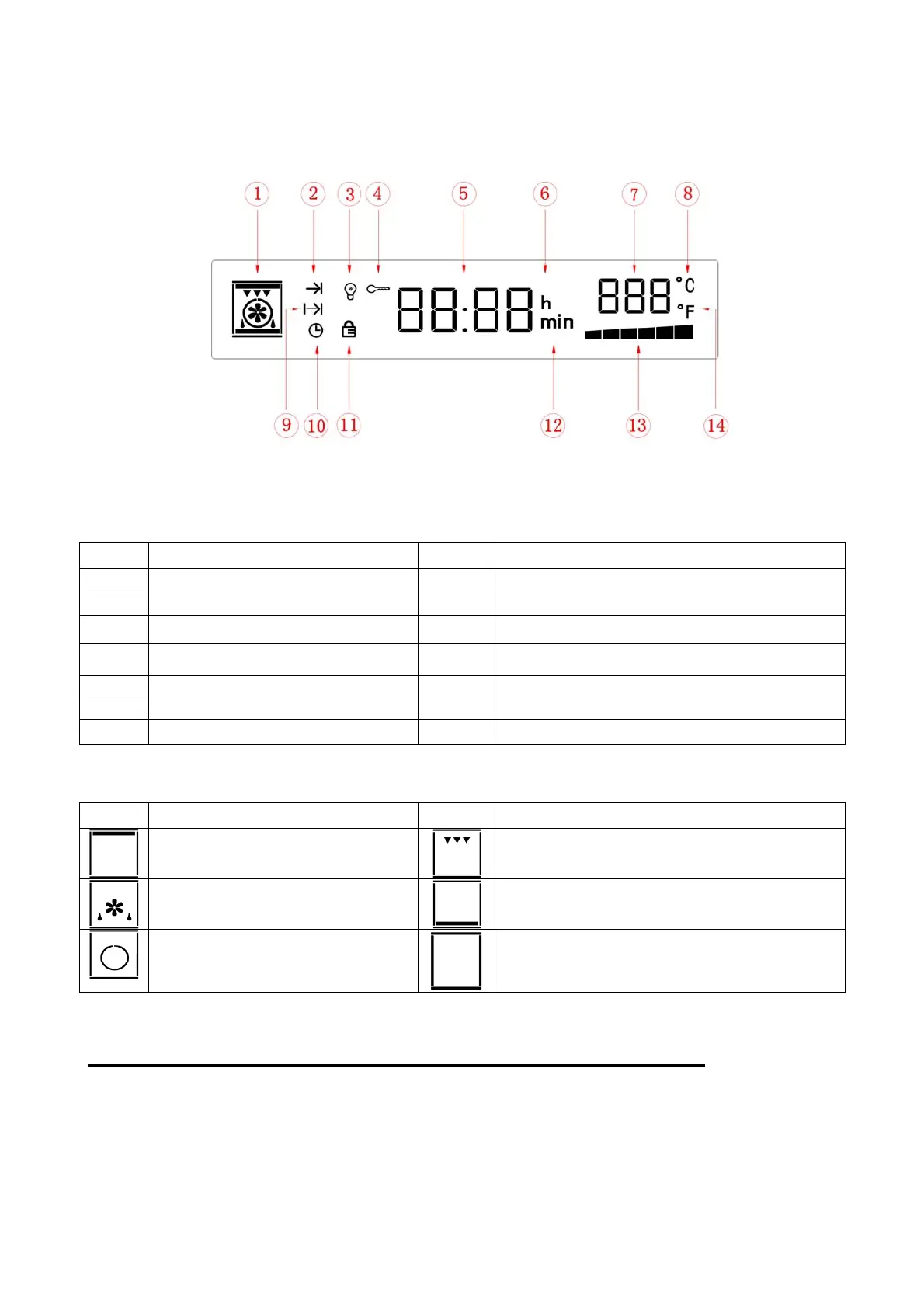
1. Display screen icon instruction
Pic 2: Display screen icon diagram
1.2 Display screen icon instruction
Icons Function Icons Function
1 Function icon 8
Unit of degree Celsius ℃ icon
2 Heating status icon 9 Cooking end time setting icon
3 Oven lamp icon 10 Clock icon
4 Screen lock function icon
11
Door lock function icon
5 Time value display 12 Minute icon
6 Hour icon 13 Working bar display icon
7 Temperature value display 14
Unit of degree Fahrenheit ℉icon
1.3 Function icon display instruction
Icons Function instruction Icons Function instruction
Top outer heat element
Top inner heat element
Heating fan(Defrost)
Bottom heat element
Rear heat element
Self-cleaning function
5.Programandfunctioninstruction
1、Power on
When oven electricity plug on, display board start to self-inspection, from left to right, every
key lighting on 0.5 seconds( total 8 keys), total 4 seconds, display screen keeps bright for 4
seconds, self-inspection will be completed when “Di” was heard. Default time show 12:00,


 To Next Page