BiliChek Service Manual
20
1014988
C
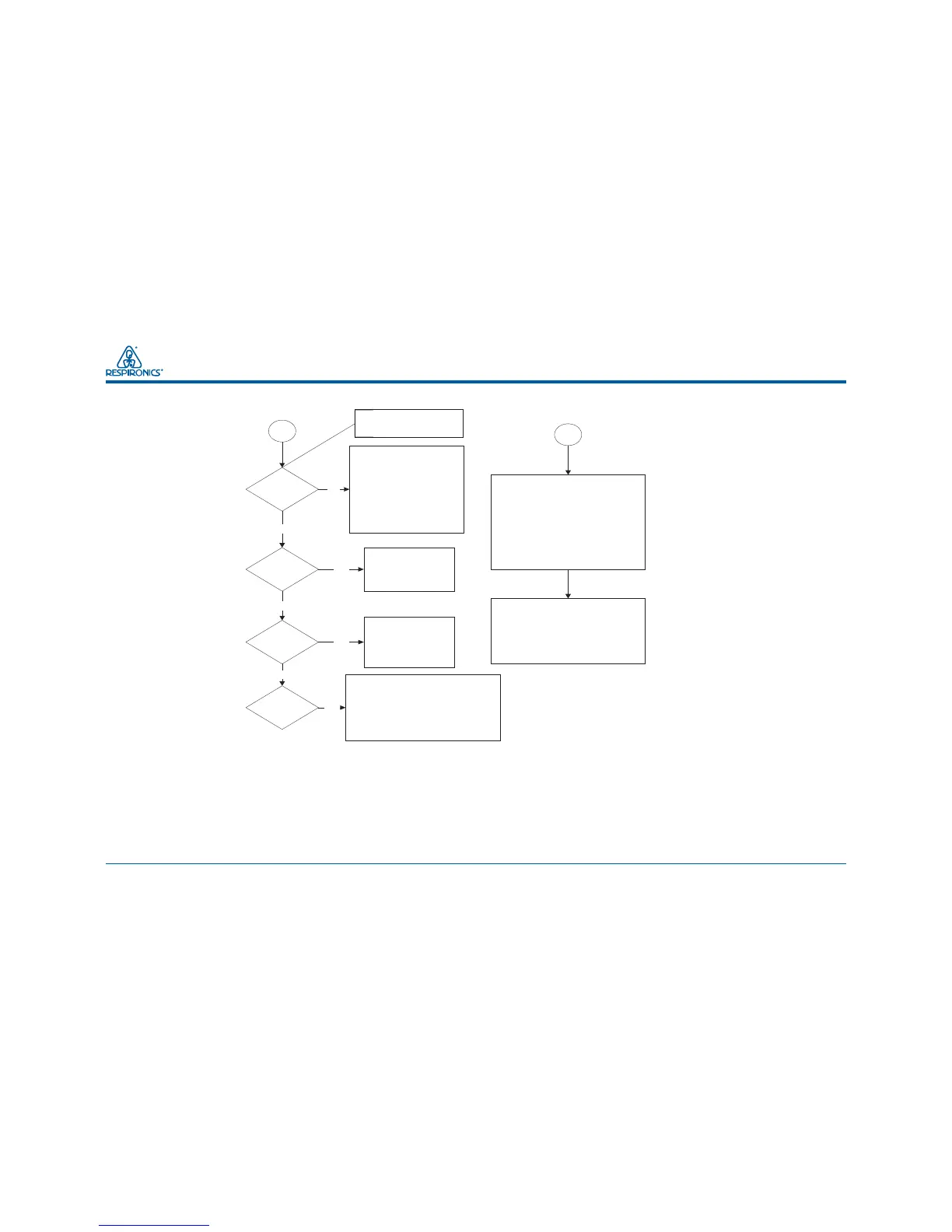
Is the BSI
illuminated ?
Is the BSI
Green ?
Is the BSI
Amber ?
Is
the BSI
blinking
Red ?
NOTE: Allow about 3
seconds for the BSI light(s)
to illuminate.
Yes
Yes
No
No
Check to ensure that the
battery pack is seated in the
well and power is applied to
the charger base. Try another
battery pack. If the BSI
illuminates with the second
battery pack, first battery pack
is defective. Order a
replacement battery pack from
your distributor.
The battery pack is fully
charged and is ready
for use in an HHU.
No
Yes
The battery pack is
charging. Leave it in
the charger base untill
the BSI light glows
green. See note 1.
below.
Yes
Try another battery pack. If the second
battery pack gives the proper indication,
the first battery pack is defective. Order
a replacement battery pack from your
distributor. If the BSI continues blinking
red with the second battery pack, the
charger base is defective and must be
repaired or replaced.
NOTES:
1. Ensure that the black switch located on the bottom of the
charger base is in the left ( ) position (charge only). If the
BSI is blinking amber, the charger is in the deep discharge/
recharge mode and the battery pack is discharging. The BSI will
glow steady amber when the battery pack is charging, and green
when the battery pack is fully charged.
2. Ensure that all contacts on both the battery pack and the
charger base are clean, not bent over or broken off, and free of
any obstructions.
D
Test the power supply in the following
manner. Check the incoming line voltage
from the mains circuit. It will be either
115 VAC or 220 VAC depending on your
locale. If the incoming power is OK, plug
in the power supply and check it's output
voltage at the connector that plugs into
the charger base. It should be approx. 12
VDC. If the output is incorrect, the power
supply is defective and must be replaced.
Contact your distributor for a
replacement.
If the power supply is operating correctly,
connect the power supply to the charger
base. If the BSI lights do not illuminate,
the charger base is defective and must
be repaired or replaced. For repair, see
section 11.3 of this manual (schematics
and drawings), and for replacement
contact your distributor.
Troubleshooting Flow Chart (continued)



 To Next Page