08
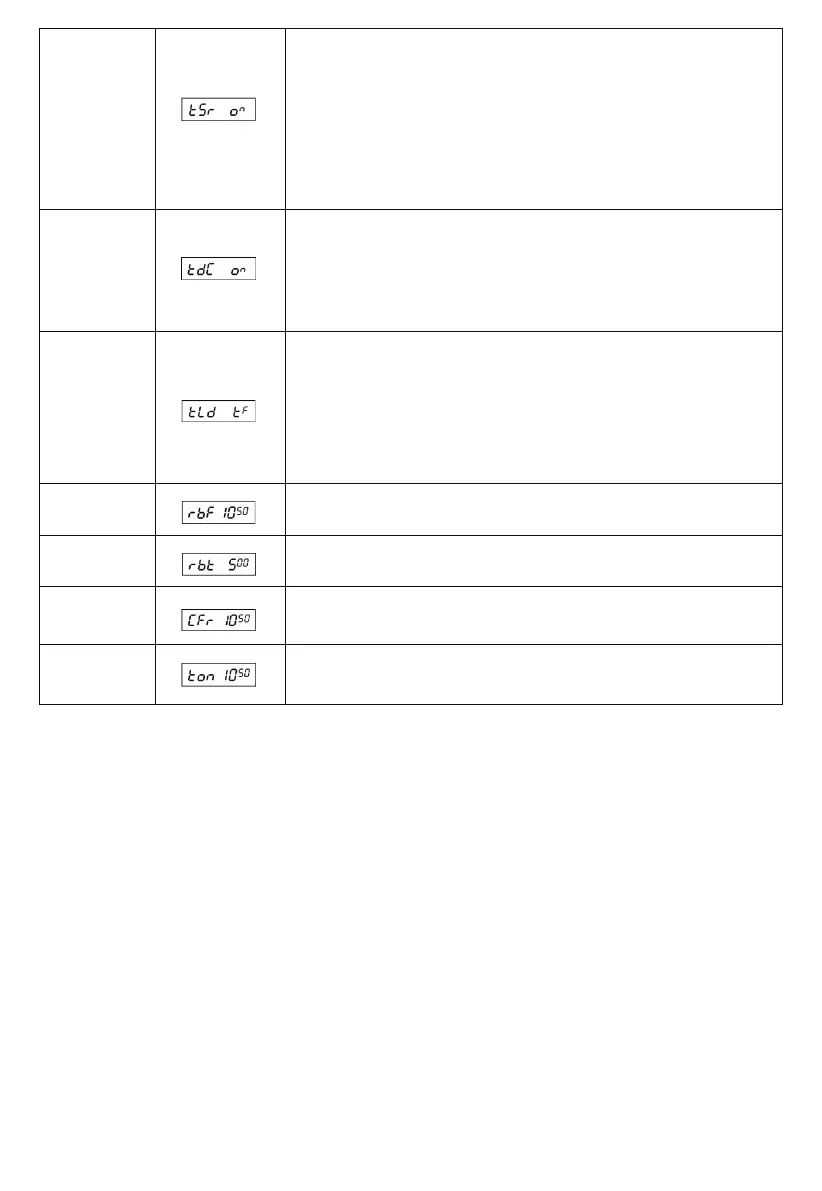
(19) TSR
(20) TDC
This menu is to choose whether to enable the Transmitting SWR Protection function
or
not.
ON: When ON is selected, the radio will detect the SWR of the antenna.
Once the SWR is beyond the SWR set in advance, the radio will prohibit transmitting
automatically and the loudspeaker will emit a voice prompt. Then, the “HI S” icon will
display on the LCD to remind you that the antenna SWR is too high or antenna does
not connect well.
OFF: When OFF is selected, SWR Protection function is disabled.
NOTE: To protect the radio from long transmission under high SWR, the radio will
automatically sta SWR Protection once the SWR Value is higher than 20�1.
Default: ON (SWR=<10�1)
This menu is to choose whether to enable the Power supplied Voltage Protection
function.
ON: When ON is selected, the radio will detect the supplied voltage. Once the voltage
surpasses the voltage set up in advance, the radio would display “DC LO” or “DC HI”
to remind you that the voltage is not in a normal state.
Meanwhile, the radio will prohibit transmitting and emit a beep prompt.
OFF: When OFF is selected, the Power Supplying Voltage is disabled.
Default: ON (DC 10.5V-16V)
(21) TLD
This menu is to set the content displayed on the LCD when transmitting.
TF: When TF is selected, LCD will display transmitting frequency when transmitting.
SR: When SR is selected, LCD will display SWR value of the antenna when transmitting,
for example: "1.2" on the LCD.
BAT: When BAT is selected, LCD will display Supplied Voltage when transmitting, for
example: "13.8DC" on the LCD.
TOT: When TOT is selected, LCD will display TOT’s remaining time when transmitting.
And TOT would count down till the remaining time is 0, for example: "170" displayed on
the LCD display.
Default: TF
(22) RBF
This menu is to select the frequency of Roger Beep. The frequency range is
300KHz-3KHz. The shift step is 10Hz.
Default: 1050Hz
(23) RBT
This menu is to select Roger Beep Holding Time from 50ms—1000ms. The shift step
is 50ms.
Default: 500m
(24) CFR
This menu is to select CW Side Tone Frequency from 300Hz-3KHz, the shift step is
10Hz.
Default: 1050Hz
(25) TON
This menu is to select Transmitting Single-Tone Frequency from 300Hz-3KHz. The shift
step is 10Hz.
Default: 1050Hz
RESET FUNCTION (Resume Facto Default)
This Radio oers the RESET FUNCTION to prevent and solve accidental upgrading, as well as provides a solution for customers who
changed or activated unconsciously some unwanted function: resuming the original “facto setting” is easy and instantly.
How to Operate:
Method 1 (Background reset)
Step 1: Power o the radio.
Step 2: Press and hold the FUNC and SCAN keys at the same time, followed by powering on the radio.
Step 3: Release the two keys when the LCD displays "RES". All former settings would be replaced by Facto Default value when the
LCD displays "REND”.
Method 2 (Background+Channel reset)
Step 1: Power o the radio.
Step 2: Press and hold the FUNC and EMG keys at the same time, followed by powering on the radio.
Step 3: Release the two keys when the LCD displays "1BAND", Press and hold the FUNC key again. All former settings would be
replaced by Facto Default value when the LCD displays "REND”.
WARNING: All former settings would be replaced by Facto Default value after operating the RESET FUNCTION.


 To Next Page