07
FUNCTION MENU SETUP
The initial functions and parameters can be changed via the following settings and operations. Please read the following instructions
before making any desired amendments.
To enter the Function Menu: under ON state, press and hold the FUNC key for more than 2 seconds, and then release the FUNC key to
enter the Function Menu Setup. Under this condition, press the FUNC key to select dierent functions menu, and CHANNEL SELECTOR
Switches to change the data of the Function Menu.
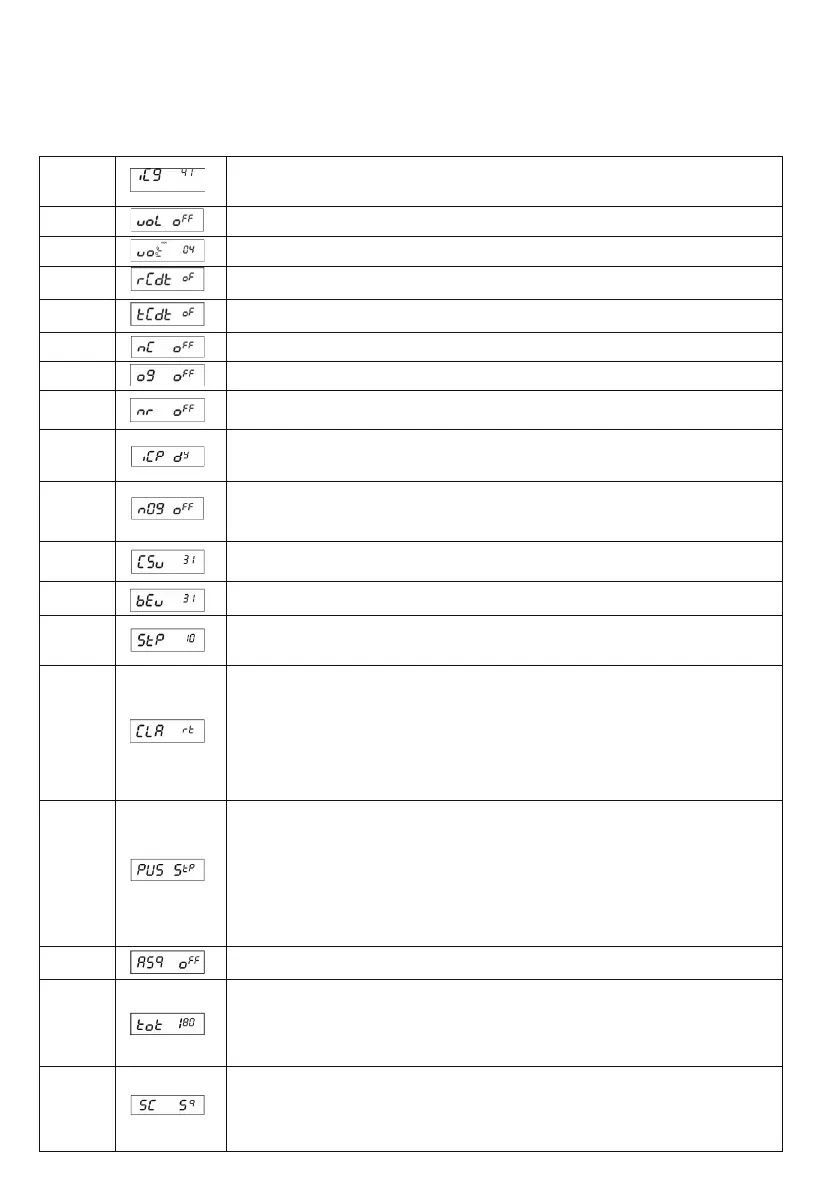
(01) ICG
This menu refers to MIC GAIN function. Users can set the value by software.
The higher value goes to higher sensitivity.
64 grades in total (OFF,0-63) Default: 41
(02) UOL
This menu controls the VOX sensitivity from level OFF to 9.
Default: OFF
(03) UOT
This menu controls the VOX delay time from level 1 to 9.
Default: 04
(04) RCDT
This menu refers to RX CTCSS and DCS code setting.
Default: OFF
(05) TCDT
This menu refers to TX CTCSS and DCS code setting.
Default: OFF
(06) NC
This menu refers to RX noise compander setting.
Default: OFF
(07) NG
This menu refers to TX noise gate setting.
Default: OFF
(08) NR
This menu refers to RX noise reduction setting
Default: OFF
(09) ICP
This menu refers to microphone type setting.
EL: electronic type, DY: dynamic type
Default: DY
(10) NOG
It refers to TX MON function. Users can set the volume and grade of the TX MON by software.
The higher grade goes to louder TX MON.
64 grades in total (OFF,0-63)
Default: OFF
(11) CSU
This menu is to adjust the side voice of CW SIDE VOL CW. 64 grades in total.
Default: 31
(12) BEU
This menu is to set the volume of prompt voice. 64 grades in total (OFF,0-63).
Default: 31
(13) STP
This menu is to set the tuning step when adjusting frequency by the CLARIFIER knob
Options: 10Hz 、100Hz 、1KHz 、10KHz
Default: 10Hz
(14) CLA
This menu is to set functions turned by the CLARIFIER knob. Options are as follows:
FIN: Fine regulation. When this option is selected, users can ne tune the receiving frequency by
rotating the CLARIFIER knob. In the tuning process, the transmitting frequency cannot be
regulated by the knob and the “1” icon will appear on the LCD.
RT: When this option is selected, users can regulate the frequency of both transmitting and
receiving. In the tuning process, the “2” icon will appear on the LCD.
T: When this option is selected, users can only regulate the transmitting frequency. In the tuning
process, the “3” icon will appear on the LCD.
Default: RT
(15) PUS
This menu is to set functions realized via the PUSH knob. Options are as follows:
COA: When this option is selected, press the PUSH and turn the CLARIFIER knob to realize the
COARSE function. When pressing this key, the "2" icon will appear on the far left of the LCD. Under
this condition, rotate the CLARIFIER knob to change frequency of both transmitting and receiving.
T: When this option is selected, press the PUSH and turn the CLARIFIER knob to change
transmitting frequency. When pressing this key, the “3" icon will display on the far left of the LCD.
Under this condition, rotate the CLARIFIER knob to change the transmitting frequency only.
STP: When this option is selected, the PUSH function will change Frequency Tuning Step of the
CLARIFIER knob. Press this key, then the corresponding frequency bit will blink.
Default: STP
(16) ASQ
ASQ control setting. It has the same function as the AQ button on the microphone.
Default: OFF
(17) TOT
This menu is to set transmitting TOT time.
When pressing the PTT key at a single time longer than the due time set up in advance, the radio
will stop transmitting automatically and the loudspeaker will emit a voice prompt till the PTT key is
released. Then, the radio can transmit again.
Options: 30-600s Step: 30s
Default: 180s
(18) SC
This menu is to set Scan Type. Options are as follows:
SQ: When SQ is selected, the scan will stop when a valid signal is detected. The radio will resume
scanning after the signal disappears for 5s.
TI: When TI is selected, the scan will stop when a valid signal is detected. The radio will resume
scanning 5 seconds later, whether the signal disappears or not.
Default: SQ


 To Next Page
 Loading...