06
22. EMG OR S/RF
(1) EMG realizes the Emergency Channel Call. When an emergent situation happens,
the radio will switch to the channel set in advance to communicate immediately. Then
the "EMG" icon will display on the LCD. Press the EMG key again to return to the
previous channel.
(2) FUNC + S/RF
S/RF is the switch of TX's or RX's S/RS indicating bar. When this function is enabled,
the "SRF" icon will display on the LCD. Repeat this operation to switch ON/OFF the
function.
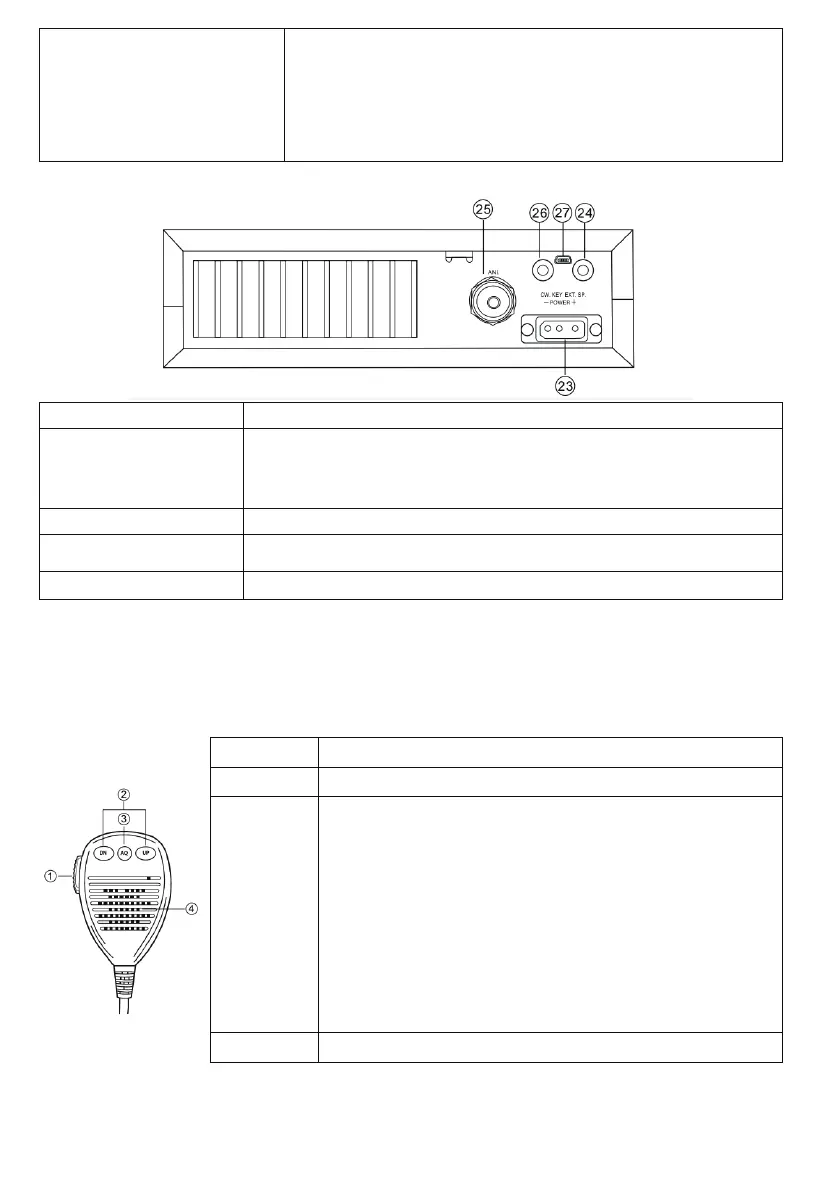
<Rear Panel>
23. POWER Accept13.8V DC power cable with built-in fuse (10 Amp) to be connected.
24. EXT SP or PA SP
EXT SP
Accepts a 4-to-8-ohm, 4-watt external speaker to be connected. When an external speaker is
connected to this jack, the built-in speaker is automatically disconnected. PA SP It is used to
connect a PA speaker. Before operating the PA, you must rst connect a PA speaker to this
jack.
25.ATTENNA Accept a 50-ohm coaxial cable with a type of PL-259 plug to be connected.
26.CW KEY
This jack is for Morse code operation; To operate, connect a CW key to this jack and place the
MODE switch in the CW position (LCD display icon "CW").
27.CW KEY
*PC connection for software programming.
<PRESS—TO—TALK—MICROPHONE>
The receiver and transmitter are controlled by the Press-To-Talk switch on the microphone. Press the switch to transmit and then release
it to receive. When transmitting, hold the microphone two inches from the mouth and speak clearly in a normal “voice”. The radios
come complete with a low-impedance (150 ohm) dynamic microphone.
1. PTT
2. UP/DN
3. AQ
Transmitting key, press to speak, and release to receive a message.
These keys allow increasing or decreasing a channel number.
(1) When the radio is receiving a call, press this key to enable the ASQ
(Automatic Squelch Control) function. Then, "AQ" will appear on the LCD. Press
this key repeatedly to switch on/o the function.
(2) When the radio is receiving a call, press and hold this key for over 2 seconds
to enable the signal monitoring function. Now, whether the radio receive a
signal or not, the radio detects the current channel to check whether the
current channel has a weak signal. Release the AQ key to exit this function.
(3) Pressing the PTT and AQ key at the same time, the radio emits a single tone.
This tone is to help and remind two sides of communication to adjust the
frequency. The frequency of this tone is adjustable.
(4) ASQ (Automatic Squelch Control)
ASQ control setting.
It has the same function as the AQ button on the microphone. This jack is for
Morse code operation; To operate, connect a CW key to this jack and place the
MODE switch in the CW position (LCD display icon "CW")
4. MICROPHONE
The radios come complete with a low-impedance (150 ohm) dynamic microphone.


 To Next Page