04
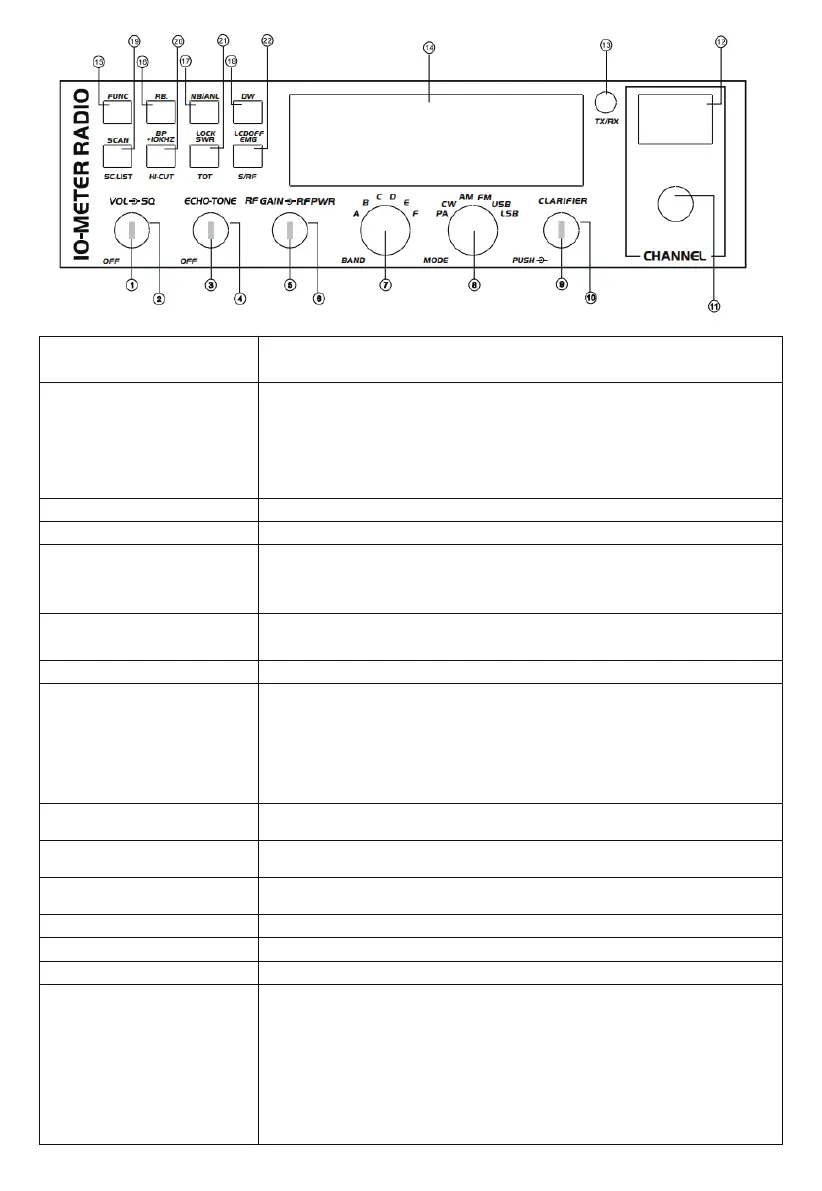
1.OFF/ON/VOLUME
(Inner Dual Concentric)
Rotate clockwise to switch on the radio and set the desired volume level. Under normal
operating state, the VOLUME control is used to adjust the output volume obtained either by
the transceiver speaker, or the external speaker, or the external PA speaker, if used.
2.SQUELCH
(Outer Dual Concentric)
This control is used to cut o or eliminate receiver background noise in the absence of an
incoming signal. For maximum receiver sensitivity, it is desired that the control be adjusted
only to the point where the receiver background noise or ambient background noise is
eliminated. Rotate fully anticlockwise then slowly clockwise until the receiver noise
disappears. Any signal to be received must now be slightly stronger than the average
received noise. Fuher clockwise rotation will increase the threshold level that a signal must
overcome to be heard. Only strong signals will be heard at a maximum clockwise setting.
3. ECHO (Inner Dual Concentric)
This switch is used to control echo eect.
4. TONE (Outer Dual Concentric)
This switch is used to control inteals of echo sound.
5. RF GAIN (Inner Dual Concentric)
This switch is for adjusting sensitivity during reception. For long distance communications,
RF GAIN should be set to maximum. RF GAIN can be reduced to avoid distoion when your
correspondent is close by and when he does not have RF POWER. The normal setting of
this function is on maximum (fully clockwise).
6.RF POWER
(Outer Dual Concentric)
Adjustment of the output power is for AM and FM mode only. Reducing the power is allowed
when communicating with a person who has no RF GAIN. The normal position of this
function is set to maximum, fully clockwise.
7. BAND SELECTOR
Rotate this switch to select A, B, C, D, E, and F bands of operation.
8.MODE(PA/CW/AM/FM/USB/LSB)
This switch allows selecting the modulation mode PA, CW, AM, FM, LSB, or USB. Your
modulation mode has to correspond with one of your correspondents. The mode selector
changes the mode of operation of both the transmitter and receiver simultaneously.
Frequency Modulation/FM: for nearby communications on a at open eld.
Amplitude Modulation/AM: Communication on a eld with relief and obstacles in middle
distance (the most used).
Upper and Lower Side Band/USB-LSB: Used for long distance communications (according
to the propagation conditions).
9. CLARIFIER
This is the frequency tuning knob which can be set as dierent modes
(refer to CLA Specications in Functions Menu for more details).
10.PUSH
This is the PUSH Key which can be set as dierent modes (refer to PSH specications
under Functions Menu for more details).
11.CHANNEL SELECTOR
Rotate this switch to select any desired channel from foy citizens band channels. The
selected channel appears on the LED directly above the channel selector knob.
12.CHANNEL INDICATOR
The numbered LED indicates the selected channel to operate on.
13.RECEIVER/TRANSMIT INDICATOR
When it is receiving, the LED will be green. The LED will be red when it is transmitting.
14.LCD DISPLAY Display frequency, all kinds of information, and icons.
15.FUNC
This is the functional key. Press and hold this key for 2 seconds to enter Functions Menu
Setup (refer to Functions Menu for more details). Press the FUNC key and another
individual key to realize the second function silk-screened under the button. For
example, press the FUNC key followed by pressing the RB key to realize the BP function.
Press the FUNC key followed by DW to realize the LCD OFF function.
Details operations are as bellows:
Press the FUNC key, "FUNC" icon will appear on the LCD. Release the FUNC key, and
then press other keys to realize the second function silk-screened under the button.
"FUNC+ Keypad name" will be used in the following operating instructions.


 To Next Page
 Loading...