56
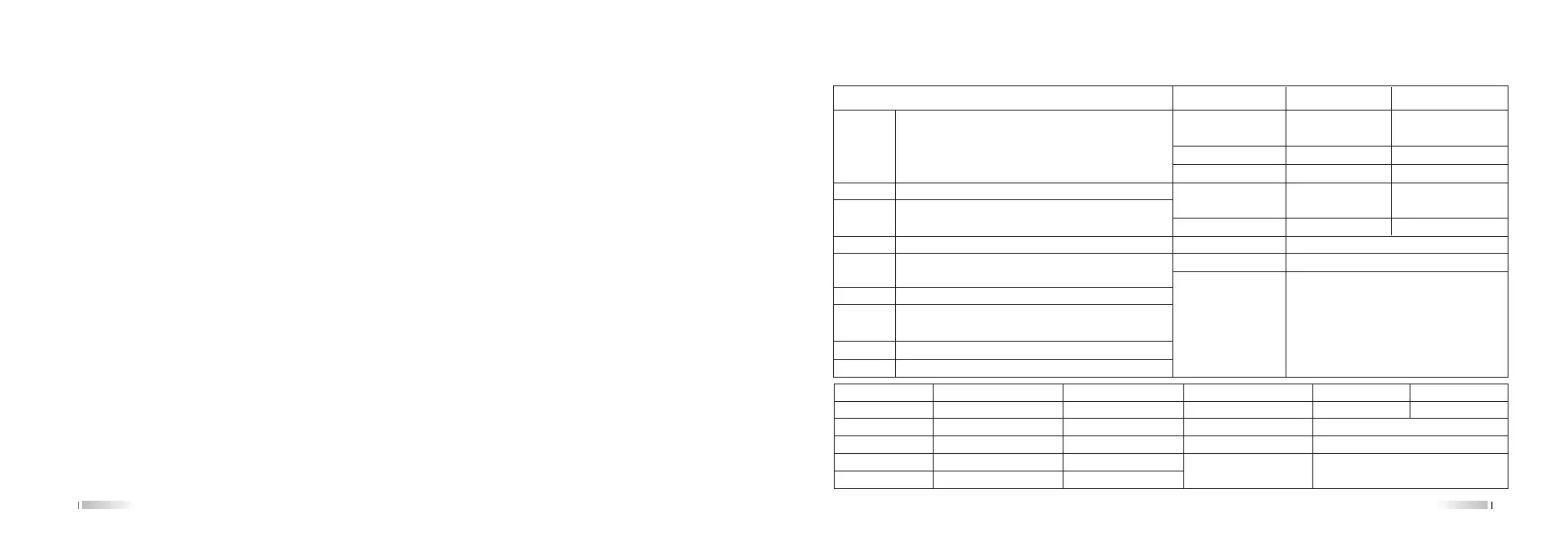
Technical specifications
Step 5KHz/6.25KHz/10KHz/12.5KHz/25KHz/50KHz/100KHz
Channel 999
Number
Work Mode F2D/F3E
Operating -20℃~+40℃
Temperature
Voltage 7.4VDC
Antenna 50Ω
Impedance
Weight 490g
Size 133.5 x 57.5 x 40 (mm)
Intergration
Frequency
Range
suitable for different countries or areas
136-174MHz & 400-470MHz 136-174MHz & 400-480MHz
136-174MHz & 420-520MHz 144-146MHz & 430-440MHz
144-148MHz & 420-520MHz
Receiver Wide Band Narrow Band
Adjacent Channel ≤70dB ≤60dB
Selectivity
Inter Modulation ≤65dB ≤60dB
Spurious Response ≤70dB ≤70dB
Audio Response +1~-3dB +1~-3dB
(0.3~3KHz) (0.3~3KHz)
Signal to Noise Ratio ≥45dB ≥40dB
Audio Distortion ≤5%
Audio Power ≤1W
Sensitivity UHF/VHF:0.25µV(12dB SINAD)
Transmitter Wide Narrow
Max Frequency Deviation ±5KHz ±2.5KHz
Frequency Stability ±2.5PPM
Audio Distortion ≤5%
Output Power UHF: H:10W, M:4W, L:1W
VHF: H:10W, M:5W, L:1W
Transmitter Wide Narrow
Adjacent Channel ≥70dB ≥60dB
Selectivity
Type of Modulation 16K F3E 11K F3E
Spurious ≥60dB ≥60dB
Audio Response +1~-3dB(0.3~3KHz) +1~-3dB(0.3~3KHz)
55
select [ON]+ [MENU] to confirm(Note: The factory default is off, it is generally not recommended to open);
5. Press [MENU] + 47+ [MENU] to enter RPT-TONE,then press the [UP] and [DOWN] keys (△▽) to select [ON]+
[MENU] to confirm(Note: The factory default is off);
6. Place two Repeater radio at a distance of about 5 meters to prevent mutual interference. Long press RPT , the
icon on the top left of the screen to indicate that they are in the transfer state. At this time, the transmitter can be
used to talk to the receiver through the Repeater radio to talk.
4. Frequency/CTCSS detection: (Hold on PTT key of the scanned transceiver during the whole scanning
period, till the scan data is saved)
1. Press [MENU]+[*SCAN] to enter scan mode, Press [EXIT] or [A/B] key to exit scan mode. Rotate the channel
knob to select the scanned frequency. The scanned frequency range is VHF(136-174MHz)/UHF(400-520MHz)
2. Power on transceiver, install the antenna and hold PTT to transmit, the up line of the screen displays the fixedly
current frequency, the down line displays fixedly CTCSS/DCS .If the transceiver is not set CTCSS/DCS, the down
line displays nothing.
3. During scanning, the green LED flashes. When scanning the matched the frequency, the green LED stops
flashing. Press [UP]/[DOWN] keys to adjust frequency, in order to minimize the frequency difference, and improve
CTCSS/DCS currency and call clearness. Press [MENU] key to save the scanned data, which will replace the
current location information.



 To Next Page